
Mobile SDK Core
This is more of a library than an SDK. It's used to encrypt card details into seToken, which can be safely passed and saved to any system (for example, merchant server). This is a good solution for merchants who want maximum flexibility or don't want to deal with card details on their servers.
Payment methods supported by this SDK:
| Payment Method | Supported |
|---|---|
| Bank card | Yes |
| Stored credential/card | Yes |
| Apple Pay | Not required |
| Google Pay | Not required |
SDK Core payment process
Web View for 3DS
The diagram below shows the SDK Core payment process with 3DS redirect via Web View.
-
Client creates an order
-
Mobile Server registers that order in Payment Gateway via register.do. Use the
returnUrlparameter as a marker to close Web View after redirect from ACS on Step 14. -
Mobile Server receives a unique order number
mdOrderin response. -
Client fills in payment data in Mobile App.
-
Mobile App calls SDK to create seToken (secure token). (Android: sdkCore.generateWithCard; iOS: CKCToken.generateWithCard).
The public key required in the corresponding method should be taken from the online resource https://uat.dskbank.bg/payment/se/keys.do. If multiple keys are available at this link, the first key should be used. (Keep in mind that different keys are used for test and production environments.)
-
Mobile App sends the seToken to Mobile Server.
-
Mobile Server uses this seToken to make a payment via paymentorder.do.
- Use seToken instead of pan, cvc and expiry date.
- Don't forget to specify the cardholder name in the
TEXTfield. If you don't collect the cardholder name, just send the valueCARDHOLDER.
-
Mobile Server receives a response without ACS redirect. This means that the payment is completed and we need to go to Step 16.
-
Mobile Server receives a response with ACS redirect.
-
Mobile App opens Web View with ACS redirect data.
-
Client enters their one-time password in the ACS form.
-
ACS redirects the client to Payment Gateway.
-
Payment Gateway makes the payment.
-
Payment Gateway redirects the client to
returnUrl, which can be used as a marker to close Web View. -
Mobile App closes Web View.
-
Payment Gateway sends a callback notification to the merchant server if it's configured for the merchant.
-
Mobile Server checks the final payment status via getOrderStatusExtended.do.
-
Mobile App shows the payment result to the client.
IOS
iOS Integration
SDKCore.framework integration
You can integrate SDKCore.framework by adding it manually.
SDKCore.framework
-
Download the latest version of the framework here.
-
Take the
SDKCore.frameworkfile and add it to the project folder.
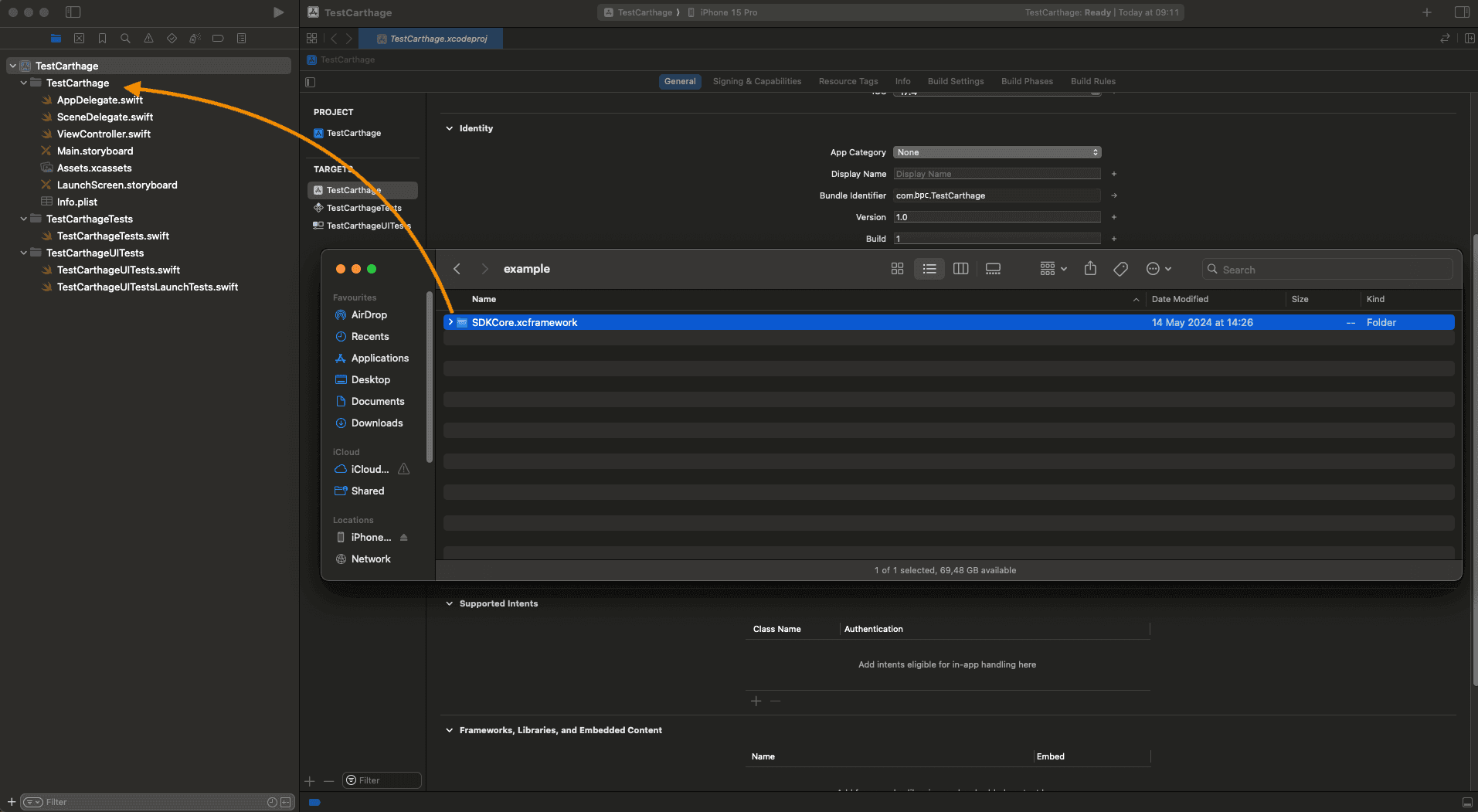
- Open Targets -> General -> Frameworks, Libraries, and Embedded Content. For
SDKCore.framework, in the Embed column, changeDo not EmbedtoEmbed & Sign.
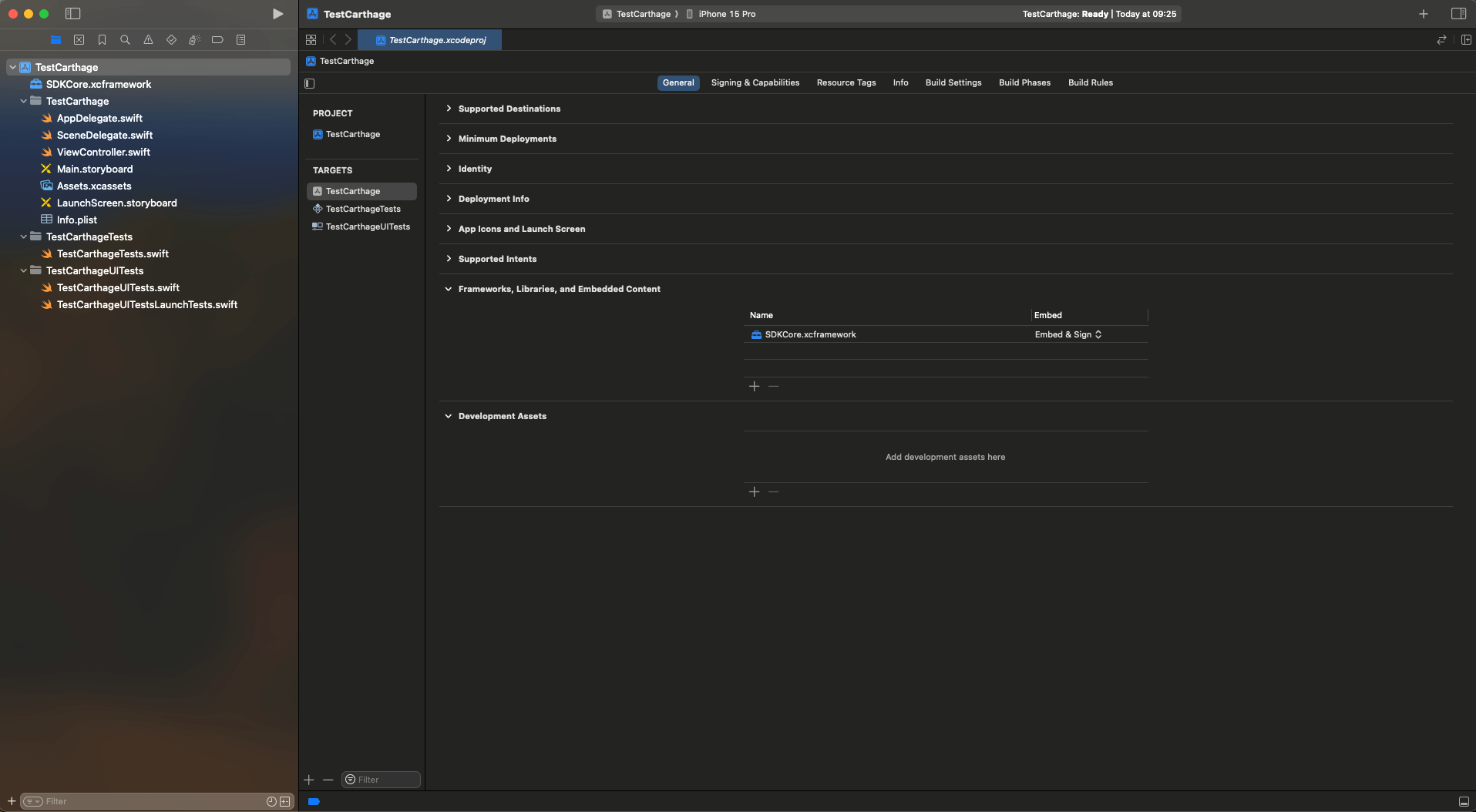
Once done, import the framework in the ViewController.swift file.
//ViewController.swift
...
import SDKCore
...
How to work with API V1
External dependencies
For generation of the token, it is necessary to set the public key.
let publicKey: String =
      "-----BEGIN PUBLIC KEY-----MIIBIjANBgkqhkiG9w0BAQEFAAOCAQ8AMIIBCgKCAQEAoIITqh9xlGx4tWA+aucb0V0YuFC9aXzJb0epdioSkq3qzNdRSZIxe/dHqcbMN2SyhzvN6MRVl3xyjGAV+lwk8poD4BRW3VwPUkT8xG/P/YLzi5N8lY6ILlfw6WCtRPK5bKGGnERcX5dqL60LhOPRDSYT5NHbbp/J2eFWyLigdU9Sq7jvz9ixOLh6xD7pgNgHtnOJ3Cw0Gqy03r3+m3+CBZwrzcp7ZFs41bit7/t1nIqgx78BCTPugap88Gs+8ZjdfDvuDM+/3EwwK0UVTj0SQOv0E5KcEHENL9QQg3ujmEi+zAavulPqXH5907q21lwQeemzkTJH4o2RCCVeYO+YrQIDAQAB-----END PUBLIC KEY-----"
Token generation method
let sdkCore = SdkCore()

let cardParams = CardParams(
     pan: "4111111111111111",
     cvc: "123",
     expiryMMYY: "12/28",
     cardholder: "TEST CARDHOLDER",
     mdOrder: "mdOrder",
     pubKey: publicKey
)

let cardParamsConfig = SDKCoreConfig(
    paymentMethodParams: .cardParams(params: cardParams)
)
let tokenResult = sdkCore.generateWithConfig(config: cardParamsConfig)

let bindignParams = BindingParams(
    pubKey: publicKey,
    bindingId: "das",
    cvc: "123",
    mdOrder: "mdOrder"
)
let bindingParamsConfig = SDKCoreConfig(
    paymentMethodParams: .bindingParams(params: bindignParams)
)
let tokenResult = sdkCore.generateWithConfig(config: bindingParamsConfig)
Models
CardParams
| Property name | Data type | Default value | Optional | Description |
|---|---|---|---|---|
| mdOrder | String | - | No | order number |
| pan | String | - | No | card number |
| cvc | String | - | No | secret card code |
| expiryMMYY | String | - | No | expiry date for the card |
| cardHolder | String | - | Yes | first and last name of cardholder |
| pubKey | String | - | No | public key |
BindingParams
| Property name | Data type | Default value | Optional | Description |
|---|---|---|---|---|
| mdOrder | String | - | No | order number |
| bindingId | String | - | No | number of a stored credential for the card |
| cvc | String | - | Yes | secret code for the card |
| pubKey | String | - | No | public key |
Field validation errors
| ParamField | Error | Description |
|---|---|---|
| UNKNOWN | - | Unknown error |
| PAN | required | An empty field is specified |
| invalid | Invalid value | |
| invalid-format | Invalid characters are used. Only numbers are available. | |
| CVC | required | An empty field is specified |
| invalid | Invalid value | |
| EXPIRY | required | An empty field is specified |
| invalid | Invalid value | |
| invalid-format | The format does not match the template MM/YY | |
| CARDHOLDER | required | An empty field is specified |
| invalid | Invalid value | |
| invalid-format | Invalid characters are used. Only characters and spaces are available. | |
| BINDING_ID | required | An empty field is specified |
| invalid | Invalid value | |
| MD_ORDER | required | An empty field is specified |
| invalid | Invalid value | |
| PUB_KEY | required | An empty field is specified |
Android
Android Integration
Connecting to a Gradle project by adding .aar library files
You must add the sdk_core-release.aar library file to the libs folder, then specify the
dependency of the added library.
build.gradle.kts
allprojects {
    repositories {
        // ...
        flatDir {
            dirs("libs")
        }
    }
}

dependencies {
    // dependency is mandatory to add
    implementation(group = "", name = "sdk_core-release", ext = "aar")
}
build.gradle
allprojects {
    repositories {
        // ...
        flatDir {
            dirs 'libs'
        }
    }
}

dependencies {
    // dependency is mandatory to add
    implementation(group: '', name: 'sdk_core-release', ext: 'aar')
}
Android Configuration
Logging
Internal processes are logged with the SDK-Core tag.
You can also log your processes.
Logging is available through the Logger object.
-
To add log- interfaces, you should call the
Logger-methodaddLogInterface().Example of logging into LogCat:
...
    Logger.addLogInterface(object : LogInterface {
        override fun log(classMethod: Class<Any>, tag: String, message: String, exception: Exception?) {
                Log.i(tag, "$classMethod: $message", exception)
            }
        })
...
The default tag is SDK-Core. You can set your own one if you like.
-
To log your own events, you should call
Logger-methodlog().Example:
...
     Logger.log(this.javaClass, "MyTag", "My process...", null)
...
Example Kotlin_core (no GUI)
Example of cryptogram formation
import net.payrdr.mobile.payment.sdk.core.SDKCore
import net.payrdr.mobile.payment.sdk.core.TokenResult
import net.payrdr.mobile.payment.sdk.core.model.BindingParams
import net.payrdr.mobile.payment.sdk.core.model.CardParams
import net.payrdr.mobile.payment.sdk.core.validation.BaseValidator
import net.payrdr.mobile.payment.sdk.core.validation.CardCodeValidator
import net.payrdr.mobile.payment.sdk.core.validation.CardExpiryValidator
import net.payrdr.mobile.payment.sdk.core.validation.CardHolderValidator
import net.payrdr.mobile.payment.sdk.core.validation.CardNumberValidator
import net.payrdr.mobile.payment.sdk.core.validation.OrderNumberValidator

class MainActivity : AppCompatActivity() {
    // initialization of validators for card information entry fields
    private val cardNumberValidator by lazy { CardNumberValidator(this) }
    private val cardExpiryValidator by lazy { CardExpiryValidator(this) }
    private val cardCodeValidator by lazy { CardCodeValidator(this) }
    private val cardHolderValidator by lazy { CardHolderValidator(this) }
    private val orderNumberValidator by lazy { OrderNumberValidator(this) }
    private val sdkCore by lazy { SDKCore(context = this) }

    override fun onCreate(savedInstanceState: Bundle?) {
        // installation of validators on the card information entry fields
        cardNumberInput.setupValidator(cardNumberValidator)
        cardExpiryInput.setupValidator(cardExpiryValidator)
        cardCodeInput.setupValidator(cardCodeValidator)
        cardHolderInput.setupValidator(cardHolderValidator)
        mdOrderInput.setupValidator(orderNumberValidator)

        // creation of an object and initialization of fields for a new card
        val params = NewPaymentMethodCardParams(
            pan = cardNumberInput.text.toString(),
            cvc = cardCodeInput.text.toString(),
            expiryMMYY = cardExpiryInput.text.toString(),
            cardHolder = cardHolderInput.text.toString(),
            pubKey = pubKeyInput.text.toString()
        )
        // method call to get the cryptogram for a new card
        sdkCore.generateWithConfig(SDKCoreConfig(params))

        // Creation of an object and initialization of fields for the linked card
        val params = NewPaymentMethodStoredCardParams(
            storedPaymentId = "storedPaymentMethodId",
            cvc = "123",
            pubKey = pubKeyInput.text.toString()
        )
        // method call to get the cryptogram for the linked card
        sdkCore.generateWithConfig(SDKCoreConfig(params))
    }
}
Models
NewPaymentMethodCardParams
| Property name | Data type | Default value | Optional | Description |
|---|---|---|---|---|
| pan | String | - | No | card number |
| cvc | String | - | No | secret card code |
| expiryMMYY | String | - | No | expiry date for the card |
| cardHolder | String | - | No | first and last name of the cardholder |
| pubKey | String | - | No | public key |
NewPaymentMethodStoredCardParams
| Property name | Data type | Default value | Optional | Description |
|---|---|---|---|---|
| storedPaymentId | String | - | No | number of a stored credential for the card |
| cvc | String | - | No | secret code for the card |
| pubKey | String | - | No | public key |
TokenResult
| Property name | Data type | Default value | Optional | Description |
|---|---|---|---|---|
| token | String | - | No | token as string |
| errors | Map<ParamField, String> | - | No | error while generating token |
Field validation errors
| ParamField | Error | Description |
|---|---|---|
| PAN | required | An empty field is specified |
| invalid | Invalid value | |
| invalid-format | Invalid characters are used. Only numbers are available. | |
| CVC | required | An empty field is specified |
| invalid | Invalid value | |
| EXPIRY | required | An empty field is specified |
| invalid | Invalid value | |
| invalid-format | The format does not match the template MM/YY. | |
| CARDHOLDER | required | An empty field is specified |
| invalid | Invalid value | |
| invalid-format | Invalid characters are used. Only characters and spaces are available. | |
| PUB_KEY | required | An empty field is specified |
| STORED_PAYMENT_ID | requrired | An empty field is specified |
| invalid | Invalid value |
How to work with API V1
External dependencies
For generation of the token, it is necessary to set the public key.
val publicKey: String =
    "-----BEGIN PUBLIC KEY-----MIIBIjANBgkqhkiG9w0BAQEFAAOCAQ8AMIIBCgKCAQEAoIITqh9xlGx4tWA+aucb0V0YuFC9aXzJb0epdioSkq3qzNdRSZIxe/dHqcbMN2SyhzvN6MRVl3xyjGAV+lwk8poD4BRW3VwPUkT8xG/P/YLzi5N8lY6ILlfw6WCtRPK5bKGGnERcX5dqL60LhOPRDSYT5NHbbp/J2eFWyLigdU9Sq7jvz9ixOLh6xD7pgNgHtnOJ3Cw0Gqy03r3+m3+CBZwrzcp7ZFs41bit7/t1nIqgx78BCTPugap88Gs+8ZjdfDvuDM+/3EwwK0UVTj0SQOv0E5KcEHENL9QQg3ujmEi+zAavulPqXH5907q21lwQeemzkTJH4o2RCCVeYO+YrQIDAQAB-----END PUBLIC KEY-----"
Token generation method
// TokenResult with CardParams
val cardParams: CardParams = CardParams(
    mdOrder = "mdOrder",
    pan = "4111111111111111",
    cvc = "123",
    expiryMMYY = "12/28",
    cardHolder = "TEST CARDHOLDER",
    pubKey = "publicKey"
)
val tokenResult = sdkCore.generationWithConfig(paymentCardParams = cardParams)

// TokenResult with BindingParams
val bindingParams: BindingParams = BindingParams(
    mdOrder = "mdOrder",
    bindingID = "das",
    cvc = "123",
    pubKey = "publicKey"
)

val tokenResult = sdkCore.generationWithConfig(paymentCardParams = bindingParams)
Cross-platform frameworks
Mobile SDK Core is not limited to native applications: the SDK calls are forwarded to native code through a bridge that you declare on the application side.
React Native
To implement integration of Mobile SDK Core into a React Native application, you need to configure a bridge — a wrapper in Kotlin/Java or Swift/Objective-C that will accept calls from JavaScript and forward them to the native SDK code.
Bridges in React Native allow your JS code to call native library methods as easily as regular asynchronous functions: you declare a native module with methods that return results via a Promise, React Native automatically links these methods to JavaScript, and then you work with them in the app without deep platform API knowledge.
IOS
-
Integrate SDKCore into your project according to the iOS Integration section.
-
Verify that for the
SDKCore.xcframeworkframework the Embed column has Embed & Sign selected. -
Create a Swift module
RadarSdkBridge.swiftwith the following content:import Foundation import React import SDKCore @objc(RadarSdk) class RadarSdkBridge: NSObject { private let sdkCore = SdkCore() @objc func generateNewCardToken( _ pan: String, cvc: String, expiryMMYY: String, cardHolder: String, mdOrder: String, pubKey: String, resolver resolve: RCTPromiseResolveBlock, rejecter reject: RCTPromiseRejectBlock ) { do { let params = CardParams( pan: pan, cvc: cvc, expiryMMYY: expiryMMYY, cardholder: cardHolder, mdOrder: mdOrder, pubKey: pubKey ) let config = SDKCoreConfig(paymentMethodParams: .cardParams(params: params)) let result = try sdkCore.generateWithConfig(config: config) resolve(result.token) } catch { reject("TOKEN_ERROR", error.localizedDescription, error) } } @objc func generateStoredCardToken( _ storedPaymentId: String, cvc: String, pubKey: String, mdOrder: String, resolver resolve: RCTPromiseResolveBlock, rejecter reject: RCTPromiseRejectBlock ) { do { let params = BindingParams( pubKey: pubKey, bindingId: storedPaymentId, cvc: cvc, mdOrder: mdOrder ) let config = SDKCoreConfig(paymentMethodParams: .bindingParams(params: params)) let result = try sdkCore.generateWithConfig(config: config) resolve(result.token) } catch { reject("TOKEN_ERROR", error.localizedDescription, error) } } @objc static func requiresMainQueueSetup() -> Bool { return false } } -
Implement the Objective-C bridge in the
RadarSdkBridge.mfile:#import <React/RCTBridgeModule.h> @interface RCT_EXTERN_MODULE(RadarSdk, NSObject) RCT_EXTERN_METHOD(generateNewCardToken: (NSString *)pan cvc:(NSString *)cvc expiryMMYY:(NSString *)expiryMMYY cardHolder:(NSString *)cardHolder mdOrder:(NSString *)mdOrder pubKey:(NSString *)pubKey resolver:(RCTPromiseResolveBlock)resolve rejecter:(RCTPromiseRejectBlock)reject ) RCT_EXTERN_METHOD(generateStoredCardToken: (NSString *)storedPaymentId cvc:(NSString *)cvc pubKey:(NSString *)pubKey mdOrder:(NSString *)mdOrder resolver:(RCTPromiseResolveBlock)resolve rejecter:(RCTPromiseRejectBlock)reject ) @end
Android
-
Download
sdk_core-release.aarandsdk_logs-release.aarand copy them into theandroid/app/libs/folder according to the Android Integration section. -
Add a flat repository and dependencies to the
android/app/build.gradlefile:android { // … rest of your project configuration … } repositories { flatDir { dirs 'libs' } } dependencies { // … other dependencies … implementation(name: 'sdk_core-release', ext: 'aar') implementation(name: 'sdk_logs-release', ext: 'aar') }
Native Module Implementation in Kotlin
-
Create the
RadarSdkModule.ktfile in theandroid/app/src/main/java/.../radar/directory:package com.mobilesdkdemo.radar import com.facebook.react.bridge.Promise import com.facebook.react.bridge.ReactApplicationContext import com.facebook.react.bridge.ReactContextBaseJavaModule import com.facebook.react.bridge.ReactMethod import net.payrdr.mobile.payment.sdk.core.SDKCore import net.payrdr.mobile.payment.sdk.core.model.SDKCoreConfig import net.payrdr.mobile.payment.sdk.core.model.CardParams import net.payrdr.mobile.payment.sdk.core.model.BindingParams class RadarSdkModule(reactContext: ReactApplicationContext) : ReactContextBaseJavaModule(reactContext) { override fun getName(): String = "RadarSdk" private val sdkCore by lazy { SDKCore(context = reactApplicationContext) } @ReactMethod fun generateNewCardToken( pan: String, cvc: String, expiryMMYY: String, cardHolder: String, mdOrder: String, pubKey: String, promise: Promise ) { try { val params = CardParams( pan = pan, cvc = cvc, expiryMMYY = expiryMMYY, cardHolder = cardHolder, mdOrder = mdOrder, pubKey = pubKey ) val config = SDKCoreConfig(paymentCardParams = params) val result = sdkCore.generateWithConfig(config) promise.resolve(result.token) } catch (e: Exception) { promise.reject("TOKEN_ERROR", e) } } @ReactMethod fun generateStoredCardToken( storedPaymentId: String, cvc: String, pubKey: String, mdOrder: String, promise: Promise ) { try { val params = BindingParams( bindingID = storedPaymentId, mdOrder = mdOrder, cvc = cvc, pubKey = pubKey ) val config = SDKCoreConfig(paymentCardParams = params) val result = sdkCore.generateWithConfig(config) promise.resolve(result.token) } catch (e: Exception) { promise.reject("TOKEN_ERROR", e) } } } -
Create the
RadarSdkPackage.ktpackage in the same directory:package com.mobilesdkdemo.radar import com.facebook.react.ReactPackage import com.facebook.react.bridge.NativeModule import com.facebook.react.bridge.ReactApplicationContext import com.facebook.react.uimanager.ViewManager class RadarSdkPackage : ReactPackage { override fun createNativeModules(reactContext: ReactApplicationContext): List<NativeModule> = listOf(RadarSdkModule(reactContext)) override fun createViewManagers( reactContext: ReactApplicationContext ): List<ViewManager<*, *>> = emptyList() } -
Register the created package in
MainApplication.kt:package com.mobilesdkdemo import android.app.Application import com.facebook.react.PackageList import com.facebook.react.ReactApplication import com.facebook.react.ReactNativeHost import com.facebook.react.ReactHost import com.facebook.react.defaults.DefaultNewArchitectureEntryPoint.load import com.facebook.react.defaults.DefaultReactNativeHost import com.facebook.soloader.SoLoader import com.mobilesdkdemo.radar.RadarSdkPackage class MainApplication : Application(), ReactApplication { override val reactNativeHost: ReactNativeHost = object : DefaultReactNativeHost(this) { override fun getPackages(): List<ReactPackage> = PackageList(this).packages.apply { add(RadarSdkPackage()) // Register the package } override fun getJSMainModuleName(): String = "index" override fun getUseDeveloperSupport(): Boolean = BuildConfig.DEBUG override val isNewArchEnabled: Boolean = BuildConfig.IS_NEW_ARCHITECTURE_ENABLED override val isHermesEnabled: Boolean = BuildConfig.IS_HERMES_ENABLED } override val reactHost: ReactHost get() = getReactNativeHost(applicationContext, reactNativeHost) override fun onCreate() { super.onCreate() SoLoader.init(this, false) if (BuildConfig.IS_NEW_ARCHITECTURE_ENABLED) { load() } } }
Usage
Use the methods from JavaScript/TypeScript as follows:
import { NativeModules } from 'react-native';
const { RadarSdk } = NativeModules;

// Generate a token for a new card
const token = await RadarSdk.generateNewCardToken(
  '4111111111111111', // PAN
  '123',              // CVC
  '12/25',            // Expiry MM/YY
  'CARDHOLDER NAME',  // Cardholder name
  'mdOrder',          // Obtained when registering the order
  '-----BEGIN PUBLIC KEY-----...' // Public key from /payment/se/keys.do
);

// Generate a token for a stored card
const bindToken = await RadarSdk.generateStoredCardToken(
  'bindingId',        // Stored card ID
  '123',              // CVC
  '-----BEGIN PUBLIC KEY-----…', // Public key from /payment/se/keys.do
  'mdOrder'           // Obtained when registering the order
);
Demo Application
An example integration of Mobile SDK Core into a React Native application can be found on GitHub.
Flutter
To implement integration of Mobile SDK Core into a Flutter application, you need to configure a platform channel — the channel through which Dart code calls the native SDK methods on Android and iOS.
A platform channel links Dart and native code by channel name: you declare a MethodChannel with the same name on both sides, call a method from Dart and receive the result via a Future. The channel name is the only thing tying the two sides together, so a mismatch fails at runtime with a MissingPluginException rather than as a compilation error.
Arguments are passed as a Map<String, dynamic> and are decoded by key name on the native side. Only values the standard codec understands can cross the channel — primitives, lists and maps; SDK objects are built natively and are never sent across.
iOS
-
Integrate SDKCore into your project according to the iOS Integration section.
-
Make sure that Embed & Sign is selected in the Embed column for the
SDKCore.xcframeworkframework. The framework inside thexcframeworkis a dynamic library: if it is only linked but not embedded, the project builds cleanly and the application crashes at launch. -
Create the
RadarSdkBridge.swiftfile in theRunnertarget:import Flutter import Foundation import SDKCore final class RadarSdkBridge: NSObject { static let channelName = "radar_sdk" private let channel: FlutterMethodChannel private let sdkCore = SdkCore() init(messenger: FlutterBinaryMessenger) { channel = FlutterMethodChannel(name: RadarSdkBridge.channelName, binaryMessenger: messenger) super.init() channel.setMethodCallHandler { [weak self] call, result in self?.handle(call, result: result) } } private func handle(_ call: FlutterMethodCall, result: @escaping FlutterResult) { switch call.method { case "generateNewCardToken": generateNewCardToken(call, result: result) case "generateStoredCardToken": generateStoredCardToken(call, result: result) default: result(FlutterMethodNotImplemented) } } private func generateNewCardToken(_ call: FlutterMethodCall, result: @escaping FlutterResult) { guard let args = call.arguments as? [String: Any], let pan = args["pan"] as? String, let cvc = args["cvc"] as? String, let expiryMMYY = args["expiryMMYY"] as? String, let cardHolder = args["cardHolder"] as? String, let mdOrder = args["mdOrder"] as? String, let pubKey = args["pubKey"] as? String else { result(FlutterError(code: "TOKEN_ERROR", message: "Invalid arguments", details: nil)) return } do { let params = CardParams( pan: pan, cvc: cvc, expiryMMYY: expiryMMYY, cardholder: cardHolder, mdOrder: mdOrder, pubKey: pubKey ) let config = SDKCoreConfig(paymentMethodParams: .cardParams(params: params)) let tokenResult = try sdkCore.generateWithConfig(config: config) result(tokenResult.token) } catch { result(FlutterError(code: "TOKEN_ERROR", message: error.localizedDescription, details: nil)) } } private func generateStoredCardToken(_ call: FlutterMethodCall, result: @escaping FlutterResult) { guard let args = call.arguments as? [String: Any], let storedPaymentId = args["storedPaymentId"] as? String, let cvc = args["cvc"] as? String, let pubKey = args["pubKey"] as? String, let mdOrder = args["mdOrder"] as? String else { result(FlutterError(code: "TOKEN_ERROR", message: "Invalid arguments", details: nil)) return } do { let params = BindingParams( pubKey: pubKey, bindingId: storedPaymentId, cvc: cvc, mdOrder: mdOrder ) let config = SDKCoreConfig(paymentMethodParams: .bindingParams(params: params)) let tokenResult = try sdkCore.generateWithConfig(config: config) result(tokenResult.token) } catch { result(FlutterError(code: "TOKEN_ERROR", message: error.localizedDescription, details: nil)) } } } -
Register the bridge in
AppDelegate.swift:import Flutter import UIKit @main @objc class AppDelegate: FlutterAppDelegate, FlutterImplicitEngineDelegate { // Keep the bridge in a property: an object created in a local variable // gets deallocated and silently stops responding to calls from Dart. private var radarSdkBridge: RadarSdkBridge? func didInitializeImplicitFlutterEngine(_ engineBridge: FlutterImplicitEngineBridge) { GeneratedPluginRegistrant.register(with: engineBridge.pluginRegistry) if let messenger = engineBridge.pluginRegistry.registrar(forPlugin: "RadarSdkBridge")?.messenger() { radarSdkBridge = RadarSdkBridge(messenger: messenger) } } }
Android
-
Download the
sdk_core-release.aarandsdk_logs-release.aarfiles and copy them into theandroid/app/libs/folder according to the Android Integration section. -
Add the dependencies to the
android/app/build.gradle.ktsfile:android { // … the rest of your project configuration … } dependencies { // … other dependencies … implementation(fileTree(mapOf("dir" to "libs", "include" to listOf("*.aar")))) } -
Create the
RadarSdkBridge.ktfile in theandroid/app/src/main/kotlin/.../directory:package com.mobilesdkdemo import android.content.Context import io.flutter.plugin.common.BinaryMessenger import io.flutter.plugin.common.MethodCall import io.flutter.plugin.common.MethodChannel import net.payrdr.mobile.payment.sdk.core.SDKCore import net.payrdr.mobile.payment.sdk.core.model.BindingParams import net.payrdr.mobile.payment.sdk.core.model.CardParams import net.payrdr.mobile.payment.sdk.core.model.SDKCoreConfig private const val CHANNEL_NAME = "radar_sdk" class RadarSdkBridge(private val context: Context) : MethodChannel.MethodCallHandler { private val sdkCore by lazy { SDKCore(context = context) } fun register(messenger: BinaryMessenger) { MethodChannel(messenger, CHANNEL_NAME).setMethodCallHandler(this) } override fun onMethodCall(call: MethodCall, result: MethodChannel.Result) { when (call.method) { "generateNewCardToken" -> generateNewCardToken(call, result) "generateStoredCardToken" -> generateStoredCardToken(call, result) else -> result.notImplemented() } } private fun generateNewCardToken(call: MethodCall, result: MethodChannel.Result) { try { val params = CardParams( pan = call.argument<String>("pan")!!, cvc = call.argument<String>("cvc")!!, expiryMMYY = call.argument<String>("expiryMMYY")!!, cardHolder = call.argument<String>("cardHolder")!!, mdOrder = call.argument<String>("mdOrder")!!, pubKey = call.argument<String>("pubKey")!! ) val config = SDKCoreConfig(paymentCardParams = params) val token = sdkCore.generateWithConfig(config).token result.success(token) } catch (e: Exception) { result.error("TOKEN_ERROR", e.message, null) } } private fun generateStoredCardToken(call: MethodCall, result: MethodChannel.Result) { try { val params = BindingParams( bindingID = call.argument<String>("storedPaymentId")!!, mdOrder = call.argument<String>("mdOrder")!!, cvc = call.argument<String>("cvc")!!, pubKey = call.argument<String>("pubKey")!! ) val config = SDKCoreConfig(paymentCardParams = params) val token = sdkCore.generateWithConfig(config).token result.success(token) } catch (e: Exception) { result.error("TOKEN_ERROR", e.message, null) } } } -
Register the bridge in
MainActivity.kt:package com.mobilesdkdemo import io.flutter.embedding.android.FlutterActivity import io.flutter.embedding.engine.FlutterEngine class MainActivity : FlutterActivity() { override fun configureFlutterEngine(flutterEngine: FlutterEngine) { super.configureFlutterEngine(flutterEngine) RadarSdkBridge(applicationContext).register(flutterEngine.dartExecutor.binaryMessenger) } }
Usage
-
Create a wrapper over the channel in
lib/radar_sdk.dart. The channel name and the argument key names have to match the native side:import 'package:flutter/services.dart'; class RadarSdk { const RadarSdk._(); static const MethodChannel _channel = MethodChannel('radar_sdk'); static Future<String?> generateNewCardToken({ required String pan, required String cvc, required String expiryMMYY, required String cardHolder, required String mdOrder, required String pubKey, }) { return _channel.invokeMethod<String>('generateNewCardToken', { 'pan': pan, 'cvc': cvc, 'expiryMMYY': expiryMMYY, 'cardHolder': cardHolder, 'mdOrder': mdOrder, 'pubKey': pubKey, }); } static Future<String?> generateStoredCardToken({ required String storedPaymentId, required String cvc, required String pubKey, required String mdOrder, }) { return _channel.invokeMethod<String>('generateStoredCardToken', { 'storedPaymentId': storedPaymentId, 'cvc': cvc, 'pubKey': pubKey, 'mdOrder': mdOrder, }); } } -
Use the methods from Dart as follows:
// Generate a token for a new card
final token = await RadarSdk.generateNewCardToken(
  pan: '4111111111111111',  // PAN
  cvc: '123',               // CVC
  expiryMMYY: '12/25',      // Expiry MM/YY
  cardHolder: 'CARDHOLDER NAME', // Cardholder name
  mdOrder: 'mdOrder',       // Obtained when registering the order
  pubKey: '-----BEGIN PUBLIC KEY-----...', // Public key from /payment/se/keys.do
);

// Generate a token for a stored card
final bindToken = await RadarSdk.generateStoredCardToken(
  storedPaymentId: 'bindingId', // Stored card ID
  cvc: '123',                   // CVC
  pubKey: '-----BEGIN PUBLIC KEY-----…', // Public key from /payment/se/keys.do
  mdOrder: 'mdOrder',           // Obtained when registering the order
);
Errors from the native side reach Dart as a PlatformException: when token generation fails the bridge answers with the TOKEN_ERROR code and puts the SDK error text in the message field.
try {
  final token = await RadarSdk.generateNewCardToken(/* … */);
} on PlatformException catch (e) {
  // e.code == 'TOKEN_ERROR', e.message — the SDK error text
}
Demo Application
An example integration of Mobile SDK Core into a Flutter application can be found on GitHub.
Mobile SDK Source
iOS
Requirements: iOS 10.0 or newer
Android
Requirements: Android 5.0 or newer