
Overview
You can use our Merchant API to create a payment flow you need. For example, you can design your own fully customized payment page and connect it to our Payment Gateway.
You can download Postman collection of some basic API methods below. Make sure to send requests as POST with attributes in the body.
Mandatory parameters
The mandatory presence of a parameter in a request/response may have the following values:
- Mandatory - the parameter must always be included. If it is not provided, an empty value should be passed, depending on the expected format;
- Optional - the parameter may be included or excluded, and its excessive inclusion will not cause a system error;
- Conditional - the parameter can either be included (be mandatory) or excluded, depending on one or more specified conditions.
The mandatory transmission of a parameter in the request/response description is indicated in the "Required" column.
Authentication
For merchant authentication in the payment gateway two methods can be used.
- Using login and password of the merchant's API user (account with
-apipostfix) received on registration. These values are passed inuserNameandpasswordparameters correspondingly (see the table below).
| Required | Name | Type | Description |
|---|---|---|---|
| Conditional | userName | String [1..100] | Merchant 's API account login (mandatory, unless token is passed). If you pass your login and password to authenticate in the payment gateway, do not pass token parameter. |
| Conditional | password | String [1..200] | Merchant's API account password (mandatory, unless token is passed). If you pass your login and password to authenticate in the payment gateway, do not pass token parameter. |
- Using a special token - you can request its value in the technical support service. In requests its value is passed in
tokenparameter (see the table below).
| Required | Name | Type | Description |
|---|---|---|---|
| Conditional | token | String [1..256] | Value that is used for merchant authentication when requests are sent to the payment gateway (mandatory, unless userName and password are passed). If you pass this parameter, do not pass userName and password. |
API URLs
TEST: https://uat.dskbank.bg/payment/rest/
PROD: https://epg.dskbank.bg/payment/rest/
HTTP codes
When calling API requests, the following HTTP status codes may be returned:
-
200– in case of the Payment Gateway API calls the JSON payload from the response must be inspected to determine whether processing was successful or not. Success is indicated by either:
– thesuccessparameter value beingtrue
– theerrorCodeparameter value being0
If both parameters are present,successoverrideserrorCode. -
400– an internal error occurred in the system. -
404– error while calling API – URL is incorrect (does not exist). -
429– this code means that the system is overloaded. Most often the main reason is that the limit of requests per second or limit of simultaneous requests is reached. But it may also be due to the fact that the system as a whole is overloaded (regardless of your requests). -
500 or 502– this code means that something went wrong on our side.
If the request, associated with an order payment, is processed successfully, it does not directly mean that the payment itself was successful.
To determine whether the payment was successful or not, you may refer to the description of the request used, where the intepretation of the payment success is thoroughly described, or you may follow the rule of thumb here:
- Call getOrderStatusExtended.do;
- Check the
orderStatusfield in the response: the order is considered to be payed only if theorderStatusvalue is1or2.
API request signature
Facing insecure integration, you may be requested to implement an asymmetric request signature. Usually, this requirement is applied only if you carry out P2P/AFT/OCT requests.
To have a possibility to sign requests, you need to perform the following steps:
- Generate and upload a certificate.
- Calculate a hash and a signature using your private key and pass the generated hash (X-Hash) and the signature value (X-Signature) in the request header.
These steps are described below in details.
Generating and uploading a certificate
-
Generate 2048-bit RSA private key. The way of generation depends on privacy policy in your company. For example, you can do it using OpenSSL:
openssl genrsa -des3 -out private.key 2048 -
Generate public CSR (Certificate Signing Request) using the generated private key:
openssl req -key private.key -new -out public.csr -
Generate a certificate using the generated private key and CSR. The example of generating a certificate for 5 years:
openssl x509 -signkey private.key -in public.csr -req -days 1825 -out public.cer -
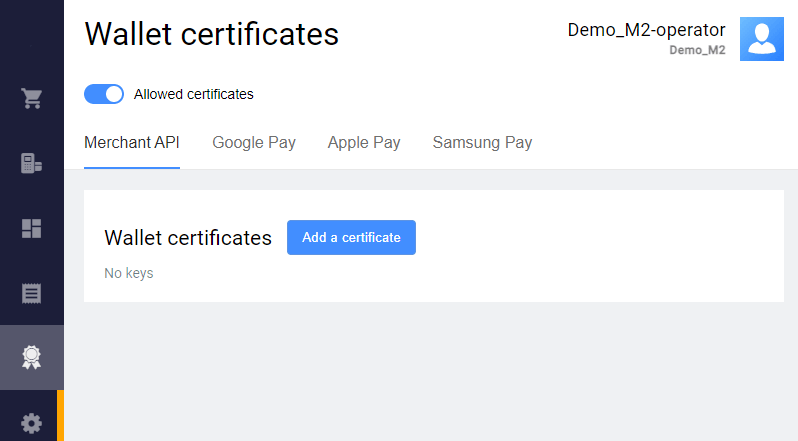
Upload the generated certificate in the Personal Area. To do this, go to Wallet certificates > Merchant API, click Add a certificate and upload the generated public certificate.
Calculating a hash and a signature
-
Calculate SHA256 hash of the request body as follows:
- Use request body as a string (in our example it is
amount=10000&password=gcjgcW1&returnUrl=http&userName=signature-api). - Calculate SHA256 hash from this string, in raw bytes.
- Convert the raw bytes into base64 encoding.
- Use request body as a string (in our example it is
-
Generate a signature for the calculated SHA256 hash with RSA algorythm using the private key.
In our example we use the following private key with the password 12345:
-----BEGIN RSA PRIVATE KEY-----

Proc-Type: 4,ENCRYPTED

DEK-Info: DES-EDE3-CBC,C502560EDE8F82B7

O4+bY1Q1ZcXFLDGVE8s9G2iVISHR/c/IMZKZEjkBED/TbuOCUGVjcav2ZaZO2dO0
lm771N6JNB01uhJbTHScVQ6R0UnGezHFTcsJlAlBa9RQyOwujs4Pk6riOGnLliIs
urnTXD0oskBR1wLRA2kp8+V0UPOAMXQaoLxFGE/o8taDGSrkyIcYTBoh9o7ZBxvO
SqUWAt2vPbGVyc6XspyuVtgHgEctaJO+E26QTweqdpN5JITF+fDFPNwUrFHoho4N
pxpKRWbiCJSpbvbsvhdizkmfgvRw+qYJvTirF3JTfGr14DttudFwjm7sNrr0JILR
XPKDUhRyWjkthZM+oDjF2HwISAGkbxcpn4PU7Tywq0uax+5KCQQn2uz4jLM2P6+9
000cvVLwhMnoUdOxuISRXeOcOWVyTO1mPfKiWnHaoO4yS3Y36OCIOe9RHGP8TTmq
acb3LUIF30eQyk3KxH/tUB0ScPDKEKMiww13/Kcfr0JkdIe/BWCvV+hSQm38TLQe
bTFy+wnD9kHACCwTSVVSOO+rHgJGVIyLgnpClZKWQyyJ4clH7/cORA7mTmp85Ckx
IjV5Egu0bPPUMudOB5BnQ4u85RnqXavasgrLRA3JZM4+Jzl8MNy/fsFXnVBQLJJC
Wlz/B7S7W8sabRogFuiqkkPmXE/QcpdKQoY3yh748QqMSl8vkA6WgndyYv1EnDDl
jA5j7vSf0wKI8BHgdHBEWuEjn3X/s0S/BiPPI6puboYY90tYVJTWSQCR83QrMF3N
BIcMu4+RIYu6GWnPx9npZpt0858c670ZII56np24iMse3qgHCOZxsGOenK2x7ta6
163gvaD8bu8xoeQcGVfd6IMbXWVb0+z1hvWR5HWHSalof4lMzZrDsQDKc2UA0ygh
hA1+VAl1MAEHVLNCCmyG1SwRwg1PI7FfftW7YARngCZRWkJ1haj1fgy7rtYolrdv
lEz/vjFD6diABx67omGgfiJhWdiKIlzsYlX1SW7yaik/Uxf1j8gTFwY34y8ekVd9
6pQTzV2V/4a48ELZl4LvelLWyt1AB3AR+/fM7YG6LYIqlo+qnLtro7Bqu8RNTNRP
wcWCd04r/20ulFWMIH8pVa60C98pSdOXriWEI1KDLc0E/fCdhjW2kL+FTPLC7ORe
cuzmfI27+06P/BvLZq/FAVBrDAmkioKwe6XYzTjpK1p5jZ3IrNwjAiasY1MNxCRy
5ufhQwkW//d+VUdU5m8Sm30/kXe9UkxMaetXgzPxbB7+5QFFr0bi7D1MjIrJNtTx
5g5E+UfOhqrp8ztBht9csQeFYSYabyyGX4Lh7ymVWrKCVdHlJib3M36nvOjpV/lA
zf35sxFz9kaQqNK7xJdQ9Bx6TBUzLjpYhNry37vKk+SIB6Weo+LJ99mALMeX79CB
osRqZqX5yrZhaQ8bbpo981nvLy5xFnpRqCuSWVZrVMBq3LQLaOvaCeyGC0V+ZN0C
CU6lHlR6XQqd/IjoEN8+8aiVp6Ubw8FuD28TDaEvCltrX3ARL0xFpABsa42LgV1F
09Vi+ju7SSNDvbezN8q0EILq9xp/zNCVhMpyRCIXBq9fzHkyCZ5qMw==

-----END RSA PRIVATE KEY-----
and get the signature:
pJ/gM4PR1/mKGuIxMvTl5pYDDjJslb0BcXFnIxijFn5qKdPd7W+2ueoctziU7omnkYp01/BlracukH1GOPWMSO+9zKuTDdFueFm1utsS0zaPFU+dmc1niGDRWE0CbCXcti/rGSTDPsnR58mwqgVkbCWxKyCDtuo5LxiKPK9mzgWTUuJ8LX6f6u42MURi5tRG6a9dc8l/+J94g0YOk911R6Lqv2jcluEvZ9ZeMMt8hyxowb0eDaCHlussu2CAyqpE9V+EUAc81Jkwv96MMSsA6UnFwEaCV/k+kwYd0jHCx94m2yWX734p9cWsBW7Fr5F0zox9Yck4GOjqe9nJMMB9jQ== -
Now you should pass the generated hash (
X-Hash) and the signature value (X-Signature) in the request header. The request will look like this:
curl --request POST \
  --url https://uat.dskbank.bg/payment/rest/register.do \
  --header 'content-type: application/x-www-form-urlencoded' \
  --header 'X-Hash: eYkMUF+xaYJhsETTIGsctl6DBNZha1ITN8muCcWQtZk=' \
  --header 'X-Signature: pJ/gM4PR1/mKGuIxMvTl5pYDDjJslb0BcXFnIxijFn5qKdPd7W+2ueoctziU7omnkYp01/BlracukH1GOPWMSO+9zKuTDdFueFm1utsS0zaPFU+dmc1niGDRWE0CbCXcti/rGSTDPsnR58mwqgVkbCWxKyCDtuo5LxiKPK9mzgWTUuJ8LX6f6u42MURi5tRG6a9dc8l/+J94g0YOk911R6Lqv2jcluEvZ9ZeMMt8hyxowb0eDaCHlussu2CAyqpE9V+EUAc81Jkwv96MMSsA6UnFwEaCV/k+kwYd0jHCx94m2yWX734p9cWsBW7Fr5F0zox9Yck4GOjqe9nJMMB9jQ==' \
  --data 'amount=10000&password=gcjgcW1&returnUrl=http&userName=signature-api'
The request should meet the following requirements:
-
All the request parameters are included into the request body (not into the URL).
-
If the request parameters are in JSON format, then the following header should be used:
--header 'content-type: application/json' -
If the request parameters are in Query format (like
parameterA=valueA¶meterB=valueB), then the following header should be used:--header 'content-type: application/x-www-form-urlencoded' -
The request contains correct login and password of the API user.
-
The
X-Hashheader contains SHA256 hash of the request body (calculated at step 1). -
The
X-Signatureheader contains the signature for the calculated SHA256 hash with RSA algorythm using the private key (generated at step 2).
Java code example
Below is the Java code example that loads a private key, calculates SHA256 hash, signs it using the private key with the password 12345, and then sends a correct register.do request:
import javax.net.ssl.HttpsURLConnection;
import java.io.BufferedReader;
import java.io.DataOutputStream;
import java.io.InputStream;
import java.io.InputStreamReader;
import java.net.URL;
import java.nio.file.Files;
import java.nio.file.Paths;
import java.security.KeyStore;
import java.security.MessageDigest;
import java.security.PrivateKey;
import java.security.Signature;
import java.util.Base64;

import static java.net.HttpURLConnection.HTTP_OK;

public class SimpleSignatureExample {

    // This example is not production ready. It just shows how to use signatures in API.
    public static void main(String[] args) throws Exception {
        // load private key from jks
        KeyStore ks = KeyStore.getInstance("JKS");
        char[] pwd = "123456".toCharArray();
        ks.load(Files.newInputStream(Paths.get("/path/to/certificates.jks")), pwd);
        PrivateKey privateKey = (PrivateKey) ks.getKey("111111", pwd);

        // Sign
        String httpBody = "amount=10000&password=gcjgcW1&returnUrl=http&userName=signature-api";

        MessageDigest digest = MessageDigest.getInstance("SHA-256");
        Signature signature = Signature.getInstance("SHA256withRSA");
        signature.initSign(privateKey);

        byte[] sha256 = digest.digest(httpBody.getBytes());
        signature.update(sha256);
        byte[] sign = signature.sign();

        // Send
        Base64.Encoder encoder = Base64.getEncoder();
        HttpsURLConnection connection = (HttpsURLConnection) new URL("https://<YOUR_DOMAIN>/payment/rest/register.do").openConnection();
        connection.setDoOutput(true);
        connection.setDoInput(true);
        connection.setRequestMethod("POST");
        connection.addRequestProperty("content-type", "application/x-www-form-urlencoded");
        connection.addRequestProperty("X-Hash", encoder.encodeToString(sha256));
        connection.addRequestProperty("X-Signature", encoder.encodeToString(sign));
        connection.addRequestProperty("Content-Length", String.valueOf(httpBody.getBytes().length));
        try (final DataOutputStream outputStream = new DataOutputStream(connection.getOutputStream())) {
            outputStream.write(httpBody.getBytes());
            outputStream.flush();
        }
        connection.connect();

        InputStream inputStream = connection.getResponseCode() == HTTP_OK ? connection.getInputStream() : connection.getErrorStream();
        BufferedReader reader = new BufferedReader(new InputStreamReader(inputStream));
        String line;
        while ((line = reader.readLine()) != null) {
            System.out.println(line);
        }
    }
}
Python code example
Below is the Python code example that generates the signature:
import OpenSSL
from OpenSSL import crypto
import base64
from hashlib import sha256
key_file = open("./priv.pem", "r")
key = key_file.read()
key_file.close()
if key.startswith('-----BEGIN '):
pkey = crypto.load_privatekey(crypto.FILETYPE_PEM, key)
else:
pkey = crypto.load_pkcs12(key, password).get_privatekey()
data = “amount=2000¤cy=978&userName=test_user&password=test_user_password&returnUrl=https%3A%2F%2Fmybestmerchantreturnurl.com&description=my_first_order&language=en”
sha256_hash = sha256(data.encode()).digest()
base64_hash = base64.b64encode(sha256_hash)
print(base64_hash)
sign = OpenSSL.crypto.sign(pkey, sha256_hash, "sha256")
signed_base64 = base64.b64encode(sign)
print(signed_base64)The private key file for the Python example should have the format:
-----BEGIN PRIVATE KEY-----
	MIIEvwIBADANBgkqhkiG9w0BAQEFAASCBKkwggSlAgEAAoIBAQDdpOwhY/p9x0WmBd3HaDfCD+KYung3M8Cxrw0ozF+h//GltRdnkJD7ejsBDB6/YeIVXZeU3AyqWvsi/IfeHwnokGxVg2IMw8OPacY6o1x7W0EQtfRoZa2Cn2PMCpZhEHlIVraXZDDeg4HY26YP0FZxRbpNnpXhGbiop+Bq0wHeE3JIk53cRmwYhxdxMmvFpgNd6C3dYhmnQqLv6WSpVNDFbQxBVU+JDNyR9FQwB1dU2MadgYwFJnEssbhUkM+sXAC4Wv3qhcZek6MWeWsbFIIlyTPa1T3yrWSXIb4qFJEro4pRMmwQ72qG02p8EPx1tlveQo22TojV9WbTPtaVwQtxAgMBAAECggEBANheTGkYOYsZwgMdzPAB7BSU/0bLGdoBuoV6dqUyRdVWjqaOTwe519625uzR0R5RRqxGzlfyLKcM5Aa2cUhEEp8mhatA87G0Va8lue66VOjTH4RZq/tR7v0J7hlc6Ipe05brl5nYo+BEjriNS+I6Jnizcfid7IBvZJW4NFr0G+mWTxl2BhUK/Mk895n8hg9QtgSRoMNO4jK2f0vJrH4hBHehTYpjHx+QhbUyIvsp60bEnNOXzl054TuWBVCYAQHcHTTZowWMY0s1Z0kGNxwsqQm4amW/v+1EqCF4fjRDrU6v/kjDKxGFx9GJUktKZAe2T8e2LySjgGpJO5g4AdxIVpUCgYEA8x9te+i2ijxoS3kIUSwXaPq5EdKGWGl5mW8KZHzmt9LB/CqTKvSOiDkMGoAx/76t5QmKOYojP+Vsc2XdfQfhT6d00MGTdiPBd+8//MmQQ07/D1/PV58Jd1O8bQFU4fZCMpQl/8Azp9ix/NEx0sHDv2KigLfFMBVGeJxwSoU2JzMCgYEA6WJC0BDTA9vx+i+p9i/41f7ozpQuYey5sxdZa2emOSYen6ptxUFLAYXMxVDaBJ89PMUa8GzWoXHhgXzbuRJk74IzUhWgPpneS4HTr5KDStJh2TqWWVLwEIgLwxvtuw0i9uSEU64D/Czzm801lrOhVgmZsWwNpFtP8ujz0v84MssCgYEA1P4YhbB3kx2e5VfwgGSXUcIttr5wMi6deF0+hpCh9DNw/QEzkzNTV2ZbAzCCHSKo5/n2nbg2b3kIDQUWCL6JlqYHAghErwBeMztoHIddmoovjAGM/Z93xJGYhwremWOL1RHTRH7XAlomfG2tL43PdvDrmsbkut44sdujyLVxnt8CgYBirK3tBMADKLJVgmOM+FlwORe7iAFYW9tj8iJXe/pWvVxDS66fsOyCl0ytvHKBc8ZTdE7gilPw7JJYyi6oQDO25EjIkuYusaXALQMQf5TNRMgkLVY2LA/eHXdDpgJMjNBUrOeZ7cA3ldXl8MyQjCBRnTuDPVlDPWw/GulEM65SIwKBgQDIEv8XK2YBkZrr+0fZSFTQAeK4R7Ve3z4hbpHhJi41YanCNaEWoeYAuQd6/b/QLwABllvfJBDYCNnF8heUxqISpyWd+FZ8nhZtxBoKj5l80czTcutIz/M+ETcvl8FqnMBsoCdp1wodqaLkOx6DIldgKLze6AqKXl5lHUsU4mvVqg==

-----END PRIVATE KEY-----
Order registration
Order registration
To register an order, use https://uat.dskbank.bg/payment/rest/register.do request.
When sending the request, you should use the header:
Content-Type: application/x-www-form-urlencoded
Request parameters
| Required | Name | Type | Description |
|---|---|---|---|
| Conditional | userName | String [1..100] | Merchant 's API account login (mandatory, unless token is passed). If you pass your login and password to authenticate in the payment gateway, do not pass token parameter. |
| Conditional | password | String [1..200] | Merchant's API account password (mandatory, unless token is passed). If you pass your login and password to authenticate in the payment gateway, do not pass token parameter. |
| Conditional | token | String [1..256] | Value that is used for merchant authentication when requests are sent to the payment gateway (mandatory, unless userName and password are passed). If you pass this parameter, do not pass userName and password. |
| Mandatory | orderNumber | String [1..36] | Order number (ID) in the merchant's system, must be unique for each order. |
| Mandatory | amount | Integer [0..12] | Payment amount in minor currency units (e.g. in cents). |
| Mandatory | currency | String [3] | ISO 4217 encoded currency key. If not specified, the default value is used. Only digits are allowed. |
| Mandatory | returnUrl | String [1..512] | The address to which the user will be redirected if the payment is successful. The address must be specified in full including the protocol used (for example, https://mybestmerchantreturnurl.com instead of mybestmerchantreturnurl.com). Otherwise, the user will be redirected to the address of the following type https://uat.dskbank.bg/payment/<merchant_address>. |
| Optional | failUrl | String [1..512] | The address to which the user is to be redirected in case of a failed payment. The address must be specified in full including the protocol used (for example, https://mybestmerchantreturnurl.com instead of mybestmerchantreturnurl.com). Otherwise, the user will be redirected to the address of the following type https://uat.dskbank.bg/payment/<merchant_address>. |
| Optional | dynamicCallbackUrl | String [1..512] | This parameter allows you to use the functionality of sending callback notifications dynamically. Here you can pass the address to which all "payment" callback notifications activated for the merchant will be sent. "Payment" notifications are callback notifications related to the following events: successful hold, payment declined by timeout, cardpresent payment is declined, successful debit, refund, cancellation. At the same time, callback notifications activated for the merchant that are not related to payments (enabling/disabling a stored credential, storing a credential) will be sent to a static address for callbacks. Whether the parameter is mandatory or not depends on the merchant configuration on Payment Gateway side. |
| Optional | description | String [1..598] | Order description in any format. To enable sending this field to the processing system, contact the technical support service. It is not allowed to fill this parameter with personal data or payment data (card numbers, etc.). This requirement is due to the fact that the order description is not masked in Merchant Portal and log files. |
| Optional | language | String [2] | ISO 639-1 encoded language key. If the language is not specified, the default language specified in the store settings is used. Supported languages: en,ru,el,ro,bg,pt,sw,hu,it,pl,de,fr,kh,cn,es,ka,da,et,fi,lt,lv,nl,sv. |
| Optional | ip | String [1..39] | Buyer's IP address. IPv6 is supported in all requests. (up to 39 characters). |
| Optional | clientId | String [0..255] | Customer number (ID) in the merchant's system — up to 255 characters. Used to implement the functionality of stored-credential transactions. Can be returned in the response if the merchant is allowed to store credentials. Specifying this parameter in stored-credential transactions is mandatory. Otherwise, a payment will be unsuccessful. |
| Optional | merchantLogin | String [1..255] | To register an order on behalf of another merchant, specify the merchant's API account login in this parameter. Can be used only if you have the permission to see the transactions of other merchants or if the specified merchant is your child merchant. |
| Optional | cardholderName | String [1..150] | Cardholder's name in Latin characters. If it's passed, it will be displayed on the payment page. |
| Optional | jsonParams | Object | A set of additional free-form attributes, structure:jsonParams={"param_1_name":"param_1_value",...,"param_n_name":"param_n_value"}Can be passed to the Processing Center for further processing (additional configuration required - contact support). Some predefined jsonParams attributes:
|
| Optional | sessionTimeoutSecs | Integer [1..9] | Order lifetime in seconds. If the parameter is not specified, the value specified in the merchant settings or the default value (1200 seconds = 20 minutes) will be used. If the request contains expirationDate, the value of sessionTimeoutSecs is not taken into account. |
| Optional | expirationDate | String [19] | Date and time of the order expiry. Format used: yyyy-MM-ddTHH:mm:ss.If this parameter is not passed in the request, sessionTimeoutSecs is used to define the expiry of the order. |
| Optional | bindingId | String [1..255] | Identifier of an already existing stored credential. This is the card ID tokenized by the Gateway. Can be used only if the merchant has the permission to work with stored credentials. If this parameter is passed in this request, it means that:
bindingId, or seToken. |
| Optional | features | String | Features of the order. To specify multiple features, use this parameter several times in one request. As an example, below are the possible values.
|
| Optional | postAddress | String [1..255] | Delivery address. |
| Optional | marketplace | Object | A block with the parameters of a marketplace, i.e. a merchant who offers goods or services from different retailers. This parameter is used if a special setting is enabled (contact the support team). See nested parameters. |
| Optional | orderBundle | Object | Object containing cart of items. See the nested parameters. |
| Optional | feeInput | Integer [0..8] | Fee amount in minimum currency units. Must be enabled by respective Merchant-level permission in the Gateway. |
| Conditional | email | String [1..40] | Email to be displayed on the payment page. Customer's email must be passed if client notification is configured for the merchant. Example: client_mail@email.com.The email will not be validated on registration. It will be later validated on payment. |
| Optional | mcc | Integer [4] | Merchant Category Code. Using this parameter requires a special permission. You can use only the values from the predefined list of allowed MCC values. Contact the support team for details. |
| Optional | mvv | String [1..10] | Merchant verification value from Mastercard for tokenized transactions. To pass this parameter, a special setting must be enabled (contact technical support). |
| Optional | paymentFacilitator | Object | A block with the parameters of a payment facilitator, i.e. a merchant who allows several submerchants to accept payments under its account. This parameter is used if a special setting is enabled (contact the support team). See nested parameters. |
| Optional | billingPayerData | Object | A block with the client's registration data (address, postal code) necessary for passing the address verification within the AVS/AVV services. Mandatory if the feature is enabled for the merchant on Payment Gateway side. See nested parameters. |
| Optional | shippingPayerData | Object | Object containing customer delivery data. It is used for further 3DS authentication of the client. See nested parameters. |
| Optional | preOrderPayerData | Object | Object containing pre-order data. It is used for further 3DS authentication of the client. See nested parameters. |
| Optional | orderPayerData | Object | Object containing data about the order payer. It is used for further 3DS authentication of the client. See nested parameters. |
| Optional | billingAndShippingAddressMatchIndicator | String [1] | Indicator for matching the cardholder's billing address and shipping address. This parameter is used for further 3DS authentication of the customer. Possible values:
|
A block with the client's registration data (address, postal code).
| Required | Name | Type | Description |
|---|---|---|---|
| Optional | billingCity | String [0..50] | The city registered on a specific card of the Issuing Bank. |
| Optional | billingCountry | String [0..50] | The country registered on a specific card of the Issuing Bank. Format: ISO 3166-1 (Alpha 2 / Alpha 3 / Number-3) or the country name. We recommend to pass a two/three-letter ISO country code. |
| Optional | billingAddressLine1 | String [0..50] | The address registered on a specific card of the Issuing Bank (A payer’s address). Line 1. Mandatory to be passed in order AVS verification works. |
| Optional | billingAddressLine2 | String [0..50] | The address registered on a specific card of the Issuing Bank. Line 2. |
| Optional | billingAddressLine3 | String [0..50] | The address registered on a specific card of the Issuing Bank. Line 3. |
| Optional | billingPostalCode | String [0..9] | Postal code registered on a specific card of the Issuing Bank. Mandatory to be passed in order AVS verification works. |
| Optional | billingState | String [0..50] | The state registered on a specific card of the Issuing Bank. Format: full ISO 3166-2 code, its part, or the state/region name. Can contain Latin characters only. We recommend to pass a two-letter ISO state code. |
| Mandatory | payerAccount | String [1..32] | Payer's account number. |
| Optional | payerLastName | String [1..64] | Payer's last name. |
| Optional | payerFirstName | String [1..35] | Payer's first name. |
| Optional | payerMiddleName | String [1..35] | Payer's middle name. |
| Optional | payerCombinedName | String [1..99] | Payer's full name. |
| Optional | payerIdType | String [1..8] | Type of the payer's identifying document provided. Allowed values:
|
| Optional | payerIdNumber | String [1..100] | Number of the payer's identifying document (e.g. passport) provided. |
| Optional | payerBirthday | String [1..20] | Payer's birth date in the YYYYMMDD format. |
Description of parameters in shippingPayerData object:
| Required | Name | Type | Description |
|---|---|---|---|
| Optional | shippingCity | String [1..50] | The customer's city (from the delivery address) |
| Optional | shippingCountry | String [1..50] | The customer's country |
| Optional | shippingAddressLine1 | String [1..50] | The customer's primary address (from the shipping address) |
| Optional | shippingAddressLine2 | String [1..50] | The customer's primary address (from the shipping address) |
| Optional | shippingAddressLine3 | String [1..50] | The customer's primary address (from the shipping address) |
| Optional | shippingPostalCode | String [1..16] | The customer's zip code for delivery |
| Optional | shippingState | String [1..50] | Customer's state/region (from delivery address) |
| Optional | shippingMethodIndicator | Integer [2] | Shipping Method Indicator. Possible values:
|
| Optional | deliveryTimeframe | Integer [2] | Product delivery timeframe. Possible values:
|
| Optional | deliveryEmail | String [1..254] | Target email address for delivery of digital distribution. Note that it is preferrable to pass the email in a separate email parameter of the request. The deliveryEmail parameter specified in this block is only used to fill MerchantRiskIndicator during 3DS authorization. |
Description of parameters in preOrderPayerData object:
| Required | Name | Type | Description |
|---|---|---|---|
| Optional | preOrderDate | String [10] | Expected date when delivery will be available (for pre-ordered purchases), in the format YYYYYYMMDD. |
| Optional | preOrderPurchaseInd | Integer [2] | Indicator of a customer placing an order for available or future delivery. Possible values:
|
| Optional | reorderItemsInd | Integer [2] | An indicator that the customer is rebooking a previously paid delivery as part of a new order. Possible values:
|
Description of parameters in orderPayerData object:
| Required | Name | Type | Description |
|---|---|---|---|
| Optional | homePhone | String [7..15] | Customer's phone number. It is always necessary to specify the country code, but you can specify or omit the + sign or 00 at the beginning. The number must be 7 to 15 digits long. Thus, the following options are valid:
|
| Optional | workPhone | String [7..15] | Customer's phone number. It is always necessary to specify the country code, but you can specify or omit the + sign or 00 at the beginning. The number must be 7 to 15 digits long. Thus, the following options are valid:
|
| Conditional | mobilePhone | String [7..15] | Customer's phone number. It is always necessary to specify the country code, but you can specify or omit the + sign or 00 at the beginning. The number must be 7 to 15 digits long. Thus, the following options are valid:
For payment by VISA with 3DS authorization, it is necessary to specify either phone or email of the cardholder. If you have a setting to display phone number on the payment page and have specified an invalid number, the customer will have a possibility to correct it on the payment page. |
Description of parameters in marketplace object:
| Required | Name | Type | Description |
|---|---|---|---|
| Mandatory | marketplaceId | String [1..11] | Acquirer marketplace identifier. |
| Conditional | foreignRetailerIndicator | Boolean | Indicates if marketplace has foreign retailers. If the retailers block is passed in the marketplace object, this parameter is optional, else – it is mandatory. |
| Optional | retailers | Array of objects | Array containing retailers. Contains only 1 element. The description of nested elements is given below. |
Description of parameters of the object that is an element of the retailers array.
| Required | Name | Type | Description |
|---|---|---|---|
| Mandatory | foreignRetailerIndicator | Boolean | Indicates if a retailer is foreign. |
Example of a marketplace object:
"marketplace": {
    "marketplaceId": "MKT12345678",
    "foreignRetailerIndicator": true,
    "retailers": [
        {
            "foreignRetailerIndicator": false
        }
    ]
}
Description of parameters in the paymentFacilitator object:
| Required | Name | Type | Description |
|---|---|---|---|
| Mandatory | pfId | String [1..11] | Payment facilitator identifier. |
| Mandatory | name | String [1..40] | Payment facilitator name. |
| Optional | isoId | String [1..11] | ISO identifier. |
| Mandatory | subMerchants | Array of objects | The array of objects with the additional information about submerchants. See nested parameters below. |
Parameters of an object in subMerchants array:
| Required | Name | Type | Description |
|---|---|---|---|
| Mandatory | subMerchantId | String [1..20] | Submerchant identifier. |
| Mandatory | name | String [1..40] | Submerchant name. |
| Mandatory | address | Object | A block with information about submerchant address. See nested parameters below. |
Parameters of the address object:
| Required | Name | Type | Description |
|---|---|---|---|
| Mandatory | city | String [1..50] | Submerchant city. |
| Mandatory | postalCode | String [1..16] | Submerchant postal code. |
| Mandatory | country | Integer [2] | Submerchant country code in ISO 3166-1 format. |
| Optional | street | String [1..40] | Submerchant street. |
Example of paymentFacilitator object:
"paymentFacilitator" :{
  "pfId": "PF123456",
  "name": "Payment Facilitator Name",
  "isoId": "ISO789",
  "subMerchants": [
    {
      "subMerchantId": "SM001",
      "name": "Sub Merchant 1",
      "address": {
        "city": "City 1",
        "postalCode": "101000",
        "country": "US",
        "street": "Street 1"
      }
    },
    {
      "subMerchantId": "SM002",
      "name": "Sub Merchant 2",
      "address": {
        "city": "City 2",
        "postalCode": "190000",
        "country": "US",
        "street": "Street 2"
      }
    }
  ]
}
Response parameters
| Required | Name | Type | Description |
|---|---|---|---|
| Optional | errorCode | String [1..2] | Information parameter in case of an error, which may have different code values:
|
| Optional | errorMessage | String [1..512] | Information parameter that is an error description in a case of error occurance. errorMessage value can vary, so it should not be hardcoded. Language of the description is set in language parameter of the request. |
| Optional | formUrl | String [1..512] | URL of the payment form, to which a customer will be redirected The URL is not returned if the registration of the order fails due to an error specified in errorCode. |
| Optional | orderId | String [1..36] | Order number in the payment gateway. Unique within the payment gateway. |
Examples
Request example
curl --request POST \
  --url https://uat.dskbank.bg/payment/rest/register.do \
  --header 'content-type: application/x-www-form-urlencoded' \
  --data amount=123456 \
  --data userName=test_user \
  --data password=test_user_password \
  --data orderNumber=1234567890ABCDEF \
  --data returnUrl=https://mybestmerchantreturnurl.com \
  --data failUrl=https://mybestmerchantfailurl.com \
  --data email=test@test.com \
  --data clientId=259753456 \
  --data features=FORCE_SSL \
  --data language=en \
  --data 'jsonParams={"param_1_name":"param_1_value","param_2_name":"param_2_value"}'
Response example - success
{
  "orderId": "01491d0b-c848-7dd6-a20d-e96900a7d8c0",
  "formUrl": "https://uat.dskbank.bg/payment/payment/merchants/ecom/payment_en.html?mdOrder=01491d0b-c848-7dd6-a20d-e96900a7d8c0"
}
Response example - fail
{
  "errorCode": "1",
  "errorMessage": "Order number is duplicated, order with given order number is processed already"
}
Passing cart of items
The orderBundle block contains a Shopping Cart of items related to the same order.
The Shopping Cart provides an order detailing by product items for which payment is made within the order. The orderBundle object contains the following parameters:
| Required | Name | Type | Description |
|---|---|---|---|
| Optional | orderCreationDate | String [19] | Order creation date in the following format: YYYY-MM-DDTHH:MM:SS. |
| Optional | customerDetails | Object | Block containing customer attributes. See the nested parameters. |
| Mandatory | cartItems | Object | Object containing cart items attributes. See the nested parameters. |
Description of parameters in customerDetails object:
| Required | Name | Type | Description |
|---|---|---|---|
| Optional | contact | String [0..40] | Customer's preferred way of communication. |
| Optional | fullName | String [1..100] | Payer's full name. |
| Optional | passport | String [1..100] | Customer's passport serial number in the following format: 2222888888. |
| Optional | deliveryInfo | Object | Object containing delivery address attributes. The description of the nested elements is given below. |
Description of parameters in deliveryInfo object.
| Required | Name | Type | Description |
|---|---|---|---|
| Optional | deliveryType | String [1..20] | Delivery method. |
| Mandatory | country | String [2] | Two letter code of the country of delivery. |
| Mandatory | city | String [0..40] | City of destination. |
| Mandatory | postAddress | String [1..255] | Delivery address. |
Description of parameters in cartItems object.
| Required | Name | Type | Description |
|---|---|---|---|
| Mandatory | items | Object | An element of the array containing cart item attributes. The description of the nested elements is given below. |
Description of parameters in items object.
| Required | Name | Type | Description |
|---|---|---|---|
| Mandatory | positionId | Integer [1..12] | Unique product identifier in the cart. |
| Mandatory | name | String [1..255] | Name or the description of an item in any format. |
| Optional | itemDetails | Object | Object containing the parameters describing an item. The description of the nested elements is given below. |
| Mandatory | quantity | Object | Element describing the total of items of one positionId and its unit of measurement. The description of the nested elements is given below. |
| Optional | itemAmount | Integer [1..12] | The total cost of all instances of one positionId specified in minor denomination of the currency. itemAmount must be passed only if the itemPrice parameter has not been passed. Otherwise passing of itemAmount is not required. If both parameters itemPrice and itemAmount are passed in the request, then itemAmount shall be equal itemPrice * quantity, otherwise the request will return an error. |
| Optional | itemPrice | Integer [1..18] | Total cost of instance of one positionId specified in minor currency units. |
| Optional | itemCurrency | Integer [3] | ISO 4217 currency code. If the parameter is not specified, it is considered to be equal to the Order currency. |
| Optional | itemCode | String [1..100] | Number (identifier) of an item in the store system. |
Description of parameters in quantity object.
| Required | Name | Type | Description |
|---|---|---|---|
| Mandatory | value | Number [1..18] | Number of items in one positionId. Use a decimal point as a separator in fractions. Maximal number of decimal places is 3. |
| Mandatory | measure | String [1..20] | The unit of measurement for the quantity of item instances. |
Description of parameters in itemDetails object.
| Required | Name | Type | Description |
|---|---|---|---|
| Optional | itemDetailsParams | Object | Parameter describing additional information regarding a line item. The description of the nested elements is given below. |
Description of parameters in itemDetailsParams object.
| Required | Name | Type | Description |
|---|---|---|---|
| Mandatory | value | String [1..2000] | Additional item info. |
| Mandatory | name | String [1..255] | Name of the parameter describing the details of an item |
Example of orderBundle block
{
  "orderCreationDate": "2025-07-29T11:11:33",
  "cartItems": {
    "items": [
      {
        "positionId": 0,
        "name": 1,
        "quantity": {
          "value": 1,
          "measure": "0"
        },
        "itemCode": "5861-0-0",
        "itemPrice": 50000,
        "itemAmount": 50000,
        "tax": {
          "taxType": 14,
          "taxSum": 0
        }
      },
      {
        "positionId": 1,
        "name": "Delivery",
        "quantity": {
          "value": 1,
          "measure": "0"
        },
        "itemCode": "delivery",
        "itemPrice": 50000,
        "itemAmount": 50000,
        "itemAttributes": {
          "attributes": [
            {
              "name": "paymentMethod",
              "value": 1
            },
            {
              "name": "paymentObject",
              "value": "4"
            }
          ]
        },
        "tax": {
          "taxType": 15,
          "taxSum": 0
        }
      },
      {
        "positionId": 3,
        "name": 1,
        "quantity": {
          "value": 1,
          "measure": "0"
        },
        "itemCode": "5861-0-0",
        "itemPrice": 50000,
        "itemAmount": 50000,
        "tax": {
          "taxType": 6,
          "taxSum": 0
        }
      },
      {
        "positionId": 4,
        "name": 1,
        "quantity": {
          "value": 1,
          "measure": "0"
        },
        "itemCode": "5861-0-0",
        "itemPrice": 50000,
        "itemAmount": 50000,
        "tax": {
          "taxType": 7,
          "taxSum": 0
        }
      }
    ]
  },
  "customerDetails": {
    "email": "demo@example.com"
  }
}
Order pre-authorization
The method used for registration of an order with preauthorization is https://uat.dskbank.bg/payment/rest/registerPreAuth.do.
When sending the request, you should use the header:
Content-Type: application/x-www-form-urlencoded
Request parameters
| Required | Name | Type | Description |
|---|---|---|---|
| Conditional | userName | String [1..100] | Merchant 's API account login (mandatory, unless token is passed). If you pass your login and password to authenticate in the payment gateway, do not pass token parameter. |
| Conditional | password | String [1..200] | Merchant's API account password (mandatory, unless token is passed). If you pass your login and password to authenticate in the payment gateway, do not pass token parameter. |
| Conditional | token | String [1..256] | Value that is used for merchant authentication when requests are sent to the payment gateway (mandatory, unless userName and password are passed). If you pass this parameter, do not pass userName and password. |
| Mandatory | orderNumber | String [1..36] | Order number (ID) in the merchant's system, must be unique for each order. |
| Mandatory | amount | Integer [0..12] | Payment amount in minor currency units (e.g. in cents). |
| Mandatory | currency | String [3] | ISO 4217 encoded currency key. If not specified, the default value is used. Only digits are allowed. |
| Mandatory | returnUrl | String [1..512] | The address to which the user will be redirected if the payment is successful. The address must be specified in full including the protocol used (for example, https://mybestmerchantreturnurl.com instead of mybestmerchantreturnurl.com). Otherwise, the user will be redirected to the address of the following type https://uat.dskbank.bg/payment/<merchant_address>. |
| Optional | failUrl | String [1..512] | The address to which the user is to be redirected in case of a failed payment. The address must be specified in full including the protocol used (for example, https://mybestmerchantreturnurl.com instead of mybestmerchantreturnurl.com). Otherwise, the user will be redirected to the address of the following type https://uat.dskbank.bg/payment/<merchant_address>. |
| Optional | dynamicCallbackUrl | String [1..512] | This parameter allows you to use the functionality of sending callback notifications dynamically. Here you can pass the address to which all "payment" callback notifications activated for the merchant will be sent. "Payment" notifications are callback notifications related to the following events: successful hold, payment declined by timeout, cardpresent payment is declined, successful debit, refund, cancellation. At the same time, callback notifications activated for the merchant that are not related to payments (enabling/disabling a stored credential, storing a credential) will be sent to a static address for callbacks. Whether the parameter is mandatory or not depends on the merchant configuration on Payment Gateway side. |
| Optional | description | String [1..598] | Order description in any format. To enable sending this field to the processing system, contact the technical support service. It is not allowed to fill this parameter with personal data or payment data (card numbers, etc.). This requirement is due to the fact that the order description is not masked in Merchant Portal and log files. |
| Optional | ip | String [1..39] | Buyer's IP address. IPv6 is supported in all requests. (up to 39 characters). |
| Optional | language | String [2] | ISO 639-1 encoded language key. If the language is not specified, the default language specified in the store settings is used. Supported languages: en,ru,el,ro,bg,pt,sw,hu,it,pl,de,fr,kh,cn,es,ka,da,et,fi,lt,lv,nl,sv. |
| Optional | clientId | String [0..255] | Customer number (ID) in the merchant's system — up to 255 characters. Used to implement the functionality of stored-credential transactions. Can be returned in the response if the merchant is allowed to store credentials. Specifying this parameter in stored-credential transactions is mandatory. Otherwise, a payment will be unsuccessful. |
| Optional | merchantLogin | String [1..255] | To register an order on behalf of another merchant, specify the merchant's API account login in this parameter. Can be used only if you have the permission to see the transactions of other merchants or if the specified merchant is your child merchant. |
| Optional | cardholderName | String [1..150] | Cardholder's name in Latin characters. If it's passed, it will be displayed on the payment page. |
| Optional | jsonParams | Object | A set of additional free-form attributes, structure:jsonParams={"param_1_name":"param_1_value",...,"param_n_name":"param_n_value"}Can be passed to the Processing Center for further processing (additional configuration required - contact support). Some predefined jsonParams attributes:
|
| Optional | sessionTimeoutSecs | Integer [1..9] | Order lifetime in seconds. If the parameter is not specified, the value specified in the merchant settings or the default value (1200 seconds = 20 minutes) will be used. If the request contains expirationDate, the value of sessionTimeoutSecs is not taken into account. |
| Optional | expirationDate | String [19] | Date and time of the order expiry. Format used: yyyy-MM-ddTHH:mm:ss.If this parameter is not passed in the request, sessionTimeoutSecs is used to define the expiry of the order. |
| Optional | bindingId | String [1..255] | Identifier of an already existing stored credential. This is the card ID tokenized by the Gateway. Can be used only if the merchant has the permission to work with stored credentials. If this parameter is passed in this request, it means that:
bindingId, or seToken. |
| Optional | features | String | Features of the order. To specify multiple features, use this parameter several times in one request. As an example, below are the possible values.
|
| Optional | autocompletionDate | String [19] | The date and time when the two-phase payment must be completed automatically in the following format: 2025-12-29T13:02:51. The used timezone is UTC+0. To enable sending this field to the processing system, contact your technical support service. |
| Optional | autoReverseDate | String [19] | The date and time when the two-phase payment must be reversed automatically in the following format: 2025-06-23T13:02:51. The used timezone is UTC+0. To enable sending this field to the processing system, contact your technical support service. |
| Optional | postAddress | String [1..255] | Delivery address. |
| Optional | marketplace | Object | A block with the parameters of a marketplace, i.e. a merchant who offers goods or services from different retailers. This parameter is used if a special setting is enabled (contact the support team). See nested parameters. |
| Optional | orderBundle | Object | Object containing cart of items. See the nested parameters. |
| Optional | feeInput | Integer [0..8] | Fee amount in minimum currency units. Must be enabled by respective Merchant-level permission in the Gateway. |
| Conditional | email | String [1..40] | Email to be displayed on the payment page. Customer's email must be passed if client notification is configured for the merchant. Example: client_mail@email.com.The email will not be validated on registration. It will be later validated on payment. |
| Optional | mcc | Integer [4] | Merchant Category Code. Using this parameter requires a special permission. You can use only the values from the predefined list of allowed MCC values. Contact the support team for details. |
| Optional | mvv | String [1..10] | Merchant verification value from Mastercard for tokenized transactions. To pass this parameter, a special setting must be enabled (contact technical support). |
| Optional | paymentFacilitator | Object | A block with the parameters of a payment facilitator, i.e. a merchant who allows several submerchants to accept payments under its account. This parameter is used if a special setting is enabled (contact the support team). See nested parameters. |
| Optional | billingPayerData | Object | A block with the client's registration data (address, postal code) necessary for passing the address verification within the AVS/AVV services. Mandatory if the feature is enabled for the merchant on Payment Gateway side. See nested parameters. |
| Optional | shippingPayerData | Object | Object containing customer delivery data. It is used for further 3DS authentication of the client. See nested parameters. |
| Optional | preOrderPayerData | Object | Object containing pre-order data. It is used for further 3DS authentication of the client. See nested parameters. |
| Optional | orderPayerData | Object | Object containing data about the order payer. It is used for further 3DS authentication of the client. See nested parameters. |
| Optional | billingAndShippingAddressMatchIndicator | String [1] | Indicator for matching the cardholder's billing address and shipping address. This parameter is used for further 3DS authentication of the customer. Possible values:
|
A block with the client's registration data (address, postal code).
| Required | Name | Type | Description |
|---|---|---|---|
| Optional | billingCity | String [0..50] | The city registered on a specific card of the Issuing Bank. |
| Optional | billingCountry | String [0..50] | The country registered on a specific card of the Issuing Bank. Format: ISO 3166-1 (Alpha 2 / Alpha 3 / Number-3) or the country name. We recommend to pass a two/three-letter ISO country code. |
| Optional | billingAddressLine1 | String [0..50] | The address registered on a specific card of the Issuing Bank (A payer’s address). Line 1. Mandatory to be passed in order AVS verification works. |
| Optional | billingAddressLine2 | String [0..50] | The address registered on a specific card of the Issuing Bank. Line 2. |
| Optional | billingAddressLine3 | String [0..50] | The address registered on a specific card of the Issuing Bank. Line 3. |
| Optional | billingPostalCode | String [0..9] | Postal code registered on a specific card of the Issuing Bank. Mandatory to be passed in order AVS verification works. |
| Optional | billingState | String [0..50] | The state registered on a specific card of the Issuing Bank. Format: full ISO 3166-2 code, its part, or the state/region name. Can contain Latin characters only. We recommend to pass a two-letter ISO state code. |
| Mandatory | payerAccount | String [1..32] | Payer's account number. |
| Optional | payerLastName | String [1..64] | Payer's last name. |
| Optional | payerFirstName | String [1..35] | Payer's first name. |
| Optional | payerMiddleName | String [1..35] | Payer's middle name. |
| Optional | payerCombinedName | String [1..99] | Payer's full name. |
| Optional | payerIdType | String [1..8] | Type of the payer's identifying document provided. Allowed values:
|
| Optional | payerIdNumber | String [1..100] | Number of the payer's identifying document (e.g. passport) provided. |
| Optional | payerBirthday | String [1..20] | Payer's birth date in the YYYYMMDD format. |
Description of parameters in shippingPayerData object:
| Required | Name | Type | Description |
|---|---|---|---|
| Optional | shippingCity | String [1..50] | The customer's city (from the delivery address) |
| Optional | shippingCountry | String [1..50] | The customer's country |
| Optional | shippingAddressLine1 | String [1..50] | The customer's primary address (from the shipping address) |
| Optional | shippingAddressLine2 | String [1..50] | The customer's primary address (from the shipping address) |
| Optional | shippingAddressLine3 | String [1..50] | The customer's primary address (from the shipping address) |
| Optional | shippingPostalCode | String [1..16] | The customer's zip code for delivery |
| Optional | shippingState | String [1..50] | Customer's state/region (from delivery address) |
| Optional | shippingMethodIndicator | Integer [2] | Shipping Method Indicator. Possible values:
|
| Optional | deliveryTimeframe | Integer [2] | Product delivery timeframe. Possible values:
|
| Optional | deliveryEmail | String [1..254] | Target email address for delivery of digital distribution. Note that it is preferrable to pass the email in a separate email parameter of the request. The deliveryEmail parameter specified in this block is only used to fill MerchantRiskIndicator during 3DS authorization. |
Description of parameters in preOrderPayerData object:
| Required | Name | Type | Description |
|---|---|---|---|
| Optional | preOrderDate | String [10] | Expected date when delivery will be available (for pre-ordered purchases), in the format YYYYYYMMDD. |
| Optional | preOrderPurchaseInd | Integer [2] | Indicator of a customer placing an order for available or future delivery. Possible values:
|
| Optional | reorderItemsInd | Integer [2] | An indicator that the customer is rebooking a previously paid delivery as part of a new order. Possible values:
|
Description of parameters in orderPayerData object:
| Required | Name | Type | Description |
|---|---|---|---|
| Optional | homePhone | String [7..15] | Customer's phone number. It is always necessary to specify the country code, but you can specify or omit the + sign or 00 at the beginning. The number must be 7 to 15 digits long. Thus, the following options are valid:
|
| Optional | workPhone | String [7..15] | Customer's phone number. It is always necessary to specify the country code, but you can specify or omit the + sign or 00 at the beginning. The number must be 7 to 15 digits long. Thus, the following options are valid:
|
| Conditional | mobilePhone | String [7..15] | Customer's phone number. It is always necessary to specify the country code, but you can specify or omit the + sign or 00 at the beginning. The number must be 7 to 15 digits long. Thus, the following options are valid:
For payment by VISA with 3DS authorization, it is necessary to specify either phone or email of the cardholder. If you have a setting to display phone number on the payment page and have specified an invalid number, the customer will have a possibility to correct it on the payment page. |
Description of parameters in marketplace object:
| Required | Name | Type | Description |
|---|---|---|---|
| Mandatory | marketplaceId | String [1..11] | Acquirer marketplace identifier. |
| Conditional | foreignRetailerIndicator | Boolean | Indicates if marketplace has foreign retailers. If the retailers block is passed in the marketplace object, this parameter is optional, else – it is mandatory. |
| Optional | retailers | Array of objects | Array containing retailers. Contains only 1 element. The description of nested elements is given below. |
Description of parameters of the object that is an element of the retailers array.
| Required | Name | Type | Description |
|---|---|---|---|
| Mandatory | foreignRetailerIndicator | Boolean | Indicates if a retailer is foreign. |
Example of a marketplace object:
"marketplace": {
    "marketplaceId": "MKT12345678",
    "foreignRetailerIndicator": true,
    "retailers": [
        {
            "foreignRetailerIndicator": false
        }
    ]
}
Description of parameters in the paymentFacilitator object:
| Required | Name | Type | Description |
|---|---|---|---|
| Mandatory | pfId | String [1..11] | Payment facilitator identifier. |
| Mandatory | name | String [1..40] | Payment facilitator name. |
| Optional | isoId | String [1..11] | ISO identifier. |
| Mandatory | subMerchants | Array of objects | The array of objects with the additional information about submerchants. See nested parameters below. |
Parameters of an object in subMerchants array:
| Required | Name | Type | Description |
|---|---|---|---|
| Mandatory | subMerchantId | String [1..20] | Submerchant identifier. |
| Mandatory | name | String [1..40] | Submerchant name. |
| Mandatory | address | Object | A block with information about submerchant address. See nested parameters below. |
Parameters of the address object:
| Required | Name | Type | Description |
|---|---|---|---|
| Mandatory | city | String [1..50] | Submerchant city. |
| Mandatory | postalCode | String [1..16] | Submerchant postal code. |
| Mandatory | country | Integer [2] | Submerchant country code in ISO 3166-1 format. |
| Optional | street | String [1..40] | Submerchant street. |
Example of paymentFacilitator object:
"paymentFacilitator" :{
  "pfId": "PF123456",
  "name": "Payment Facilitator Name",
  "isoId": "ISO789",
  "subMerchants": [
    {
      "subMerchantId": "SM001",
      "name": "Sub Merchant 1",
      "address": {
        "city": "City 1",
        "postalCode": "101000",
        "country": "US",
        "street": "Street 1"
      }
    },
    {
      "subMerchantId": "SM002",
      "name": "Sub Merchant 2",
      "address": {
        "city": "City 2",
        "postalCode": "190000",
        "country": "US",
        "street": "Street 2"
      }
    }
  ]
}
Response parameters
| Required | Name | Type | Description |
|---|---|---|---|
| Optional | errorCode | String [1..2] | Information parameter in case of an error, which may have different code values:
|
| Optional | errorMessage | String [1..512] | Information parameter that is an error description in a case of error occurance. errorMessage value can vary, so it should not be hardcoded. Language of the description is set in language parameter of the request. |
| Optional | orderId | String [1..36] | Order number in the payment gateway. Unique within the payment gateway. |
| Optional | formUrl | String [1..512] | URL of the payment form, to which a customer will be redirected The URL is not returned if the registration of the order fails due to an error specified in errorCode. |
Examples
Request example
curl --request POST \
  --url https://uat.dskbank.bg/payment/rest/registerPreAuth.do \
  --header 'content-type: application/x-www-form-urlencoded' \
  --data amount=2000 \
  --data userName=test_user \
  --data password=test_user_password \
  --data returnUrl=https://mybestmerchantreturnurl.com \
  --data orderNumber=1255555555555 \
  --data clientId=259753456 \
  --data language=en
Response example
{
  "orderId": "01492437-d2fb-77fa-8db7-9e2900a7d8c0",
  "formUrl": "https://uat.dskbank.bg/payment/merchants/pay/payment_en.html?mdOrder=01492437-d2fb-77fa-8db7-9e2900a7d8c0"
}
Passing cart of items
The orderBundle block contains a Shopping Cart of items related to the same order.
The Shopping Cart provides an order detailing by product items for which payment is made within the order. The orderBundle object contains the following parameters:
| Required | Name | Type | Description |
|---|---|---|---|
| Optional | orderCreationDate | String [19] | Order creation date in the following format: YYYY-MM-DDTHH:MM:SS. |
| Optional | customerDetails | Object | Block containing customer attributes. See the nested parameters. |
| Mandatory | cartItems | Object | Object containing cart items attributes. See the nested parameters. |
Description of parameters in customerDetails object:
| Required | Name | Type | Description |
|---|---|---|---|
| Optional | contact | String [0..40] | Customer's preferred way of communication. |
| Optional | fullName | String [1..100] | Payer's full name. |
| Optional | passport | String [1..100] | Customer's passport serial number in the following format: 2222888888. |
| Optional | deliveryInfo | Object | Object containing delivery address attributes. The description of the nested elements is given below. |
Description of parameters in deliveryInfo object.
| Required | Name | Type | Description |
|---|---|---|---|
| Optional | deliveryType | String [1..20] | Delivery method. |
| Mandatory | country | String [2] | Two letter code of the country of delivery. |
| Mandatory | city | String [0..40] | City of destination. |
| Mandatory | postAddress | String [1..255] | Delivery address. |
Description of parameters in cartItems object.
| Required | Name | Type | Description |
|---|---|---|---|
| Mandatory | items | Object | An element of the array containing cart item attributes. The description of the nested elements is given below. |
Description of parameters in items object.
| Required | Name | Type | Description |
|---|---|---|---|
| Mandatory | positionId | Integer [1..12] | Unique product identifier in the cart. |
| Mandatory | name | String [1..255] | Name or the description of an item in any format. |
| Optional | itemDetails | Object | Object containing the parameters describing an item. The description of the nested elements is given below. |
| Mandatory | quantity | Object | Element describing the total of items of one positionId and its unit of measurement. The description of the nested elements is given below. |
| Optional | itemAmount | Integer [1..12] | The total cost of all instances of one positionId specified in minor denomination of the currency. itemAmount must be passed only if the itemPrice parameter has not been passed. Otherwise passing of itemAmount is not required. If both parameters itemPrice and itemAmount are passed in the request, then itemAmount shall be equal itemPrice * quantity, otherwise the request will return an error. |
| Optional | itemPrice | Integer [1..18] | Total cost of instance of one positionId specified in minor currency units. |
| Optional | itemCurrency | Integer [3] | ISO 4217 currency code. If the parameter is not specified, it is considered to be equal to the Order currency. |
| Optional | itemCode | String [1..100] | Number (identifier) of an item in the store system. |
Description of parameters in quantity object.
| Required | Name | Type | Description |
|---|---|---|---|
| Mandatory | value | Number [1..18] | Number of items in one positionId. Use a decimal point as a separator in fractions. Maximal number of decimal places is 3. |
| Mandatory | measure | String [1..20] | The unit of measurement for the quantity of item instances. |
Description of parameters in itemDetails object.
| Required | Name | Type | Description |
|---|---|---|---|
| Optional | itemDetailsParams | Object | Parameter describing additional information regarding a line item. The description of the nested elements is given below. |
Description of parameters in itemDetailsParams object.
| Required | Name | Type | Description |
|---|---|---|---|
| Mandatory | value | String [1..2000] | Additional item info. |
| Mandatory | name | String [1..255] | Name of the parameter describing the details of an item |
Example of orderBundle block
{
  "orderCreationDate": "2025-07-29T11:11:33",
  "cartItems": {
    "items": [
      {
        "positionId": 0,
        "name": 1,
        "quantity": {
          "value": 1,
          "measure": "0"
        },
        "itemCode": "5861-0-0",
        "itemPrice": 50000,
        "itemAmount": 50000,
        "tax": {
          "taxType": 14,
          "taxSum": 0
        }
      },
      {
        "positionId": 1,
        "name": "Delivery",
        "quantity": {
          "value": 1,
          "measure": "0"
        },
        "itemCode": "delivery",
        "itemPrice": 50000,
        "itemAmount": 50000,
        "itemAttributes": {
          "attributes": [
            {
              "name": "paymentMethod",
              "value": 1
            },
            {
              "name": "paymentObject",
              "value": "4"
            }
          ]
        },
        "tax": {
          "taxType": 15,
          "taxSum": 0
        }
      },
      {
        "positionId": 3,
        "name": 1,
        "quantity": {
          "value": 1,
          "measure": "0"
        },
        "itemCode": "5861-0-0",
        "itemPrice": 50000,
        "itemAmount": 50000,
        "tax": {
          "taxType": 6,
          "taxSum": 0
        }
      },
      {
        "positionId": 4,
        "name": 1,
        "quantity": {
          "value": 1,
          "measure": "0"
        },
        "itemCode": "5861-0-0",
        "itemPrice": 50000,
        "itemAmount": 50000,
        "tax": {
          "taxType": 7,
          "taxSum": 0
        }
      }
    ]
  },
  "customerDetails": {
    "email": "demo@example.com"
  }
}
Direct payments
Payment for order
To initiate payment on earlier registered order https://uat.dskbank.bg/payment/rest/paymentorder.do request is used.
Request is used in Internal 3DS Server mode, you don't need any additional permissions and/or certifications.
Request is used in External 3DS Server mode if you have agreement with Payment System or special Certificate, which alows you to perform 3DS authentacation on your own.
It means, that you can use your own 3DS Server to authenticate your client using 3D Secure technology. Read more about payment with your own 3DS Server here.
When sending the request, you should use the header:
Content-Type: application/x-www-form-urlencoded
Payment for order (internal 3DS Server)
Payment is initiated using payment card data and using 3DS authentication (authentication is regulated by permissions, managed by Support).
Request parameters
| Required | Name | Type | Description |
|---|---|---|---|
| Mandatory | userName | String [1..100] | Merchant's API account login. |
| Mandatory | password | String [1..200] | Merchant's API account password. |
| Mandatory | MDORDER | String [1..36] | Order number in the payment gateway. |
| Conditional | $PAN | Integer [1..19] | Payment card number. Mandatory, if seToken is not passed. |
| Conditional | $CVC | String [3] | CVC/CVV2 code on the back of a payment card. Mandatory, if seToken is not passed. Only digits are allowed. |
| Conditional | YYYY | Integer [4] | Payment card expiry year. If seToken is not passed, it is mandatory to pass either $EXPIRY or YYYY and MM. |
| Conditional | MM | Integer [2] | Payment card expiry month. If seToken is not passed, it is mandatory to pass either $EXPIRY or YYYY and MM. |
| Conditional | $EXPIRY | Integer [6] | Card expiration in the following format: YYYYMM. Overrides YYYY and MM parameters. If seToken is not passed, it is mandatory to pass either $EXPIRY or YYYY and MM. |
| Conditional | seToken | String | Encrypted card data that replaces $PAN, $CVC, and $EXPIRY (or YYYY,MM) parameters. Use this parameter if you are not confident in the reliability of the communication channel and do not want to compromise customers’ payment data. Must be passed if used instead of the card data. The mandatory parameters for seToken string are timestamp, UUID, PAN, EXPDATE, MDORDER. Click here for more information about seToken generation. If seToken contains encrypted data about a stored credential ( bindingId), the paymentOrderBinding.do request should be used for payment instead of paymentorder.do. |
| Mandatory | TEXT | String [1..512] | Cardholder name. |
| Mandatory | language | String [2] | ISO 639-1 encoded language key. If the language is not specified, the default language specified in the store settings is used. Supported languages: en,ru,el,ro,bg,pt,sw,hu,it,pl,de,fr,kh,cn,es,ka,da,et,fi,lt,lv,nl,sv. |
| Optional | ip | String [1..39] | Buyer's IP address. IPv6 is supported in all requests. (up to 39 characters). |
| Optional | bindingNotNeeded | Boolean | Allowed values:
|
| Optional | jsonParams | Object | A set of additional free-form attributes, structure: jsonParams={"param_1_name":"param_1_value",...,"param_n_name":"param_n_value"}.These fields can be passed to the Processing Center for further processing (additional setup is needed, please contact Support). If you use your own 3DS Server the payment gateway expects that every paymentOrder request will include the following additional parameters such as eci, cavv, xid etc. Please refer here for more information.To initiate 3RI authentication in case when there is no stored credentials, you may need to pass a number of additional parameters (see 3RI authentication for details). Some pre-defined jsonParams attributes:
|
| Optional | threeDSSDK | Boolean | Possible values: true or false. Flag showing that payment comes from 3DS SDK. |
| Conditional | email | String [1..40] | Email to be displayed on the payment page. Customer's email must be passed if client notification is configured for the merchant. Example: client_mail@email.com. For payment by VISA with 3DS authorization, it is necessary to specify either phone or email of the cardholder. |
| Optional | mcc | Integer [4] | Merchant Category Code. Using this parameter requires a special permission. You can use only the values from the predefined list of allowed MCC values. Contact the support team for details. |
| Optional | mvv | String [1..10] | Merchant verification value from Mastercard for tokenized transactions. To pass this parameter, a special setting must be enabled (contact technical support). |
| Conditional | originalSchemeTransactionId | String [1..22] | The identifier of the original successful Mastercard transaction. Is mandatory when using merchant's stored credentials in stored credential transfers. |
| Optional | paymentFacilitator | Object | A block with the parameters of a payment facilitator, i.e. a merchant who allows several submerchants to accept payments under its account. This parameter is used if a special setting is enabled (contact the support team). See nested parameters. |
| Optional | billingPayerData | Object | A block with the client's registration data (address, postal code) necessary for passing the address verification within the AVS/AVV services. Mandatory if the feature is enabled for the merchant on Payment Gateway side. See nested parameters. |
| Optional | shippingPayerData | Object | Object containing customer delivery data. It is used for further 3DS authentication of the client. See nested parameters. |
| Optional | preOrderPayerData | Object | Object containing pre-order data. It is used for further 3DS authentication of the client. See nested parameters. |
| Optional | orderPayerData | Object | Object containing data about the order payer. It is used for further 3DS authentication of the client. See nested parameters. |
| Optional | tii | String | Transaction initiator indicator. A parameter indicating what type of operation will be carried out by the initiator (Customer or Merchant). Possible values |
| Optional | externalScaExemptionIndicator | String | The type of SCA (Strong Customer Authentication) excemption. If this parameter is specified, the transaction will be processed depending on your settings in the payment gateway: either forced SSL operation will be done, or the issuer bank will get the information about SCA excemption and decide to perform operation with or without 3DS authentication (for details, contact our support team). Allowed values:
To pass this parameter, you must have sufficient permissions in the payment gateway. |
| Optional | clientBrowserInfo | Object | A block with the data about the client's browser that is sent to ACS during the 3DS authentication. To pass this block, you should have a special setting (contact the support team). See nested parameters. |
| Conditional | originalPaymentNetRefNum | String [1..36] | The identifier of the original or previous successful transaction in the payment system in relation to the performed stored-credential transaction - TRN ID. Is passed when tii = R,U, or F.Is mandatory when using merchant's stored credentials in stored credential transfers. |
| Conditional | originalPaymentDate | String | Date of initiating transaction. The format is Unix timestamp, in milliseconds. Is passed when tii = R,U, or F. |
| Optional | marketplace | Object | A block with the parameters of a marketplace, i.e. a merchant who offers goods or services from different retailers. This parameter is used if a special setting is enabled (contact the support team). See nested parameters. |
A block with the client's registration data (address, postal code).
| Required | Name | Type | Description |
|---|---|---|---|
| Optional | billingCity | String [0..50] | The city registered on a specific card of the Issuing Bank. |
| Optional | billingCountry | String [0..50] | The country registered on a specific card of the Issuing Bank. Format: ISO 3166-1 (Alpha 2 / Alpha 3 / Number-3) or the country name. We recommend to pass a two/three-letter ISO country code. |
| Optional | billingAddressLine1 | String [0..50] | The address registered on a specific card of the Issuing Bank (A payer’s address). Line 1. Mandatory to be passed in order AVS verification works. |
| Optional | billingAddressLine2 | String [0..50] | The address registered on a specific card of the Issuing Bank. Line 2. |
| Optional | billingAddressLine3 | String [0..50] | The address registered on a specific card of the Issuing Bank. Line 3. |
| Optional | billingPostalCode | String [0..9] | Postal code registered on a specific card of the Issuing Bank. Mandatory to be passed in order AVS verification works. |
| Optional | billingState | String [0..50] | The state registered on a specific card of the Issuing Bank. Format: full ISO 3166-2 code, its part, or the state/region name. Can contain Latin characters only. We recommend to pass a two-letter ISO state code. |
| Mandatory | payerAccount | String [1..32] | Payer's account number. |
| Optional | payerLastName | String [1..64] | Payer's last name. |
| Optional | payerFirstName | String [1..35] | Payer's first name. |
| Optional | payerMiddleName | String [1..35] | Payer's middle name. |
| Optional | payerCombinedName | String [1..99] | Payer's full name. |
| Optional | payerIdType | String [1..8] | Type of the payer's identifying document provided. Allowed values:
|
| Optional | payerIdNumber | String [1..100] | Number of the payer's identifying document (e.g. passport) provided. |
| Optional | payerBirthday | String [1..20] | Payer's birth date in the YYYYMMDD format. |
Description of parameters in shippingPayerData object:
| Required | Name | Type | Description |
|---|---|---|---|
| Optional | shippingCity | String [1..50] | The customer's city (from the delivery address) |
| Optional | shippingCountry | String [1..50] | The customer's country |
| Optional | shippingAddressLine1 | String [1..50] | The customer's primary address (from the shipping address) |
| Optional | shippingAddressLine2 | String [1..50] | The customer's primary address (from the shipping address) |
| Optional | shippingAddressLine3 | String [1..50] | The customer's primary address (from the shipping address) |
| Optional | shippingPostalCode | String [1..16] | The customer's zip code for delivery |
| Optional | shippingState | String [1..50] | Customer's state/region (from delivery address) |
| Optional | shippingMethodIndicator | Integer [2] | Shipping Method Indicator. Possible values:
|
| Optional | deliveryTimeframe | Integer [2] | Product delivery timeframe. Possible values:
|
| Optional | deliveryEmail | String [1..254] | Target email address for delivery of digital distribution. Note that it is preferrable to pass the email in a separate email parameter of the request. The deliveryEmail parameter specified in this block is only used to fill MerchantRiskIndicator during 3DS authorization. |
Description of parameters in preOrderPayerData object:
| Required | Name | Type | Description |
|---|---|---|---|
| Optional | preOrderDate | String [10] | Expected date when delivery will be available (for pre-ordered purchases), in the format YYYYYYMMDD. |
| Optional | preOrderPurchaseInd | Integer [2] | Indicator of a customer placing an order for available or future delivery. Possible values:
|
| Optional | reorderItemsInd | Integer [2] | An indicator that the customer is rebooking a previously paid delivery as part of a new order. Possible values:
|
Description of parameters in orderPayerData object:
| Required | Name | Type | Description |
|---|---|---|---|
| Optional | homePhone | String [7..15] | Customer's phone number. It is always necessary to specify the country code, but you can specify or omit the + sign or 00 at the beginning. The number must be 7 to 15 digits long. Thus, the following options are valid:
|
| Optional | workPhone | String [7..15] | Customer's phone number. It is always necessary to specify the country code, but you can specify or omit the + sign or 00 at the beginning. The number must be 7 to 15 digits long. Thus, the following options are valid:
|
| Conditional | mobilePhone | String [7..15] | Customer's phone number. It is always necessary to specify the country code, but you can specify or omit the + sign or 00 at the beginning. The number must be 7 to 15 digits long. Thus, the following options are valid:
For payment by VISA with 3DS authorization, it is necessary to specify either phone or email of the cardholder. If you have a setting to display phone number on the payment page and have specified an invalid number, the customer will have a possibility to correct it on the payment page. |
Possible values of tii (read about the stored credential types supported by the Payment Gateway here):
tii value | Description | Transaction type | Transaction initiator | Card data for transaction | Card data saved after transaction | Note |
|---|---|---|---|---|---|---|
| Empty | Regular | Customer | Entered by Customer | No | An e-commerce transaction, credential is not stored. | |
| CI | Initial Common CIT | Initiating | Customer | Entered by Customer | Yes | An e-commerce transaction, credential is stored. |
| F | Unscheduled CIT | Subsequent | Customer | Customer selects card instead of manual entry | No | An e-commerce transaction that uses a stored credential. |
| U | Unscheduled MIT | Subsequent | Merchant | No manual entry, Merchant passes the data | No | An e-commerce transaction that uses a stored credential. Used for one-phase payments only. |
| RI | Initial Recurrent CIT | Initiating | Customer | Entered by Customer | Yes | An e-commerce transaction, credential is stored. |
| R | Recurrent MIT | Subsequent | Merchant | No manual entry, Merchant passes the data | No | A recurrent transaction that uses a stored credential. Used for one-phase payments only. |
Below are the parameters of the clientBrowserInfo block (data about the client's browser).
| Required | Name | Type | Description |
|---|---|---|---|
| Optional | userAgent | String [1..2048] | Browser agent. |
| Optional | OS | String | Operation system. |
| Optional | OSVersion | String | Operation system version. |
| Optional | browserAcceptHeader | String [1..2048] | The Accept header that tells the server what file formats (or MIME-types) the browser accepts. |
| Optional | browserIpAddress | String [1..45] | Browser IP address. |
| Optional | browserLanguage | String [1..8] | Browser language. |
| Optional | browserTimeZone | String | Browser time zone. |
| Optional | browserTimeZoneOffset | String [1..5] | The time zone offset in minutes between the user's local time and UTC. |
| Optional | colorDepth | String [1..2] | Screen color depth, in bits. |
| Optional | fingerprint | String | Browser fingerprint - a unique digital identifier of the browser. |
| Optional | isMobile | Boolean | Possible values: true or false. Flag showing that a mobile device is used. |
| Optional | javaEnabled | Boolean | Possible values: true or false. Flag showing that java is enabled in the browser. |
| Optional | javascriptEnabled | Boolean | Possible values: true or false. Flag showing that javascript is enabled in the browser. |
| Optional | plugins | String | Comma-separated list of plugins the browser uses. |
| Optional | screenHeight | Integer [1..6] | Screen height, in pixels. |
| Optional | screenWidth | Integer [1..6] | Screen width, in pixels. |
| Optional | screenPrint | String | Data about current screen print including resolution, color depth, display metrics. |
| Optional | device | String | Information about the cardholder's device (model, version, and so on). |
| Optional | deviceType | String | Type of device on which the browser is running (mobile phone, desktop, tablet, and so on). |
Example of clientBrowserInfo block:
"clientBrowserInfo":
    {
		"userAgent":"Mozilla/5.0 (Windows NT 10.0; Win64; x64) AppleWebKit/537.36 (KHTML, like Gecko) Chrome/111.0.0.0 Safari/537.36 Edg/111.0.1661.41",
		"fingerprint":850891523,
		"OS":"Windows",
		"OSVersion":"10",
		"isMobile":false,
		"screenPrint":"Current Resolution: 1536x864, Available Resolution: 1536x824, Color Depth: 24, Device XDPI: undefined, Device YDPI: undefined",
		"colorDepth":24,
		"screenHeight":"864",
		"screenWidth":"1536",
		"plugins":"PDF Viewer, Chrome PDF Viewer, Chromium PDF Viewer, Microsoft Edge PDF Viewer, WebKit built-in PDF",
		"javaEnabled":false,
		"javascriptEnabled":true,
		"browserLanguage":"it-IT",
		"browserTimeZone":"Europe/Rome",
		"browserTimeZoneOffset":-120,
		"browserAcceptHeader":"gzip",
        "browserIpAddress":"x.x.x.x"
	}
Description of parameters in the paymentFacilitator object:
| Required | Name | Type | Description |
|---|---|---|---|
| Mandatory | pfId | String [1..11] | Payment facilitator identifier. |
| Mandatory | name | String [1..40] | Payment facilitator name. |
| Optional | isoId | String [1..11] | ISO identifier. |
| Mandatory | subMerchants | Array of objects | The array of objects with the additional information about submerchants. See nested parameters below. |
Parameters of an object in subMerchants array:
| Required | Name | Type | Description |
|---|---|---|---|
| Mandatory | subMerchantId | String [1..20] | Submerchant identifier. |
| Mandatory | name | String [1..40] | Submerchant name. |
| Mandatory | address | Object | A block with information about submerchant address. See nested parameters below. |
Parameters of the address object:
| Required | Name | Type | Description |
|---|---|---|---|
| Mandatory | city | String [1..50] | Submerchant city. |
| Mandatory | postalCode | String [1..16] | Submerchant postal code. |
| Mandatory | country | Integer [2] | Submerchant country code in ISO 3166-1 format. |
| Optional | street | String [1..40] | Submerchant street. |
Example of paymentFacilitator object:
"paymentFacilitator" :{
  "pfId": "PF123456",
  "name": "Payment Facilitator Name",
  "isoId": "ISO789",
  "subMerchants": [
    {
      "subMerchantId": "SM001",
      "name": "Sub Merchant 1",
      "address": {
        "city": "City 1",
        "postalCode": "101000",
        "country": "US",
        "street": "Street 1"
      }
    },
    {
      "subMerchantId": "SM002",
      "name": "Sub Merchant 2",
      "address": {
        "city": "City 2",
        "postalCode": "190000",
        "country": "US",
        "street": "Street 2"
      }
    }
  ]
}
Description of parameters in marketplace object:
| Required | Name | Type | Description |
|---|---|---|---|
| Mandatory | marketplaceId | String [1..11] | Acquirer marketplace identifier. |
| Conditional | foreignRetailerIndicator | Boolean | Indicates if marketplace has foreign retailers. If the retailers block is passed in the marketplace object, this parameter is optional, else – it is mandatory. |
| Optional | retailers | Array of objects | Array containing retailers. Contains only 1 element. The description of nested elements is given below. |
Description of parameters of the object that is an element of the retailers array.
| Required | Name | Type | Description |
|---|---|---|---|
| Mandatory | foreignRetailerIndicator | Boolean | Indicates if a retailer is foreign. |
Example of a marketplace object:
"marketplace": {
    "marketplaceId": "MKT12345678",
    "foreignRetailerIndicator": true,
    "retailers": [
        {
            "foreignRetailerIndicator": false
        }
    ]
}
The following parameters are also passed during the authentication via the 3DS2 protocol:
| Required | Name | Type | Description |
|---|---|---|---|
| Optional | threeDSServerTransId | String [1..36] | Transaction identifier created on 3DS Server. Mandatory for 3DS authentication. |
| Optional | threeDSVer2FinishUrl | String [1..512] | URL where Customer should be redirected after authentication on ACS Server. |
| Optional | threeDSMethodNotificationUrl | String [1..512] | URL where notification about performed 3DS-method should be sent to. |
Response parameters
| Required | Name | Type | Description |
|---|---|---|---|
| Mandatory | errorCode | String [1..2] | Information parameter in case of an error, which may have different code values:
|
| Optional | errorMessage | String [1..512] | Information parameter that is an error description in a case of error occurance. errorMessage value can vary, so it should not be hardcoded. Language of the description is set in language parameter of the request. |
| Optional | info | String | If response is successful. Result of a payment attempt. Below are the possible values.
|
| Optional | redirect | String [1..512] | This parameter is returned if the payment is successful and that payment did not include check for 3-D Secure involvement. Merchants can use it if they want to redirect the user to the payment gateway page. If they have their own response page then this value can be ignored. |
| Optional | termUrl | String [1..512] | In a successful response in case of a 3D-Secure payment. The URL address to which ACS redirects the cardholder after authentication. For details see Redirect to ACS. |
| Optional | acsUrl | String [1..512] | The URL address for redirecting to ACS. It is returned in a successful response in case of a 3D-Secure payment, when redirect to the ACS is needed. For details see Redirect to ACS. |
| Optional | paReq | String [1..255] | PAReq (Payment Authentication Request) - a message that should be sent to ACS together with redirect. It is returned in a successful response in case of a 3D-Secure payment, when redirect to the ACS is needed. This message contains the Base64-encoded data necessary for the cardholder authentication. For details see Redirect to ACS. |
payerData element contains the following parameters.
| Required | Name | Type | Description |
|---|---|---|---|
| Optional | paymentAccountReference | String [1..29] | The unique account number of the client, which links all their payment means within the IPS (cards and tokens). |
When authenticating via the 3DS2 protocol, the following parameters are returned during the initial request:
| Required | Name | Type | Description |
|---|---|---|---|
| Mandatory | is3DSVer2 | Boolean | Possible values: true or false. Flag showing that payment uses 3DS2. |
| Mandatory | threeDSServerTransId | String [1..36] | Transaction identifier created on 3DS Server. Mandatory for 3DS authentication. |
| Optional | threeDSMethodUrl | String [1..512] | URL of ACS Server for gathering browser data. |
| Mandatory | threeDSMethodUrlServer | String [1..512] | URL of 3DS Server for gathering browser data to be included in the AReq (Authentication Request) from 3DS Server to ACS Server. |
| Optional | threeDSMethodDataPacked | String [1..1024] | Base-64-encoded data of CReq (Challenge Response) to be sent to ACS Server. |
| Optional | threeDSMethodURLServerDirect | String [1..512] | URL of 3dsmethod.do for executing the 3DS method on 3DS Server via Payment Gateway (subject to respective Merchant-level permission). |
Below are the parameters to be present in the response, after a repeated request for the payment and the need to redirect the client to the ACS during the authentication via the 3DS2 protocol:
| Required | Name | Type | Description |
|---|---|---|---|
| Conditional | acsUrl | String [1..512] | The URL address for redirecting to ACS. It is returned in a successful response in case of a 3D-Secure payment, when redirect to the ACS is needed. For details see Redirect to ACS. |
| Conditional | packedCReq | String | Packed challenge request data. It is returned in a successful response in case of a 3D-Secure payment, when redirect to the ACS is needed. This value should be used as the ACS link creq parameter (acsUrl) to redirect the client to the ACS. For details see Redirect to ACS. |
Examples
Request example
Example of the first request:
curl --request POST \
  --url https://uat.dskbank.bg/payment/rest/paymentorder.do \
  --header 'content-type: application/x-www-form-urlencoded' \
  --data userName=test_user \
  --data password=test_user_password \
  --data MDORDER=64d3b8c2-5d87-7d92-bd20-d8db011b4f5b \
  --data '$PAN=4000001111111118' \
  --data '$CVC=123' \
  --data YYYY=2030 \
  --data MM=12 \
  --data 'TEXT=TEST CARDHOLDER' \
  --data language=en \
  --data 'jsonParams={"param_1_name":"param_1_value","param_2_name":"param_2_value"}'
Example of the second request:
curl --request POST \
  --url https://uat.dskbank.bg/payment/rest/paymentorder.do \
  --header 'content-type: application/x-www-form-urlencoded' \
  --data userName=test_user \
  --data password=test_user_password \
  --data MDORDER=64d3b8c2-5d87-7d92-bd20-d8db011b4f5b \
  --data '$PAN=4000001111111118' \
  --data '$CVC=123' \
  --data YYYY=2030 \
  --data MM=12 \
  --data 'TEXT=TEST CARDHOLDER' \
  --data language=en \
  --data threeDSServerTransID=5802746e-3393-40c3-929a-dc966ebf08c6
Example of a request with a cryptogram (seToken):
curl --location --request POST 'https://uat.dskbank.bg/payment/rest/paymentorder.do' \
    --header 'Content-type: application/x-www-form-urlencoded' \
    --data-urlencode 'MDORDER=63447c9c-b432-7c8e-962f-161c0008f9da' \
    --data-urlencode 'language=en' \
    --data-urlencode 'TEXT=CARDHOLDER NAME' \
    --data-urlencode 'email=' \
    --data-urlencode 'seToken=Cfqv4t2XHBb9k8ixM7jxxCvziETS4koa3bV3F0QUvGVY47nKyMBqjGzV%2FrvmCAw6KzwoBDzeLsqwBLEzvQhaF627ZS0OJnhttBi4fL3%2Fh%2FsBSwFtxr3s%2BoVUeoE3e4SNVUq9vciinOyNCIKqfpeQya%2BpOUYt3MgrtSeu66Ar12XEj4k6lecZN7Ffquj9RqhZsYhP63np5VCxJR90cNQG%2BTMWIFU6rqxLAe4gzCJtcXNrPT8aDOI201Zwd%2Be4K1YnrI7dZGlibO7MVMPB9m7NJaJTHko%2FMiJNWumAjS4yDDovLraIKMwOFTvAhqXsHslthpcUO0GZXEIaDRgERD7%2Bjw%3D%3D' \
    --data-urlencode 'userName=tm-api' \
    --data-urlencode 'password=XXXXXXX'
Response examples
Example of the response to the first request:
{
  "errorCode": 0,
  "is3DSVer2": true,
  "threeDSServerTransId": "5802746e-3393-40c3-929a-dc966ebf08c6",
  "threeDSMethodURL": "https://example.com/acs2/acs/3dsMethod",
  "threeDSMethodURLServer": "example.com/3dsserver/api/v1/client/gather?threeDSServerTransID=5802746e-3393-40c3-929a-dc966ebf08c6",
  "threeDSMethodDataPacked": "eyJ0aHJlZURTTWV0aG9kTm90aWZpY2F0aW9uVVJMIjoiaHR0cHM6Ly9hY3F1aXJlci5jb20vM2Rzc2VydmVyL2FwaS92MS9hY3Mvbm90aWZpY2F0aW9uP3RocmVlRFNTZXJ2ZXJUcmFuc0lEPTNhZmMxNjhhLTk0YjQtNGViMy04ZTJlLTgwZjZjMTg2NjY5ZCIsInRocmVlRFNTZXJ2ZXJUcmFuc0lEIjoiM2FmYzE2OGEtOTRiNC00ZWIzLThlMmUtODBmNmMxODY2NjlkIn0="
}
Example of the response to the second request:
{
  "info": "Your order is proceeded, redirecting...",
  "errorCode": 0,
  "acsUrl": "https://example.com/acs2/acs/creq",
  "is3DSVer2": true,
  "packedCReq": "eyJ0aHJlZURTU2VydmVyVHJhbnNJRCI6IjU4MDI3NDZlLTMzOTMtNDBjMy05MjlhLWRjOTY2ZWJmMDhjNiIsIm1lc3NhZ2VUeXBlIjoiQ1JlcSIsIm1lc3NhZ2VWZXJzaW9uIjoiMi4xLjAiLCJhY3NUcmFuc0lEIjoiODFmZTU1ODUtZmZhOS00Y2NkLTljMjAtY2QzYWFiZDQwNTllIiwiY2hhbGxlbmdlV2luZG93U2l6ZSI6IjA1In0"
}
Payment for order (external 3DS Server)
In order to use paymenOrder.do request in external 3DS Server mode, you need to perform 3DS authentication using your own 3DS Server.
Also, you need an additional permission managed by Support.
Request parameters
| Required | Name | Type | Description |
|---|---|---|---|
| Mandatory | userName | String [1..100] | Merchant's API account login. |
| Mandatory | password | String [1..200] | Merchant's API account password. |
| Mandatory | MDORDER | String [1..36] | Order number in the payment gateway. |
| Conditional | $PAN | Integer [1..19] | Payment card number. Mandatory, if seToken is not passed. |
| Conditional | $CVC | String [3] | CVC/CVV2 code on the back of a payment card. Mandatory, if seToken is not passed. Only digits are allowed. |
| Conditional | YYYY | Integer [4] | Payment card expiry year. If seToken is not passed, it is mandatory to pass either $EXPIRY or YYYY and MM. |
| Conditional | MM | Integer [2] | Payment card expiry month. If seToken is not passed, it is mandatory to pass either $EXPIRY or YYYY and MM. |
| Conditional | $EXPIRY | Integer [6] | Card expiration in the following format: YYYYMM. Overrides YYYY and MM parameters. If seToken is not passed, it is mandatory to pass either $EXPIRY or YYYY and MM. |
| Conditional | seToken | String | Encrypted card data that replaces $PAN, $CVC, and $EXPIRY (or YYYY,MM) parameters. Use this parameter if you are not confident in the reliability of the communication channel and do not want to compromise customers’ payment data. Must be passed if used instead of the card data. The mandatory parameters for seToken string are timestamp, UUID, PAN, EXPDATE, MDORDER. Click here for more information about seToken generation. If seToken contains encrypted data about a stored credential ( bindingId), the paymentOrderBinding.do request should be used for payment instead of paymentorder.do. |
| Mandatory | TEXT | String [1..512] | Cardholder name. |
| Mandatory | language | String [2] | ISO 639-1 encoded language key. If the language is not specified, the default language specified in the store settings is used. Supported languages: en,ru,el,ro,bg,pt,sw,hu,it,pl,de,fr,kh,cn,es,ka,da,et,fi,lt,lv,nl,sv. |
| Optional | ip | String [1..39] | Buyer's IP address. IPv6 is supported in all requests. (up to 39 characters). |
| Optional | bindingNotNeeded | Boolean | Allowed values:
|
| Optional | jsonParams | Object | A set of additional free-form attributes, structure: jsonParams={"param_1_name":"param_1_value",...,"param_n_name":"param_n_value"}.These fields can be passed to the Processing Center for further processing (additional setup is needed, please contact Support). If you use your own 3DS Server the payment gateway expects that every paymentOrder request will include the following additional parameters such as eci, cavv, xid etc. Please refer here for more information.To initiate 3RI authentication in case when there is no stored credentials, you may need to pass a number of additional parameters (see 3RI authentication for details). Some pre-defined jsonParams attributes:
|
| Optional | tii | String | Transaction initiator indicator. A parameter indicating what type of operation will be carried out by the initiator (Customer or Merchant). Possible values |
| Optional | threeDSProtocolVersion | String | 3DS protocol version. Possible values are "2.1.0", "2.2.0" for 3DS2. If threeDSProtocolVersion is not passed in the request, then the default value will be used for 3D Secure authorization (2.1.0 - for 3DS 2). |
| Conditional | email | String [1..40] | Email to be displayed on the payment page. Customer's email must be passed if client notification is configured for the merchant. Example: client_mail@email.com. For payment by VISA with 3DS authorization, it is necessary to specify either phone or email of the cardholder. |
| Optional | mcc | Integer [4] | Merchant Category Code. Using this parameter requires a special permission. You can use only the values from the predefined list of allowed MCC values. Contact the support team for details. |
| Optional | mvv | String [1..10] | Merchant verification value from Mastercard for tokenized transactions. To pass this parameter, a special setting must be enabled (contact technical support). |
| Optional | paymentFacilitator | Object | A block with the parameters of a payment facilitator, i.e. a merchant who allows several submerchants to accept payments under its account. This parameter is used if a special setting is enabled (contact the support team). See nested parameters. |
| Optional | billingPayerData | Object | A block with the client's registration data (address, postal code) necessary for passing the address verification within the AVS/AVV services. Mandatory if the feature is enabled for the merchant on Payment Gateway side. See nested parameters. |
| Optional | shippingPayerData | Object | Object containing customer delivery data. It is used for further 3DS authentication of the client. See nested parameters. |
| Optional | preOrderPayerData | Object | Object containing pre-order data. It is used for further 3DS authentication of the client. See nested parameters. |
| Optional | orderPayerData | Object | Object containing data about the order payer. It is used for further 3DS authentication of the client. See nested parameters. |
| Optional | billingAndShippingAddressMatchIndicator | String [1] | Indicator for matching the cardholder's billing address and shipping address. This parameter is used for further 3DS authentication of the customer. Possible values:
|
| Optional | clientBrowserInfo | Object | A block with the data about the client's browser that is sent to ACS during the 3DS authentication. To pass this block, you should have a special setting (contact the support team). See nested parameters. |
| Optional | postAddress | String [1..255] | Delivery address. |
| Optional | marketplace | Object | A block with the parameters of a marketplace, i.e. a merchant who offers goods or services from different retailers. This parameter is used if a special setting is enabled (contact the support team). See nested parameters. |
A block with the client's registration data (address, postal code).
| Required | Name | Type | Description |
|---|---|---|---|
| Optional | billingCity | String [0..50] | The city registered on a specific card of the Issuing Bank. |
| Optional | billingCountry | String [0..50] | The country registered on a specific card of the Issuing Bank. Format: ISO 3166-1 (Alpha 2 / Alpha 3 / Number-3) or the country name. We recommend to pass a two/three-letter ISO country code. |
| Optional | billingAddressLine1 | String [0..50] | The address registered on a specific card of the Issuing Bank (A payer’s address). Line 1. Mandatory to be passed in order AVS verification works. |
| Optional | billingAddressLine2 | String [0..50] | The address registered on a specific card of the Issuing Bank. Line 2. |
| Optional | billingAddressLine3 | String [0..50] | The address registered on a specific card of the Issuing Bank. Line 3. |
| Optional | billingPostalCode | String [0..9] | Postal code registered on a specific card of the Issuing Bank. Mandatory to be passed in order AVS verification works. |
| Optional | billingState | String [0..50] | The state registered on a specific card of the Issuing Bank. Format: full ISO 3166-2 code, its part, or the state/region name. Can contain Latin characters only. We recommend to pass a two-letter ISO state code. |
| Mandatory | payerAccount | String [1..32] | Payer's account number. |
| Optional | payerLastName | String [1..64] | Payer's last name. |
| Optional | payerFirstName | String [1..35] | Payer's first name. |
| Optional | payerMiddleName | String [1..35] | Payer's middle name. |
| Optional | payerCombinedName | String [1..99] | Payer's full name. |
| Optional | payerIdType | String [1..8] | Type of the payer's identifying document provided. Allowed values:
|
| Optional | payerIdNumber | String [1..100] | Number of the payer's identifying document (e.g. passport) provided. |
| Optional | payerBirthday | String [1..20] | Payer's birth date in the YYYYMMDD format. |
Description of parameters in shippingPayerData object:
| Required | Name | Type | Description |
|---|---|---|---|
| Optional | shippingCity | String [1..50] | The customer's city (from the delivery address) |
| Optional | shippingCountry | String [1..50] | The customer's country |
| Optional | shippingAddressLine1 | String [1..50] | The customer's primary address (from the shipping address) |
| Optional | shippingAddressLine2 | String [1..50] | The customer's primary address (from the shipping address) |
| Optional | shippingAddressLine3 | String [1..50] | The customer's primary address (from the shipping address) |
| Optional | shippingPostalCode | String [1..16] | The customer's zip code for delivery |
| Optional | shippingState | String [1..50] | Customer's state/region (from delivery address) |
| Optional | shippingMethodIndicator | Integer [2] | Shipping Method Indicator. Possible values:
|
| Optional | deliveryTimeframe | Integer [2] | Product delivery timeframe. Possible values:
|
| Optional | deliveryEmail | String [1..254] | Target email address for delivery of digital distribution. Note that it is preferrable to pass the email in a separate email parameter of the request. The deliveryEmail parameter specified in this block is only used to fill MerchantRiskIndicator during 3DS authorization. |
Description of parameters in preOrderPayerData object:
| Required | Name | Type | Description |
|---|---|---|---|
| Optional | preOrderDate | String [10] | Expected date when delivery will be available (for pre-ordered purchases), in the format YYYYYYMMDD. |
| Optional | preOrderPurchaseInd | Integer [2] | Indicator of a customer placing an order for available or future delivery. Possible values:
|
| Optional | reorderItemsInd | Integer [2] | An indicator that the customer is rebooking a previously paid delivery as part of a new order. Possible values:
|
Description of parameters in orderPayerData object:
| Required | Name | Type | Description |
|---|---|---|---|
| Optional | homePhone | String [7..15] | Customer's phone number. It is always necessary to specify the country code, but you can specify or omit the + sign or 00 at the beginning. The number must be 7 to 15 digits long. Thus, the following options are valid:
|
| Optional | workPhone | String [7..15] | Customer's phone number. It is always necessary to specify the country code, but you can specify or omit the + sign or 00 at the beginning. The number must be 7 to 15 digits long. Thus, the following options are valid:
|
| Conditional | mobilePhone | String [7..15] | Customer's phone number. It is always necessary to specify the country code, but you can specify or omit the + sign or 00 at the beginning. The number must be 7 to 15 digits long. Thus, the following options are valid:
For payment by VISA with 3DS authorization, it is necessary to specify either phone or email of the cardholder. If you have a setting to display phone number on the payment page and have specified an invalid number, the customer will have a possibility to correct it on the payment page. |
Possible values of tii (read about the stored credential types supported by the Payment Gateway here):
tii value | Description | Transaction type | Transaction initiator | Card data for transaction | Card data saved after transaction | Note |
|---|---|---|---|---|---|---|
| Empty | Regular | Customer | Entered by Customer | No | An e-commerce transaction, credential is not stored. | |
| CI | Initial Common CIT | Initiating | Customer | Entered by Customer | Yes | An e-commerce transaction, credential is stored. |
| F | Unscheduled CIT | Subsequent | Customer | Customer selects card instead of manual entry | No | An e-commerce transaction that uses a stored credential. |
| U | Unscheduled MIT | Subsequent | Merchant | No manual entry, Merchant passes the data | No | An e-commerce transaction that uses a stored credential. Used for one-phase payments only. |
| RI | Initial Recurrent CIT | Initiating | Customer | Entered by Customer | Yes | An e-commerce transaction, credential is stored. |
| R | Recurrent MIT | Subsequent | Merchant | No manual entry, Merchant passes the data | No | A recurrent transaction that uses a stored credential. Used for one-phase payments only. |
Below are the parameters of the clientBrowserInfo block (data about the client's browser).
| Required | Name | Type | Description |
|---|---|---|---|
| Optional | userAgent | String [1..2048] | Browser agent. |
| Optional | OS | String | Operation system. |
| Optional | OSVersion | String | Operation system version. |
| Optional | browserAcceptHeader | String [1..2048] | The Accept header that tells the server what file formats (or MIME-types) the browser accepts. |
| Optional | browserIpAddress | String [1..45] | Browser IP address. |
| Optional | browserLanguage | String [1..8] | Browser language. |
| Optional | browserTimeZone | String | Browser time zone. |
| Optional | browserTimeZoneOffset | String [1..5] | The time zone offset in minutes between the user's local time and UTC. |
| Optional | colorDepth | String [1..2] | Screen color depth, in bits. |
| Optional | fingerprint | String | Browser fingerprint - a unique digital identifier of the browser. |
| Optional | isMobile | Boolean | Possible values: true or false. Flag showing that a mobile device is used. |
| Optional | javaEnabled | Boolean | Possible values: true or false. Flag showing that java is enabled in the browser. |
| Optional | javascriptEnabled | Boolean | Possible values: true or false. Flag showing that javascript is enabled in the browser. |
| Optional | plugins | String | Comma-separated list of plugins the browser uses. |
| Optional | screenHeight | Integer [1..6] | Screen height, in pixels. |
| Optional | screenWidth | Integer [1..6] | Screen width, in pixels. |
| Optional | screenPrint | String | Data about current screen print including resolution, color depth, display metrics. |
| Optional | device | String | Information about the cardholder's device (model, version, and so on). |
| Optional | deviceType | String | Type of device on which the browser is running (mobile phone, desktop, tablet, and so on). |
Example of clientBrowserInfo block:
"clientBrowserInfo":
    {
		"userAgent":"Mozilla/5.0 (Windows NT 10.0; Win64; x64) AppleWebKit/537.36 (KHTML, like Gecko) Chrome/111.0.0.0 Safari/537.36 Edg/111.0.1661.41",
		"fingerprint":850891523,
		"OS":"Windows",
		"OSVersion":"10",
		"isMobile":false,
		"screenPrint":"Current Resolution: 1536x864, Available Resolution: 1536x824, Color Depth: 24, Device XDPI: undefined, Device YDPI: undefined",
		"colorDepth":24,
		"screenHeight":"864",
		"screenWidth":"1536",
		"plugins":"PDF Viewer, Chrome PDF Viewer, Chromium PDF Viewer, Microsoft Edge PDF Viewer, WebKit built-in PDF",
		"javaEnabled":false,
		"javascriptEnabled":true,
		"browserLanguage":"it-IT",
		"browserTimeZone":"Europe/Rome",
		"browserTimeZoneOffset":-120,
		"browserAcceptHeader":"gzip",
        "browserIpAddress":"x.x.x.x"
	}
Description of parameters in the paymentFacilitator object:
| Required | Name | Type | Description |
|---|---|---|---|
| Mandatory | pfId | String [1..11] | Payment facilitator identifier. |
| Mandatory | name | String [1..40] | Payment facilitator name. |
| Optional | isoId | String [1..11] | ISO identifier. |
| Mandatory | subMerchants | Array of objects | The array of objects with the additional information about submerchants. See nested parameters below. |
Parameters of an object in subMerchants array:
| Required | Name | Type | Description |
|---|---|---|---|
| Mandatory | subMerchantId | String [1..20] | Submerchant identifier. |
| Mandatory | name | String [1..40] | Submerchant name. |
| Mandatory | address | Object | A block with information about submerchant address. See nested parameters below. |
Parameters of the address object:
| Required | Name | Type | Description |
|---|---|---|---|
| Mandatory | city | String [1..50] | Submerchant city. |
| Mandatory | postalCode | String [1..16] | Submerchant postal code. |
| Mandatory | country | Integer [2] | Submerchant country code in ISO 3166-1 format. |
| Optional | street | String [1..40] | Submerchant street. |
Example of paymentFacilitator object:
"paymentFacilitator" :{
  "pfId": "PF123456",
  "name": "Payment Facilitator Name",
  "isoId": "ISO789",
  "subMerchants": [
    {
      "subMerchantId": "SM001",
      "name": "Sub Merchant 1",
      "address": {
        "city": "City 1",
        "postalCode": "101000",
        "country": "US",
        "street": "Street 1"
      }
    },
    {
      "subMerchantId": "SM002",
      "name": "Sub Merchant 2",
      "address": {
        "city": "City 2",
        "postalCode": "190000",
        "country": "US",
        "street": "Street 2"
      }
    }
  ]
}
Description of parameters in marketplace object:
| Required | Name | Type | Description |
|---|---|---|---|
| Mandatory | marketplaceId | String [1..11] | Acquirer marketplace identifier. |
| Conditional | foreignRetailerIndicator | Boolean | Indicates if marketplace has foreign retailers. If the retailers block is passed in the marketplace object, this parameter is optional, else – it is mandatory. |
| Optional | retailers | Array of objects | Array containing retailers. Contains only 1 element. The description of nested elements is given below. |
Description of parameters of the object that is an element of the retailers array.
| Required | Name | Type | Description |
|---|---|---|---|
| Mandatory | foreignRetailerIndicator | Boolean | Indicates if a retailer is foreign. |
Example of a marketplace object:
"marketplace": {
    "marketplaceId": "MKT12345678",
    "foreignRetailerIndicator": true,
    "retailers": [
        {
            "foreignRetailerIndicator": false
        }
    ]
}
Response parameters
| Required | Name | Type | Description |
|---|---|---|---|
| Mandatory | errorCode | String [1..2] | Information parameter in case of an error, which may have different code values:
|
| Optional | errorMessage | String [1..512] | Information parameter that is an error description in a case of error occurance. errorMessage value can vary, so it should not be hardcoded. Language of the description is set in language parameter of the request. |
| Optional | info | String | If response is successful. Result of a payment attempt. Below are the possible values.
|
Examples
Request example
curl --request POST \\
  --url https://uat.dskbank.bg/payment/rest/paymentorder.do \\
  --header 'content-type: application/x-www-form-urlencoded' \\
  --data userName=test_user \\
  --data password=test_user_password \\
  --data MDORDER=0140dda0-71ed-7706-a61f-36bd00a7d8c0 \\
  --data '$PAN=4000001111111118' \\
  --data '$CVC=123' \\
  --data YYYY=2030 \\
  --data MM=12 \\
  --data 'TEXT=TEST CARDHOLDER' \\
  --data language=en \\
  --data 'jsonParams={
  "eci": "02",
  "cavv": "AkZO5XQAA0rhBxoaufa+MAABAAA=",
  "xid": "5010857f-8d3f-74e1-9c5a-54a000cc4110",
  "threeDSProtocolVersion": "2.2.0",
  "threeDsType": "5"
}'
Response example
{
  "redirect": "https://uat.dskbank.bg/payment/merchants/temp/finish.html?orderId=01493844-d4d3-703f-9f7e-a73900a7d8c0&lang=en",
  "info": "Your order is proceeded, redirecting...",
  "errorCode": 0
}
Payment for an Industry Practice transaction order
To pay for an order with Industry Practice transaction characteristics, use the request https://uat.dskbank.bg/payment/industryPractice/paymentOrder.do.
When sending the request, you should use the header:
Content-Type: application/x-www-form-urlencoded
Request parameters
| Required | Name | Type | Description |
|---|---|---|---|
| Conditional | userName | String [1..100] | Merchant 's API account login (mandatory, unless token is passed). If you pass your login and password to authenticate in the payment gateway, do not pass token parameter. |
| Conditional | password | String [1..200] | Merchant's API account password (mandatory, unless token is passed). If you pass your login and password to authenticate in the payment gateway, do not pass token parameter. |
| Conditional | token | String [1..256] | Value that is used for merchant authentication when requests are sent to the payment gateway (mandatory, unless userName and password are passed). If you pass this parameter, do not pass userName and password. |
| Mandatory | originalMdOrder | String [1..36] | The number of the original order in the Payment Gateway for which Industry Practice payment is made. |
| Mandatory | orderNumber | String [1..36] | Order number (ID) in the merchant's system, must be unique for each order. |
| Conditional | amount | Integer [0..12] | Payment amount in minor currency units (e.g. in cents) of original payment for Incremental, Delayed Charges, No show operations. The parameter is required for the Incremental, Delayed Charges, No show operations. The parameter must not be specified for Resubmission and Reauthorization. |
| Optional | jsonParams | Object | Object containing the attributes used to pass additional parameters. See below. The former params parameter is an alias to this parameter (i.e., the requests with params also work). |
| Mandatory | tii | String | The initiator ID of the transaction. A parameter indicating what type of operation will be carried out by the initiator (Customer or Merchant). |
| Optional | features | String | Features of the order. To specify multiple features, use this parameter several times in one request. As an example, below are the possible values.
|
Possible values of tii:
tii value | Description | Transaction type | Transaction initiator | Card data for transaction | Note |
|---|---|---|---|---|---|
| IPI | Industry Practice Incremental (MIT) | Subsequent | Merchant | Not entered, loaded from the corresponding transaction record stored credential in the payment gateway. | A transaction to increase the payment amount within an already paid order. |
| IPS | Industry Practice Resubmission (MIT) | Subsequent | Merchant | Not entered, loaded from the corresponding transaction record stored credential in the payment gateway. | A transaction attempting to repay when the original payment failed. |
| IPD | Industry Practice Delayed Charges (MIT) | Subsequent | Merchant | Not entered, loaded from the corresponding transaction record stored credential in the payment gateway. | Delayed charges. |
| IPA | Industry Practice Reauthorization (MIT) | Subsequent | Merchant | Not entered, loaded from the corresponding transaction record stored credential in the payment gateway. | Retry authorization if completion or execution of original order exceeds Visa/MC authorization validity period. |
| IPN | Industry Practice No Show (MIT) | Subsequent | Merchant | Not entered, loaded from the corresponding transaction record stored credential in the payment gateway. | Performed by Merchants to issue fines to the Client for no-show when booking hotels and Car Sharing. |
The jsonParams block contains additional information fields for later storage. To pass N parameters, a request must contain N jsonParams tags, where the name attribute contains the parameter name and value attribute contains its value:
| Required | Name | Type | Description |
|---|---|---|---|
| Mandatory | name | String [1..255] | Name of an additional parameter. |
| Mandatory | value | String [1..1024] | Value of an additional parameter - up to 1024 characters. |
Response parameters
| Required | Name | Type | Description |
|---|---|---|---|
| Optional | errorCode | String [1..2] | Information parameter in case of an error, which may have different code values:
|
| Optional | errorMessage | String [1..512] | Information parameter that is an error description in a case of error occurance. errorMessage value can vary, so it should not be hardcoded. Language of the description is set in language parameter of the request. |
| Optional | mdOrder | String [1..36] | The number of the order in the payment gateway with the payment completed by Industry Practice. |
| Optional | actionCode | String | Response code from the processing bank. Contains a numeric value. See the list of action codes here. |
| Optional | approvalCode | String [6] | IPS authorization code. This field has a fixed length (six symbols) and can contain digits and Latin letters. |
| Optional | rrn | Integer [1..12] | Reference Retrieval Number - transaction ID assigned by Acquiring Bank. |
Examples
Request example
curl --request POST \\
  --url https://uat.dskbank.bg/payment/industryPractice/paymentOrder.do \\
  --header 'content-type: application/x-www-form-urlencoded' \\
  --data '{
    "originalMdOrder":"f252eee4-5598-728a-a023-af6e09078dd0",
    "orderNumber":"testOrderNumber1",
    "tii":"IPI",
    "amount":"10",
    "username":"test_user",
    "password":"test_user_password"
}'
Response example - successfull industry practice payment
{
  "errorCode": "0",
  "errorMessage": "Successful",
  "mdOrder": "d88680c4-54e9-7115-80ae-3cc709017350",
  "actionCode": "0",
  "approvalCode": "000000",
  "rrn": "111111111113"
}
Response example - Unsuccessful industry practice payment (processing returned a failure)
{
  "errorCode": "5",
  "errorMessage": "Unsuccessful",
  "mdOrder": "d88680c4-54e9-7115-80ae-3cc709017350",
  "actionCode": "116",
  "approvalCode": "000000",
  "rrn": "111111111113"
}
Unsuccessful industry practice payment (for example, validation error)
{
  "errorCode": "5",
  "errorMessage": "Operation is not allowed for original order"
}
Instant payment
The request used to register an order and at the same time carry out the payment for it is https://uat.dskbank.bg/payment/rest/instantPayment.do.
When sending the request, you should use the header:
Content-Type: application/x-www-form-urlencoded
Request parameters
| Required | Name | Type | Description |
|---|---|---|---|
| Conditional | userName | String [1..100] | Merchant 's API account login (mandatory, unless token is passed). If you pass your login and password to authenticate in the payment gateway, do not pass token parameter. |
| Conditional | password | String [1..200] | Merchant's API account password (mandatory, unless token is passed). If you pass your login and password to authenticate in the payment gateway, do not pass token parameter. |
| Conditional | token | String [1..256] | Value that is used for merchant authentication when requests are sent to the payment gateway (mandatory, unless userName and password are passed). If you pass this parameter, do not pass userName and password. |
| Mandatory | amount | Integer [0..12] | Payment amount in minor currency units (e.g. in cents). |
| Mandatory | currency | String [3] | ISO 4217 encoded currency key. If not specified, the default value is used. Only digits are allowed. |
| Optional | clientId | String [0..255] | Customer number (ID) in the merchant's system — up to 255 characters. Used to implement the functionality of stored-credential transactions. Can be returned in the response if the merchant is allowed to store credentials. Specifying this parameter in stored-credential transactions is mandatory. Otherwise, a payment will be unsuccessful. |
| Optional | ip | String [1..39] | Buyer's IP address. IPv6 is supported in all requests. (up to 39 characters). |
| Optional | bindingNotNeeded | Boolean | Allowed values:
|
| Conditional | orderNumber | String [1..36] | Order number (ID) in the merchant's system, must be unique for each merchant registered in the payment gateway . If the Order number is generated on the Payment Gateway side, this parameter is not mandatory. |
| Optional | description | String [1..598] | Order description in any format. To enable sending this field to the processing system, contact the technical support service. It is not allowed to fill this parameter with personal data or payment data (card numbers, etc.). This requirement is due to the fact that the order description is not masked in Merchant Portal and log files. |
| Optional | language | String [2] | ISO 639-1 encoded language key. If the language is not specified, the default language specified in the store settings is used. Supported languages: en,ru,el,ro,bg,pt,sw,hu,it,pl,de,fr,kh,cn,es,ka,da,et,fi,lt,lv,nl,sv. |
| Optional | bindingId | String [1..255] | Identifier of an already existing stored credential. This is the card ID tokenized by the Gateway. Can be used only if the merchant has the permission to work with stored credentials. If this parameter is passed in this request, it means that:
bindingId, or seToken. |
| Conditional | originalSchemeTransactionId | String [1..22] | The identifier of the original successful Mastercard transaction. Is mandatory when using merchant's stored credentials in stored credential transfers. |
| Optional | preAuth | Boolean | Parameter that defines the necessity of a pre-authorization (putting the amount on hold on the customer's account until its debiting). The following values are available:
|
| Optional | pan | String [15..19] | Payment card number (mandatory, unless bindinId is passed). pan overrides bindingId. |
| Optional | cvc | String [3] | The presence of this parameter is determined by payment type:
Only digits are allowed. |
| Optional | cardholderName | String [2..45] | Cardholder's name in Latin characters. This parameter is passed only after an order is paid. Such special characters as space, full stop, hyphen, apostrophe ( . - ') can be used. The use of other characters is prohibited. |
| Optional | merchantLogin | String [1..255] | To register an order and carry out payment on behalf of another merchant, specify the merchant's API account login in this parameter. Can be used only if you have the permission to see the transactions of other merchants or if the specified merchant is your child merchant. |
| Optional | sessionTimeoutSecs | Integer [1..9] | Order lifetime in seconds. If the parameter is not specified, the value specified in the merchant settings or the default value (1200 seconds = 20 minutes) will be used. If the request contains expirationDate, the value of sessionTimeoutSecs is not taken into account. |
| Optional | autocompletionDate | String [19] | The date and time when the two-phase payment must be completed automatically in the following format: 2025-12-29T13:02:51. The used timezone is UTC+0. To enable sending this field to the processing system, contact your technical support service. |
| Optional | autoReverseDate | String [19] | The date and time when the two-phase payment must be reversed automatically in the following format: 2025-06-23T13:02:51. The used timezone is UTC+0. To enable sending this field to the processing system, contact your technical support service. |
| Optional | expirationDate | String [19] | Date and time of the order expiry. Format used: yyyy-MM-ddTHH:mm:ss.If this parameter is not passed in the request, sessionTimeoutSecs is used to define the expiry of the order. |
| Conditional | seToken | String [1..8192] | Encrypted card data that replaces $PAN, $CVC, and $EXPIRY (or YYYY,MM) parameters. Must be passed if used instead of the card data. The mandatory parameters for seToken string are timestamp, UUID, bindingId(or PAN,EXPDATE). Click here for more information about seToken generation. |
| Mandatory | returnUrl | String [1..512] | The address to which the user will be redirected if the payment is successful. The address must be specified in full including the protocol used (for example, https://mybestmerchantreturnurl.com instead of mybestmerchantreturnurl.com). Otherwise, the user will be redirected to the address of the following type https://uat.dskbank.bg/payment/<merchant_address>. |
| Optional | failUrl | String [1..512] | The address to which the user is to be redirected in case of a failed payment. The address must be specified in full including the protocol used (for example, https://mybestmerchantreturnurl.com instead of mybestmerchantreturnurl.com). Otherwise, the user will be redirected to the address of the following type https://uat.dskbank.bg/payment/<merchant_address>. |
| Optional | jsonParams | Object | A set of additional free-form attributes, structure: jsonParams={"param_1_name":"param_1_value",...,"param_n_name":"param_n_value"}.These fields can be passed to the Processing Center for further processing (additional setup is needed, please contact Support). If you use your own 3DS Server the payment gateway expects that every paymentOrder request will include the following additional parameters such as eci, cavv, xid etc. Please refer here for more information.To initiate 3RI authentication in case when there is no stored credentials, you may need to pass a number of additional parameters (see 3RI authentication for details). Some pre-defined jsonParams attributes:
|
| Optional | features | String | Features of the order. To specify multiple features, use this parameter several times in one request. As an example, below are the possible values.
|
| Optional | orderBundle | Object | Object containing cart of items. See the nested parameters. |
| Optional | dynamicCallbackUrl | String [1..512] | This parameter allows you to use the functionality of sending callback notifications dynamically. Here you can pass the address to which all "payment" callback notifications activated for the merchant will be sent. "Payment" notifications are callback notifications related to the following events: successful hold, payment declined by timeout, cardpresent payment is declined, successful debit, refund, cancellation. At the same time, callback notifications activated for the merchant that are not related to payments (enabling/disabling a stored credential, storing a credential) will be sent to a static address for callbacks. Whether the parameter is mandatory or not depends on the merchant configuration on Payment Gateway side. |
| Optional | threeDSServerTransId | String [1..36] | Transaction identifier created on 3DS Server. Mandatory for 3DS authentication. |
| Optional | threeDSVer2FinishUrl | String [1..512] | URL where Customer should be redirected after authentication on ACS Server. |
| Optional | threeDSMethodNotificationUrl | String [1..512] | URL where notification about performed 3DS-method should be sent to. |
| Conditional | threeDSVer2MdOrder | String [1..36] | Order number which was registered in the first part of the request within 3DS2 transaction. Mandatory for 3DS2 authentication. If this parameter is present in the request, the mdOrder value passed in it overrides, and in this case the order gets paid right away instead of being registered. This parameter is used only for instant payments, i.e., when the order is registered and payed via the same request. |
| Optional | threeDSSDK | Boolean | Possible values: true or false. Flag showing that payment comes from 3DS SDK. |
| Optional | threeDSProtocolVersion | String | 3DS protocol version. Possible values are "2.1.0", "2.2.0" for 3DS2. If threeDSProtocolVersion is not passed in the request, then the default value will be used for 3D Secure authorization (2.1.0 - for 3DS 2). |
| Optional | expiry | Integer [6] | Card expiration in the following format: YYYYMM. Mandatory, if neither seToken nor bindingId is passed. |
| Optional | email | String [1..40] | Email to be displayed on the payment page. Customer's email must be passed if client notification is configured for the merchant. Example: client_mail@email.com. For payment by VISA with 3DS authorization, it is necessary to specify either phone or email of the cardholder. |
| Optional | mcc | Integer [4] | Merchant Category Code. Using this parameter requires a special permission. You can use only the values from the predefined list of allowed MCC values. Contact the support team for details. |
| Optional | mvv | String [1..10] | Merchant verification value from Mastercard for tokenized transactions. To pass this parameter, a special setting must be enabled (contact technical support). |
| Optional | paymentFacilitator | Object | A block with the parameters of a payment facilitator, i.e. a merchant who allows several submerchants to accept payments under its account. This parameter is used if a special setting is enabled (contact the support team). See nested parameters. |
| Optional | tii | String | Transaction initiator indicator. A parameter indicating what type of operation will be carried out by the initiator (Customer or Merchant). Possible values |
| Conditional | originalPaymentNetRefNum | String [1..36] | The identifier of the original or previous successful transaction in the payment system in relation to the performed stored-credential transaction - TRN ID. Is passed when tii = R,U, or F.Is mandatory when using merchant's stored credentials in stored credential transfers. |
| Conditional | originalPaymentDate | String | Date of initiating transaction. The format is Unix timestamp, in milliseconds. Is passed when tii = R,U, or F. |
| Optional | postAddress | String [1..255] | Delivery address. |
| Optional | marketplace | Object | A block with the parameters of a marketplace, i.e. a merchant who offers goods or services from different retailers. This parameter is used if a special setting is enabled (contact the support team). See nested parameters. |
| Optional | externalScaExemptionIndicator | String | The type of SCA (Strong Customer Authentication) excemption. If this parameter is specified, the transaction will be processed depending on your settings in the payment gateway: either forced SSL operation will be done, or the issuer bank will get the information about SCA excemption and decide to perform operation with or without 3DS authentication (for details, contact our support team). Allowed values:
To pass this parameter, you must have sufficient permissions in the payment gateway. |
| Optional | billingPayerData | Object | A block with the client's registration data (address, postal code) necessary for passing the address verification within the AVS/AVV services. Mandatory if the feature is enabled for the merchant on Payment Gateway side. See nested parameters. |
| Optional | shippingPayerData | Object | Object containing customer delivery data. It is used for further 3DS authentication of the client. See nested parameters. |
| Optional | preOrderPayerData | Object | Object containing pre-order data. It is used for further 3DS authentication of the client. See nested parameters. |
| Optional | orderPayerData | Object | Object containing data about the order payer. It is used for further 3DS authentication of the client. See nested parameters. |
| Optional | clientBrowserInfo | Object | A block with the data about the client's browser that is sent to ACS during the 3DS authentication. To pass this block, you should have a special setting (contact the support team). See nested parameters. |
| Optional | billingAndShippingAddressMatchIndicator | String [1] | Indicator for matching the cardholder's billing address and shipping address. This parameter is used for further 3DS authentication of the customer. Possible values:
|
Possible values of tii (read about the stored credential types supported by the Payment Gateway here):
tii value | Description | Transaction type | Transaction initiator | Card data for transaction | Card data saved after transaction | Note |
|---|---|---|---|---|---|---|
| Empty | Regular | Customer | Entered by Customer | No | An e-commerce transaction, credential is not stored. | |
| CI | Initial Common CIT | Initiating | Customer | Entered by Customer | Yes | An e-commerce transaction, credential is stored. |
| F | Unscheduled CIT | Subsequent | Customer | Customer selects card instead of manual entry | No | An e-commerce transaction that uses a stored credential. |
| U | Unscheduled MIT | Subsequent | Merchant | No manual entry, Merchant passes the data | No | An e-commerce transaction that uses a stored credential. Used for one-phase payments only. |
| RI | Initial Recurrent CIT | Initiating | Customer | Entered by Customer | Yes | An e-commerce transaction, credential is stored. |
| R | Recurrent MIT | Subsequent | Merchant | No manual entry, Merchant passes the data | No | A recurrent transaction that uses a stored credential. Used for one-phase payments only. |
A block with the client's registration data (address, postal code).
| Required | Name | Type | Description |
|---|---|---|---|
| Optional | billingCity | String [0..50] | The city registered on a specific card of the Issuing Bank. |
| Optional | billingCountry | String [0..50] | The country registered on a specific card of the Issuing Bank. Format: ISO 3166-1 (Alpha 2 / Alpha 3 / Number-3) or the country name. We recommend to pass a two/three-letter ISO country code. |
| Optional | billingAddressLine1 | String [0..50] | The address registered on a specific card of the Issuing Bank (A payer’s address). Line 1. Mandatory to be passed in order AVS verification works. |
| Optional | billingAddressLine2 | String [0..50] | The address registered on a specific card of the Issuing Bank. Line 2. |
| Optional | billingAddressLine3 | String [0..50] | The address registered on a specific card of the Issuing Bank. Line 3. |
| Optional | billingPostalCode | String [0..9] | Postal code registered on a specific card of the Issuing Bank. Mandatory to be passed in order AVS verification works. |
| Optional | billingState | String [0..50] | The state registered on a specific card of the Issuing Bank. Format: full ISO 3166-2 code, its part, or the state/region name. Can contain Latin characters only. We recommend to pass a two-letter ISO state code. |
| Mandatory | payerAccount | String [1..32] | Payer's account number. |
| Optional | payerLastName | String [1..64] | Payer's last name. |
| Optional | payerFirstName | String [1..35] | Payer's first name. |
| Optional | payerMiddleName | String [1..35] | Payer's middle name. |
| Optional | payerCombinedName | String [1..99] | Payer's full name. |
| Optional | payerIdType | String [1..8] | Type of the payer's identifying document provided. Allowed values:
|
| Optional | payerIdNumber | String [1..100] | Number of the payer's identifying document (e.g. passport) provided. |
| Optional | payerBirthday | String [1..20] | Payer's birth date in the YYYYMMDD format. |
Description of parameters in shippingPayerData object:
| Required | Name | Type | Description |
|---|---|---|---|
| Optional | shippingCity | String [1..50] | The customer's city (from the delivery address) |
| Optional | shippingCountry | String [1..50] | The customer's country |
| Optional | shippingAddressLine1 | String [1..50] | The customer's primary address (from the shipping address) |
| Optional | shippingAddressLine2 | String [1..50] | The customer's primary address (from the shipping address) |
| Optional | shippingAddressLine3 | String [1..50] | The customer's primary address (from the shipping address) |
| Optional | shippingPostalCode | String [1..16] | The customer's zip code for delivery |
| Optional | shippingState | String [1..50] | Customer's state/region (from delivery address) |
| Optional | shippingMethodIndicator | Integer [2] | Shipping Method Indicator. Possible values:
|
| Optional | deliveryTimeframe | Integer [2] | Product delivery timeframe. Possible values:
|
| Optional | deliveryEmail | String [1..254] | Target email address for delivery of digital distribution. Note that it is preferrable to pass the email in a separate email parameter of the request. The deliveryEmail parameter specified in this block is only used to fill MerchantRiskIndicator during 3DS authorization. |
Description of parameters in preOrderPayerData object:
| Required | Name | Type | Description |
|---|---|---|---|
| Optional | preOrderDate | String [10] | Expected date when delivery will be available (for pre-ordered purchases), in the format YYYYYYMMDD. |
| Optional | preOrderPurchaseInd | Integer [2] | Indicator of a customer placing an order for available or future delivery. Possible values:
|
| Optional | reorderItemsInd | Integer [2] | An indicator that the customer is rebooking a previously paid delivery as part of a new order. Possible values:
|
Description of parameters in orderPayerData object:
| Required | Name | Type | Description |
|---|---|---|---|
| Optional | homePhone | String [7..15] | Customer's phone number. It is always necessary to specify the country code, but you can specify or omit the + sign or 00 at the beginning. The number must be 7 to 15 digits long. Thus, the following options are valid:
|
| Optional | workPhone | String [7..15] | Customer's phone number. It is always necessary to specify the country code, but you can specify or omit the + sign or 00 at the beginning. The number must be 7 to 15 digits long. Thus, the following options are valid:
|
| Conditional | mobilePhone | String [7..15] | Customer's phone number. It is always necessary to specify the country code, but you can specify or omit the + sign or 00 at the beginning. The number must be 7 to 15 digits long. Thus, the following options are valid:
For payment by VISA with 3DS authorization, it is necessary to specify either phone or email of the cardholder. If you have a setting to display phone number on the payment page and have specified an invalid number, the customer will have a possibility to correct it on the payment page. |
Below are the parameters of the clientBrowserInfo block (data about the client's browser).
| Required | Name | Type | Description |
|---|---|---|---|
| Optional | userAgent | String [1..2048] | Browser agent. |
| Optional | OS | String | Operation system. |
| Optional | OSVersion | String | Operation system version. |
| Optional | browserAcceptHeader | String [1..2048] | The Accept header that tells the server what file formats (or MIME-types) the browser accepts. |
| Optional | browserIpAddress | String [1..45] | Browser IP address. |
| Optional | browserLanguage | String [1..8] | Browser language. |
| Optional | browserTimeZone | String | Browser time zone. |
| Optional | browserTimeZoneOffset | String [1..5] | The time zone offset in minutes between the user's local time and UTC. |
| Optional | colorDepth | String [1..2] | Screen color depth, in bits. |
| Optional | fingerprint | String | Browser fingerprint - a unique digital identifier of the browser. |
| Optional | isMobile | Boolean | Possible values: true or false. Flag showing that a mobile device is used. |
| Optional | javaEnabled | Boolean | Possible values: true or false. Flag showing that java is enabled in the browser. |
| Optional | javascriptEnabled | Boolean | Possible values: true or false. Flag showing that javascript is enabled in the browser. |
| Optional | plugins | String | Comma-separated list of plugins the browser uses. |
| Optional | screenHeight | Integer [1..6] | Screen height, in pixels. |
| Optional | screenWidth | Integer [1..6] | Screen width, in pixels. |
| Optional | screenPrint | String | Data about current screen print including resolution, color depth, display metrics. |
| Optional | device | String | Information about the cardholder's device (model, version, and so on). |
| Optional | deviceType | String | Type of device on which the browser is running (mobile phone, desktop, tablet, and so on). |
Example of clientBrowserInfo block:
"clientBrowserInfo":
    {
		"userAgent":"Mozilla/5.0 (Windows NT 10.0; Win64; x64) AppleWebKit/537.36 (KHTML, like Gecko) Chrome/111.0.0.0 Safari/537.36 Edg/111.0.1661.41",
		"fingerprint":850891523,
		"OS":"Windows",
		"OSVersion":"10",
		"isMobile":false,
		"screenPrint":"Current Resolution: 1536x864, Available Resolution: 1536x824, Color Depth: 24, Device XDPI: undefined, Device YDPI: undefined",
		"colorDepth":24,
		"screenHeight":"864",
		"screenWidth":"1536",
		"plugins":"PDF Viewer, Chrome PDF Viewer, Chromium PDF Viewer, Microsoft Edge PDF Viewer, WebKit built-in PDF",
		"javaEnabled":false,
		"javascriptEnabled":true,
		"browserLanguage":"it-IT",
		"browserTimeZone":"Europe/Rome",
		"browserTimeZoneOffset":-120,
		"browserAcceptHeader":"gzip",
        "browserIpAddress":"x.x.x.x"
	}
Description of parameters in the paymentFacilitator object:
| Required | Name | Type | Description |
|---|---|---|---|
| Mandatory | pfId | String [1..11] | Payment facilitator identifier. |
| Mandatory | name | String [1..40] | Payment facilitator name. |
| Optional | isoId | String [1..11] | ISO identifier. |
| Mandatory | subMerchants | Array of objects | The array of objects with the additional information about submerchants. See nested parameters below. |
Parameters of an object in subMerchants array:
| Required | Name | Type | Description |
|---|---|---|---|
| Mandatory | subMerchantId | String [1..20] | Submerchant identifier. |
| Mandatory | name | String [1..40] | Submerchant name. |
| Mandatory | address | Object | A block with information about submerchant address. See nested parameters below. |
Parameters of the address object:
| Required | Name | Type | Description |
|---|---|---|---|
| Mandatory | city | String [1..50] | Submerchant city. |
| Mandatory | postalCode | String [1..16] | Submerchant postal code. |
| Mandatory | country | Integer [2] | Submerchant country code in ISO 3166-1 format. |
| Optional | street | String [1..40] | Submerchant street. |
Example of paymentFacilitator object:
"paymentFacilitator" :{
  "pfId": "PF123456",
  "name": "Payment Facilitator Name",
  "isoId": "ISO789",
  "subMerchants": [
    {
      "subMerchantId": "SM001",
      "name": "Sub Merchant 1",
      "address": {
        "city": "City 1",
        "postalCode": "101000",
        "country": "US",
        "street": "Street 1"
      }
    },
    {
      "subMerchantId": "SM002",
      "name": "Sub Merchant 2",
      "address": {
        "city": "City 2",
        "postalCode": "190000",
        "country": "US",
        "street": "Street 2"
      }
    }
  ]
}
Description of parameters in marketplace object:
| Required | Name | Type | Description |
|---|---|---|---|
| Mandatory | marketplaceId | String [1..11] | Acquirer marketplace identifier. |
| Conditional | foreignRetailerIndicator | Boolean | Indicates if marketplace has foreign retailers. If the retailers block is passed in the marketplace object, this parameter is optional, else – it is mandatory. |
| Optional | retailers | Array of objects | Array containing retailers. Contains only 1 element. The description of nested elements is given below. |
Description of parameters of the object that is an element of the retailers array.
| Required | Name | Type | Description |
|---|---|---|---|
| Mandatory | foreignRetailerIndicator | Boolean | Indicates if a retailer is foreign. |
Example of a marketplace object:
"marketplace": {
    "marketplaceId": "MKT12345678",
    "foreignRetailerIndicator": true,
    "retailers": [
        {
            "foreignRetailerIndicator": false
        }
    ]
}
Response parameters
| Required | Name | Type | Description |
|---|---|---|---|
| Mandatory | errorCode | String [1..2] | Information parameter in case of an error, which may have different code values:
|
| Optional | error | String [1..512] | Error message (if response returned an error) in the language passed in the request. |
| Optional | orderId | String [1..36] | Order number in the payment gateway. Unique within the payment gateway. |
| Optional | info | String | If response is successful. Result of a payment attempt. Below are the possible values.
|
| Optional | redirect | String [1..512] | This parameter is returned if the payment is successful and that payment did not include check for 3-D Secure involvement. Merchants can use it if they want to redirect the user to the payment gateway page. If they have their own response page then this value can be ignored. |
| Optional | termUrl | String [1..512] | In a successful response in case of a 3D-Secure payment. The URL address to which ACS redirects the cardholder after authentication. For details see Redirect to ACS. |
| Optional | acsUrl | String [1..512] | The URL address for redirecting to ACS. It is returned in a successful response in case of a 3D-Secure payment, when redirect to the ACS is needed. For details see Redirect to ACS. |
| Optional | paReq | String [1..255] | PAReq (Payment Authentication Request) - a message that should be sent to ACS together with redirect. It is returned in a successful response in case of a 3D-Secure payment, when redirect to the ACS is needed. This message contains the Base64-encoded data necessary for the cardholder authentication. For details see Redirect to ACS. |
| Conditional | orderStatus | Object | Contains order status parameters and is returned only if the payment gateway has recognized all request parameters as correct. See the description below. |
When authenticating via the 3DS2 protocol, the following parameters are returned during the initial request:
| Required | Name | Type | Description |
|---|---|---|---|
| Mandatory | is3DSVer2 | Boolean | Possible values: true or false. Flag showing that payment uses 3DS2. |
| Mandatory | threeDSServerTransId | String [1..36] | Transaction identifier created on 3DS Server. Mandatory for 3DS authentication. |
| Optional | threeDSMethodUrl | String [1..512] | URL of ACS Server for gathering browser data. |
| Mandatory | threeDSMethodUrlServer | String [1..512] | URL of 3DS Server for gathering browser data to be included in the AReq (Authentication Request) from 3DS Server to ACS Server. |
| Optional | threeDSMethodDataPacked | String [1..1024] | Base-64-encoded data of CReq (Challenge Response) to be sent to ACS Server. |
| Optional | threeDSMethodURLServerDirect | String [1..512] | URL of 3dsmethod.do for executing the 3DS method on 3DS Server via Payment Gateway (subject to respective Merchant-level permission). |
payerData element contains the following parameters.
| Required | Name | Type | Description |
|---|---|---|---|
| Optional | paymentAccountReference | String [1..29] | The unique account number of the client, which links all their payment means within the IPS (cards and tokens). |
orderStatus block contains the following elements.
| Required | Name | Type | Description |
|---|---|---|---|
| Optional | ErrorCode | String [1..2] | Information parameter in case of an error, which may have different code values:
|
| Optional | ErrorMessage | String [1..512] | Information parameter that is an error description in a case of error occurance. ErrorMessage value can vary, so it should not be hardcoded. Language of the description is set in language parameter of the request. |
| Optional | OrderNumber | String [1..36] | Order number (ID) in the merchant's system, must be unique for each merchant. |
| Optional | OrderStatus | Integer | The value of this parameter specifies the status of the order in the payment gateway. It is missing if the order has not been found. Below is the list of available values:
|
| Optional | expiration | Integer [6] | Card expiration date in the following format: YYYYMM. |
| Optional | cardholderName | String [1..26] | Cardholder's name (if available). |
| Optional | approvedAmount | Integer [0..12] | Amount in minimum currency units (e.g. cents) that was put on hold on buyer's account. Used in two-phase payments only. |
| Optional | depositAmount | Integer [1..12] | Charged amount in minimum currency units (e.g., in cents). |
| Optional | currency | String [3] | ISO 4217 encoded currency key. If not specified, the default value is used. Only digits are allowed. |
| Optional | approvalCode | String [6] | IPS authorization code. This field has a fixed length (six symbols) and can contain digits and Latin letters. |
| Optional | authCode | Integer [6] | Deprecated parameter (not used). Its value is always 2 regardless the order status and authorization code of the processing system. |
| Optional | Pan | String [1..19] | Masked number of the card that has been used for the payment. This parameter is to be specified only after the order has been paid. When paying via Apple Pay, DPAN is used as card number - it is a number linked to customer's mobile device that functions as a payment card number in the Apple Pay system. |
| Optional | amount | Integer [0..12] | Payment amount in minor currency units (e.g. in cents). |
| Optional | Ip | String [1..39] | Buyer's IP address. IPv6 is supported in all requests. (up to 39 characters). |
| Optional | originalActionCode | String [1..15] | Response code received from the processing system. To enable receiving this field, contact the technical support service. |
| Optional | rrn | Integer [1..12] | Reference Retrieval Number - transaction ID assigned by Acquiring Bank. |
| Optional | paymentNetRefNum | String [1..512] | Original Network Reference Number - a unique identifier assigned by the card network (e.g., Mastercard, Visa) to the original transaction (such as a purchase or authorization). When a follow-up transaction is initiated (e.g., refund, recurring payment), this number must be included to:
|
- If
errorCode<> 0 a transaction should be rejected. - If
errorCode= 0 andOrderStatusis not in (1,2) a transaction should be rejected. - If
errorCode= 0 andOrderStatus= 1 or 2 andacsUrlis null a transaction is approved. - If
errorCode= 0 andOrderStatus= 0 andacsUrlis null a transaction should be rejected. - If
errorCode=0 andOrderStatus= 0 andacsUrlis not null a 3DS flow should be initiated.
Examples
Request example
curl --request POST \
--url https://uat.dskbank.bg/payment/rest/instantPayment.do \
--header 'content-type: application/x-www-form-urlencoded' \
--data userName=test_user \
--data password=test_user_password \
--data amount=100 \
--data currency=975 \
--data description=my_first_order \
--data orderNumber=1218637308 \
--data pan=4000001111111118 \
--data cvc=123 \
--data expiry=203012 \
--data cardholderName="TEST CARDHOLDER" \
--data email="demo@example.com" \
--data phone="+449998887766" \
--data language=en \
--data returnUrl=https://mybestmerchantreturnurl.com \
--data failUrl=https://mybestmerchantreturnurl.com
Response example
{
    "errorCode": "0",
    "orderId": "eee72f6e-b980-79c5-92e8-6f4200b1eae0",
    "info": "Your order is proceeded, redirecting...",
    "redirect": "https://www.test.com/payment/merchants/gateway/finish.html?orderId=eee72f6e-b980-79c5-92e8-6f4200b1eae0&lang=en",
    "orderStatus": {
        "expiration": "202412",
        "cardholderName": "TEST CARDHOLDER",
        "depositAmount": 100,
        "currency": "975",
        "approvalCode": "123456",
        "authCode": 2,
        "originalActionCode": "S1",
        "rrn": "311489272111",
        "ErrorCode": "0",
        "ErrorMessage": "Success",
        "OrderStatus": 2,
        "OrderNumber": "2011",
        "Pan": "500000**1115",
        "Amount": 100,
        "Ip": "x.x.x.x"
    }
}
Passing cart of items
The orderBundle block contains a Shopping Cart of items related to the same order.
The Shopping Cart provides an order detailing by product items for which payment is made within the order. The orderBundle object contains the following parameters:
| Required | Name | Type | Description |
|---|---|---|---|
| Optional | orderCreationDate | String [19] | Order creation date in the following format: YYYY-MM-DDTHH:MM:SS. |
| Optional | customerDetails | Object | Block containing customer attributes. See the nested parameters. |
| Mandatory | cartItems | Object | Object containing cart items attributes. See the nested parameters. |
Description of parameters in customerDetails object:
| Required | Name | Type | Description |
|---|---|---|---|
| Optional | contact | String [0..40] | Customer's preferred way of communication. |
| Optional | fullName | String [1..100] | Payer's full name. |
| Optional | passport | String [1..100] | Customer's passport serial number in the following format: 2222888888. |
| Optional | deliveryInfo | Object | Object containing delivery address attributes. The description of the nested elements is given below. |
Description of parameters in deliveryInfo object.
| Required | Name | Type | Description |
|---|---|---|---|
| Optional | deliveryType | String [1..20] | Delivery method. |
| Mandatory | country | String [2] | Two letter code of the country of delivery. |
| Mandatory | city | String [0..40] | City of destination. |
| Mandatory | postAddress | String [1..255] | Delivery address. |
Description of parameters in cartItems object.
| Required | Name | Type | Description |
|---|---|---|---|
| Mandatory | items | Object | An element of the array containing cart item attributes. The description of the nested elements is given below. |
Description of parameters in items object.
| Required | Name | Type | Description |
|---|---|---|---|
| Mandatory | positionId | Integer [1..12] | Unique product identifier in the cart. |
| Mandatory | name | String [1..255] | Name or the description of an item in any format. |
| Optional | itemDetails | Object | Object containing the parameters describing an item. The description of the nested elements is given below. |
| Mandatory | quantity | Object | Element describing the total of items of one positionId and its unit of measurement. The description of the nested elements is given below. |
| Optional | itemAmount | Integer [1..12] | The total cost of all instances of one positionId specified in minor denomination of the currency. itemAmount must be passed only if the itemPrice parameter has not been passed. Otherwise passing of itemAmount is not required. If both parameters itemPrice and itemAmount are passed in the request, then itemAmount shall be equal itemPrice * quantity, otherwise the request will return an error. |
| Optional | itemPrice | Integer [1..18] | Total cost of instance of one positionId specified in minor currency units. |
| Optional | itemCurrency | Integer [3] | ISO 4217 currency code. If the parameter is not specified, it is considered to be equal to the Order currency. |
| Optional | itemCode | String [1..100] | Number (identifier) of an item in the store system. |
Description of parameters in quantity object.
| Required | Name | Type | Description |
|---|---|---|---|
| Mandatory | value | Number [1..18] | Number of items in one positionId. Use a decimal point as a separator in fractions. Maximal number of decimal places is 3. |
| Mandatory | measure | String [1..20] | The unit of measurement for the quantity of item instances. |
Description of parameters in itemDetails object.
| Required | Name | Type | Description |
|---|---|---|---|
| Optional | itemDetailsParams | Object | Parameter describing additional information regarding a line item. The description of the nested elements is given below. |
Description of parameters in itemDetailsParams object.
| Required | Name | Type | Description |
|---|---|---|---|
| Mandatory | value | String [1..2000] | Additional item info. |
| Mandatory | name | String [1..255] | Name of the parameter describing the details of an item |
Example of orderBundle block
{
  "orderCreationDate": "2025-07-29T11:11:33",
  "cartItems": {
    "items": [
      {
        "positionId": 0,
        "name": 1,
        "quantity": {
          "value": 1,
          "measure": "0"
        },
        "itemCode": "5861-0-0",
        "itemPrice": 50000,
        "itemAmount": 50000,
        "tax": {
          "taxType": 14,
          "taxSum": 0
        }
      },
      {
        "positionId": 1,
        "name": "Delivery",
        "quantity": {
          "value": 1,
          "measure": "0"
        },
        "itemCode": "delivery",
        "itemPrice": 50000,
        "itemAmount": 50000,
        "itemAttributes": {
          "attributes": [
            {
              "name": "paymentMethod",
              "value": 1
            },
            {
              "name": "paymentObject",
              "value": "4"
            }
          ]
        },
        "tax": {
          "taxType": 15,
          "taxSum": 0
        }
      },
      {
        "positionId": 3,
        "name": 1,
        "quantity": {
          "value": 1,
          "measure": "0"
        },
        "itemCode": "5861-0-0",
        "itemPrice": 50000,
        "itemAmount": 50000,
        "tax": {
          "taxType": 6,
          "taxSum": 0
        }
      },
      {
        "positionId": 4,
        "name": 1,
        "quantity": {
          "value": 1,
          "measure": "0"
        },
        "itemCode": "5861-0-0",
        "itemPrice": 50000,
        "itemAmount": 50000,
        "tax": {
          "taxType": 7,
          "taxSum": 0
        }
      }
    ]
  },
  "customerDetails": {
    "email": "demo@example.com"
  }
}
Redirect to ACS (simplified)
If 3-D Secure is required, then, after receiving payment response, the customer must be redirected to ACS. In this case, the payment response contains the acsUrl parameter that will be used for the redirect.
The https://uat.dskbank.bg/payment/acsRedirect.do?orderId={orderId} request allows to redirect a customer to the ACS authentication page in a simplified way - just using orderId parameter received after an order registration.
It is also possible to redirect a customer to ACS with a POST request (regular redirect). The description of this method can be found here.
Without other actions required from customer, the payment gateway redirects them to the ACS page, where customer authenticates.
Then, depending on the authentication result, the customer is redirected to the following URL:
- if authentication succeeds -
returnUrlwith appendedorderIdparameter; - if authentication fails -
failUrl(orreturnUrliffailUrlwas not passed) with appendedorderIDparameter.
To redirect a customer to the ACS, use the following URL:
https://uat.dskbank.bg/payment/acsRedirect.do?orderId={Order number in the payment gateway}
Request parameters
| Required | Name | Type | Description |
|---|---|---|---|
| Mandatory | orderId | String [1..36] | Order number in the payment gateway. Unique within the payment gateway. |
Examples
Request example
curl -X GET https://uat.dskbank.bg/payment/acsRedirect.do?orderId=85eb9a84-2a47-7cca-b0ae-662c000016d1
Redirect URL example
https://mybestmerchantreturnurl.com/?orderId=85eb9a84-2a47-7cca-b0ae-662c000016d1
Wallets
Apple Pay order registration
The https://uat.dskbank.bg/payment/applepay/payment.do request is used to register and pay for the order.
When sending the request, you should use the header:
Content-Type: application/json
Request parameters
| Required | Name | Type | Description |
|---|---|---|---|
| Mandatory | merchant | String [1..255] | To register an order and carry out payment on behalf of another merchant, specify the merchant's API account login in this parameter. Can be used only if you have the permission to see the transactions of other merchants or if the specified merchant is your child merchant. |
| Mandatory | orderNumber | String [1..36] | Order number (ID) in the merchant's system, must be unique for each order. |
| Optional | description | String [1..598] | Order description in any format. To enable sending this field to the processing system, contact the technical support service. It is not allowed to fill this parameter with personal data or payment data (card numbers, etc.). This requirement is due to the fact that the order description is not masked in Merchant Portal and log files. |
| Optional | language | String [2] | ISO 639-1 encoded language key. If the language is not specified, the default language specified in the store settings is used. Supported languages: en,ru,el,ro,bg,pt,sw,hu,it,pl,de,fr,kh,cn,es,ka,da,et,fi,lt,lv,nl,sv. |
| Optional | additionalParameters | Object | Additional parameters of the order that are stored in the merchant personal area for the subsequent viewing. Each new pair of a parameter name and its value must be separated by a comma. Below is a usage example.{ "firstParamName": "firstParamValue", "secondParamName": "secondParamValue"} When storing a credential, this tag can contain parameters that specify the type of the stored credential. See the list of parameters. |
| Optional | preAuth | Boolean | Parameter that defines the necessity of a pre-authorization (putting the amount on hold on the customer's account until its debiting). The following values are available:
|
| Optional | autocompletionDate | String [19] | The date and time when the two-phase payment must be completed automatically in the following format: 2025-12-29T13:02:51. The used timezone is UTC+0. To enable sending this field to the processing system, contact your technical support service. |
| Optional | autoReverseDate | String [19] | The date and time when the two-phase payment must be reversed automatically in the following format: 2025-06-23T13:02:51. The used timezone is UTC+0. To enable sending this field to the processing system, contact your technical support service. |
| Mandatory | paymentToken | String [1..8192] | The paymentToken parameter must contain a Base64 encoded value of the paymentData property that was received in PKPaymentToken Object from the Apple Pay system (see https://developer.apple.com/library/content/documentation/PassKit/Reference/PaymentTokenJSON/PaymentTokenJSON.html). Thus, to make a request to the payment gateway, the merchant must:
|
| Optional | tii | String | Transaction initiator indicator. A parameter indicating what type of operation will be carried out by the initiator (Customer or Merchant). Possible values. |
| Conditional | clientId | String [0..255] | Customer number (ID) in the merchant's system — up to 255 characters. Used to implement the functionality of stored-credential transactions. Can be returned in the response if the merchant is allowed to store credentials. Specifying this parameter in stored-credential transactions is mandatory. Otherwise, a payment will be unsuccessful. |
| Conditional | email | String [1..40] | Email to be displayed on the payment page. Customer's email must be passed if client notification is configured for the merchant. Example: client_mail@email.com. For payment by VISA with 3DS authorization, it is necessary to specify either phone or email of the cardholder. |
| Optional | mcc | Integer [4] | Merchant Category Code. Using this parameter requires a special permission. You can use only the values from the predefined list of allowed MCC values. Contact the support team for details. |
| Optional | mvv | String [1..10] | Merchant verification value from Mastercard for tokenized transactions. To pass this parameter, a special setting must be enabled (contact technical support). |
| Optional | paymentFacilitator | Object | A block with the parameters of a payment facilitator, i.e. a merchant who allows several submerchants to accept payments under its account. This parameter is used if a special setting is enabled (contact the support team). See nested parameters. |
| Conditional | phone | String [7..15] | Customer's phone number. It is always necessary to specify the country code, but you can specify or omit the + sign or 00 at the beginning. The number must be 7 to 15 digits long. Thus, the following options are valid:
For payment by VISA with 3DS authorization, it is necessary to specify either phone or email of the cardholder. If you have a setting to display phone number on the payment page and have specified an invalid number, the customer will have a possibility to correct it on the payment page. |
| Optional | marketplace | Object | A block with the parameters of a marketplace, i.e. a merchant who offers goods or services from different retailers. This parameter is used if a special setting is enabled (contact the support team). See nested parameters. |
| Optional | threeDSProtocolVersion | String | 3DS protocol version. Possible values are "2.1.0", "2.2.0" for 3DS2. If threeDSProtocolVersion is not passed in the request, then the default value will be used for 3D Secure authorization (2.1.0 - for 3DS 2). |
| Optional | externalScaExemptionIndicator | String | The type of SCA (Strong Customer Authentication) excemption. If this parameter is specified, the transaction will be processed depending on your settings in the payment gateway: either forced SSL operation will be done, or the issuer bank will get the information about SCA excemption and decide to perform operation with or without 3DS authentication (for details, contact our support team). Allowed values:
To pass this parameter, you must have sufficient permissions in the payment gateway. |
Description of parameters in marketplace object:
| Required | Name | Type | Description |
|---|---|---|---|
| Mandatory | marketplaceId | String [1..11] | Acquirer marketplace identifier. |
| Conditional | foreignRetailerIndicator | Boolean | Indicates if marketplace has foreign retailers. If the retailers block is passed in the marketplace object, this parameter is optional, else – it is mandatory. |
| Optional | retailers | Array of objects | Array containing retailers. Contains only 1 element. The description of nested elements is given below. |
Description of parameters of the object that is an element of the retailers array.
| Required | Name | Type | Description |
|---|---|---|---|
| Mandatory | foreignRetailerIndicator | Boolean | Indicates if a retailer is foreign. |
Example of a marketplace object:
"marketplace": {
    "marketplaceId": "MKT12345678",
    "foreignRetailerIndicator": true,
    "retailers": [
        {
            "foreignRetailerIndicator": false
        }
    ]
}
Possible values of tii (read about the stored credential types supported by the Payment Gateway here):
tii value | Description | Transaction type | Transaction initiator | Card data for transaction | Card data saved after transaction | Note |
|---|---|---|---|---|---|---|
| Empty | Regular | Customer | Entered by Customer | No | An e-commerce transaction, credential is not stored. | |
| CI | Initial Common CIT | Initiating | Customer | Entered by Customer | Yes | An e-commerce transaction, credential is stored. This value is possible to pass only if the "Vendor pays common bindings creation is allowed" permission is enabled. |
| RI | Initial Recurrent CIT | Initiating | Customer | Entered by Customer | Yes | An e-commerce transaction, credential is stored. |
Description of parameters in the paymentFacilitator object:
| Required | Name | Type | Description |
|---|---|---|---|
| Mandatory | pfId | String [1..11] | Payment facilitator identifier. |
| Mandatory | name | String [1..40] | Payment facilitator name. |
| Optional | isoId | String [1..11] | ISO identifier. |
| Mandatory | subMerchants | Array of objects | The array of objects with the additional information about submerchants. See nested parameters below. |
Parameters of an object in subMerchants array:
| Required | Name | Type | Description |
|---|---|---|---|
| Mandatory | subMerchantId | String [1..20] | Submerchant identifier. |
| Mandatory | name | String [1..40] | Submerchant name. |
| Mandatory | address | Object | A block with information about submerchant address. See nested parameters below. |
Parameters of the address object:
| Required | Name | Type | Description |
|---|---|---|---|
| Mandatory | city | String [1..50] | Submerchant city. |
| Mandatory | postalCode | String [1..16] | Submerchant postal code. |
| Mandatory | country | Integer [2] | Submerchant country code in ISO 3166-1 format. |
| Optional | street | String [1..40] | Submerchant street. |
Example of paymentFacilitator object:
"paymentFacilitator" :{
  "pfId": "PF123456",
  "name": "Payment Facilitator Name",
  "isoId": "ISO789",
  "subMerchants": [
    {
      "subMerchantId": "SM001",
      "name": "Sub Merchant 1",
      "address": {
        "city": "City 1",
        "postalCode": "101000",
        "country": "US",
        "street": "Street 1"
      }
    },
    {
      "subMerchantId": "SM002",
      "name": "Sub Merchant 2",
      "address": {
        "city": "City 2",
        "postalCode": "190000",
        "country": "US",
        "street": "Street 2"
      }
    }
  ]
}
Response parameters
| Required | Name | Type | Description |
|---|---|---|---|
| Mandatory | success | Boolean | Main parameter which indicates directly that the request was successful. The following values are available:
Note that the value true here simply means that the request was proccessed, not that the order was paid. Read here to find out how to get payment status. |
| Conditional | data | Object | This parameter is returned only if the payment is processed successfully. See the description below. |
| Conditional | error | Object | This parameter is returned only if the payment failed. See the description below. |
| Conditional | orderStatus | Object | Contains order status parameters and is returned only if the payment gateway has recognized all request parameters as correct. See the description below. |
data block contains the following elements.
| Required | Name | Type | Description |
|---|---|---|---|
| Mandatory | orderId | String [1..36] | Order number in the payment gateway. Unique within the payment gateway. |
error block contains the following elements.
| Required | Name | Type | Description |
|---|---|---|---|
code | String [1..3] | Code as an information parameter stating an error occurred. | |
description | String [1..598] | A detailed technical explanation of the error - the contents of this parameter should not to be displayed to the customer. | |
message | String [1..512] | Information parameter that is an error description to be displayed to the user. The parameter may vary, so it should not be hardcoded. |
orderStatus block contains the following elements.
| Required | Name | Type | Description |
|---|---|---|---|
| Optional | errorCode | String [1..2] | Information parameter in case of an error, which may have different code values:
|
| Optional | errorMessage | String [1..512] | Information parameter that is an error description in a case of error occurance. errorMessage value can vary, so it should not be hardcoded. Language of the description is set in language parameter of the request. |
| Optional | orderNumber | String [1..36] | Order number (ID) in the merchant's system, must be unique for each order. |
| Optional | orderStatus | Integer | The value of this parameter specifies the status of the order in the payment gateway. It is missing if the order has not been found. Below is the list of available values:
|
| Optional | actionCode | String | Response code from the processing bank. Contains a numeric value. See the list of action codes here. |
| Optional | actionCodeDescription | String [1..512] | actionCode description returned from the processing bank. |
| Optional | amount | Integer [0..12] | Payment amount in minor currency units (e.g. in cents). |
| Optional | currency | String [3] | ISO 4217 encoded currency key. If not specified, the default value is used. Only digits are allowed. |
| Optional | date | Integer | Order registration date as the amount of milliseconds since 00:00 January 1, 1970 GMT (UNIX time). Example: 1740392720718 (Corresponds to February 24, 2025, 10:25:20 (UTC)). |
| Optional | ip | String [1..39] | Buyer's IP address. IPv6 is supported in all requests. (up to 39 characters). |
| Conditional | merchantOrderParams | Object | Object with attributes in which the merchant's additional parameters are transmitted. See the description below. |
| Conditional | attributes | Object | Attributes of the order in the payment system (order number). See the description below. |
| Conditional | cardAuthInfo | Object | Information about the buyer's payment card. See the description below. |
| Optional | authDateTime | Integer | Authorization date and time, shown as the amount of milliseconds since 00:00 January 1, 1970 GMT (UNIX time). Example: 1740392720718 (Corresponds to February 24, 2025, 10:25:20 (UTC)). |
| Optional | terminalId | String [1..10] | Terminal identifier in the system that processes the payment. |
| Optional | authRefNum | String [1..24] | Reference number of the payment authorization that has been assigned to it upon its registration. |
| Conditional | paymentAmountInfo | Object | A parameter containing embedded parameters with information about confirmation, debiting and refund amounts. See the description below. |
| Conditional | bankInfo | Object | Contains the embedded bankCountryName parameter. See the description below. |
payerData element contains the following parameters.
| Required | Name | Type | Description |
|---|---|---|---|
| Optional | paymentAccountReference | String [1..29] | The unique account number of the client, which links all their payment means within the IPS (cards and tokens). |
merchantOrderParams block contains the following elements.
| Required | Name | Type | Description |
|---|---|---|---|
| Mandatory | name | String [1..255] | Name of the merchant's additional parameter. |
| Mandatory | value | String [1..1024] | The value of the merchant's additional parameter - up to 1024 characters. |
attributes block contains the following elements.
| Required | Name | Type | Description |
|---|---|---|---|
| Mandatory | name | String [1..255] | Name of an additional parameter. |
| Mandatory | value | String [1..1024] | Value of an additional parameter - up to 1024 characters. |
cardAuthInfo block contains the following elements.
| Required | Name | Type | Description |
|---|---|---|---|
| Mandatory | expiration | Integer [6] | Card expiration date in the following format: YYYYMM. |
| Mandatory | cardholderName | String [1..26] | Cardholder's name in Latin characters. Allowed symbols: Latin characters, period, space. |
| Mandatory | approvalCode | String [6] | IPS authorization code. This field has a fixed length (six symbols) and can contain digits and Latin letters. |
| Mandatory | pan | String [1..19] | Masked DPAN: a number that is linked to the customer's mobile device and functions as a payment card number in the Apple Pay system. |
| Optional | detokenizedPanRepresentation | String [1..19] | The detokenized card number (the last 4 digits or in a masked form). |
| Optional | detokenizedPanExpiryDate | String | The card's detokenized expiration date in the following format: "YYYYMM". |
paymentAmountInfo block contains the following elements.
| Required | Name | Type | Description |
|---|---|---|---|
| Mandatory | paymentState | String | Order status, this parameter can have the following values:
|
| Mandatory | approvedAmount | Integer [0..12] | Amount in minimum currency units (e.g. cents) that was put on hold on buyer's account. Used in two-phase payments only. |
| Mandatory | depositedAmount | Integer [1..12] | Charged amount in minimum currency units (e.g., in cents). |
| Mandatory | refundedAmount | Integer [1..12] | Refunded amount in minimum currency units. |
bankInfo block contains the following elements.
| Required | Name | Type | Description |
|---|---|---|---|
| Mandatory | bankCountryName | String [1..160] | Country of the issuing bank. |
- If
success=trueandorderStatus.orderStatus=1or2a transaction is approved. - If
success=trueandorderStatus.orderStatus<>1or2a transaction is declined. - If
success=falseorerrorCode<>0transaction is declined.
Examples
Request example
curl --request POST \
--url https://uat.dskbank.bg/payment/applepay/payment.do \
--header 'Content-Type: application/json' \
--data-raw '{
  "additionalParameters" : {
    "phone" : "9521235847",
    "order-pain" : "111",
    "email" : "apple@pay.com"
  },
  "language" : "en",
  "clientId" : "259753456",
  "orderNumber" : "281477871",
  "paymentToken" : "eyJtZXJjaGFudCI6ICJ...FnXCJ9In0=",
  "preAuth" : false
}'
Response in case of a successful payment
{
    "success": true,
    "data": {
        "orderId": "b926351f-a634-49cf-9484-ccb0a3b8cfad"
    },
    "orderStatus": {
        "errorCode": "0",
        "orderNumber": "229",
        "orderStatus": 1,
        "actionCode": 0,
        "actionCodeDescription": "",
        "amount": 960000,
        "currency": "975",
        "date": 1478682458102,
        "ip": "x.x.x.x",
        "merchantOrderParams": [
            {
                "name": "param2",
                "value": "param2"
            },
            {
                "name": "param1",
                "value": "param1"
            }
        ],
        "attributes": [
            {
                "name": "mdOrder",
                "value": "b926351f-a634-49cf-9484-ccb0a3b8cfad"
            }
        ],
        "cardAuthInfo": {
            "expiration": "203012",
            "cardholderName": "TEST CARDHOLDER",
            "approvalCode": "123456",
            "pan": "500000**1115"
        },
        "authDateTime": 1478682459082,
        "terminalId": "12345678",
        "authRefNum": "111111111111",
        "paymentAmountInfo": {
            "paymentState": "APPROVED",
            "approvedAmount": 960000,
            "depositedAmount": 0,
            "refundedAmount": 0
        },
        "bankInfo": {
            "bankCountryName": "<UNKNOWN>"
        }
    }
}
Response in case of a failed payment
{
  "error": {
    "code": 10,
    "description": "Processing Error",
    "message": "Auth is invalid"
  },
  "success": false
}
Google Pay order registration
The https://uat.dskbank.bg/payment/google/payment.do request is used to register and pay for the order.
When sending the request, you should use the header:
Content-Type: application/json
Request parameters
| Required | Name | Type | Description |
|---|---|---|---|
| Mandatory | merchant | String [1..255] | To register an order and carry out payment on behalf of another merchant, specify the merchant's API account login in this parameter. Can be used only if you have the permission to see the transactions of other merchants or if the specified merchant is your child merchant. |
| Mandatory | orderNumber | String [1..36] | Order number (ID) in the merchant's system, must be unique for each order. |
| Optional | description | String [1..598] | Order description in any format. To enable sending this field to the processing system, contact the technical support service. It is not allowed to fill this parameter with personal data or payment data (card numbers, etc.). This requirement is due to the fact that the order description is not masked in Merchant Portal and log files. |
| Optional | language | String [2] | ISO 639-1 encoded language key. If the language is not specified, the default language specified in the store settings is used. Supported languages: en,ru,el,ro,bg,pt,sw,hu,it,pl,de,fr,kh,cn,es,ka,da,et,fi,lt,lv,nl,sv. |
| Optional | additionalParameters | Object | Additional parameters of the order that are stored in the merchant personal area for the subsequent viewing. Each new pair of a parameter name and its value must be separated by a comma. Below is a usage example.{ "firstParamName": "firstParamValue", "secondParamName": "secondParamValue"} When storing a credential, this tag can contain parameters that specify the type of the stored credential. See the list of parameters. |
| Optional | preAuth | Boolean | Parameter that defines the necessity of a pre-authorization (putting the amount on hold on the customer's account until its debiting). The following values are available:
|
| Optional | autocompletionDate | String [19] | The date and time when the two-phase payment must be completed automatically in the following format: 2025-12-29T13:02:51. The used timezone is UTC+0. To enable sending this field to the processing system, contact your technical support service. |
| Optional | autoReverseDate | String [19] | The date and time when the two-phase payment must be reversed automatically in the following format: 2025-06-23T13:02:51. The used timezone is UTC+0. To enable sending this field to the processing system, contact your technical support service. |
| Mandatory | clientId | String [0..255] | Customer number (ID) in the merchant's system — up to 255 characters. Used to implement the functionality of stored-credential transactions. Can be returned in the response if the merchant is allowed to store credentials. Specifying this parameter in stored-credential transactions is mandatory. Otherwise, a payment will be unsuccessful. |
| Optional | tii | String | Transaction initiator indicator. A parameter indicating what type of operation will be carried out by the initiator (Customer or Merchant). Possible values. |
| Mandatory | paymentToken | String [1..8192] | A token obtained from Google Pay and encoded in Base64. |
| Mandatory | ip | String [1..39] | Buyer's IP address. IPv6 is supported in all requests. (up to 39 characters). |
| Mandatory | amount | Integer [0..12] | Payment amount in minor currency units (e.g. in cents). |
| Optional | currencyCode | String [3] | Numeric ISO 4217 code of the payment currency. If this parameter is not specified, it is considered to be equal to the default currency code. Only digits are allowed. |
| Mandatory | returnUrl | String [1..512] | The address to which the user will be redirected if the payment is successful. The address must be specified in full including the protocol used (for example, https://mybestmerchantreturnurl.com instead of mybestmerchantreturnurl.com). Otherwise, the user will be redirected to the address of the following type https://uat.dskbank.bg/payment/<merchant_address>. |
| Optional | failUrl | String [1..512] | The address to which the user is to be redirected in case of a failed payment. The address must be specified in full including the protocol used (for example, https://mybestmerchantreturnurl.com instead of mybestmerchantreturnurl.com). Otherwise, the user will be redirected to the address of the following type https://uat.dskbank.bg/payment/<merchant_address>. |
| Optional | dynamicCallbackUrl | String [1..512] | This parameter allows you to use the functionality of sending callback notifications dynamically. Here you can pass the address to which all "payment" callback notifications activated for the merchant will be sent. "Payment" notifications are callback notifications related to the following events: successful hold, payment declined by timeout, cardpresent payment is declined, successful debit, refund, cancellation. At the same time, callback notifications activated for the merchant that are not related to payments (enabling/disabling a stored credential, storing a credential) will be sent to a static address for callbacks. Whether the parameter is mandatory or not depends on the merchant configuration on Payment Gateway side. |
| Conditional | email | String [1..40] | Email to be displayed on the payment page. Customer's email must be passed if client notification is configured for the merchant. Example: client_mail@email.com. For payment by VISA with 3DS authorization, it is necessary to specify either phone or email of the cardholder. |
| Optional | mcc | Integer [4] | Merchant Category Code. Using this parameter requires a special permission. You can use only the values from the predefined list of allowed MCC values. Contact the support team for details. |
| Optional | mvv | String [1..10] | Merchant verification value from Mastercard for tokenized transactions. To pass this parameter, a special setting must be enabled (contact technical support). |
| Optional | marketplace | Object | A block with the parameters of a marketplace, i.e. a merchant who offers goods or services from different retailers. This parameter is used if a special setting is enabled (contact the support team). See nested parameters. |
| Optional | paymentFacilitator | Object | A block with the parameters of a payment facilitator, i.e. a merchant who allows several submerchants to accept payments under its account. This parameter is used if a special setting is enabled (contact the support team). See nested parameters. |
| Optional | billingPayerData | Object | A block with the client's registration data (address, postal code) necessary for passing the address verification within the AVS/AVV services. Mandatory if the feature is enabled for the merchant on Payment Gateway side. See nested parameters. |
| Optional | shippingPayerData | Object | Object containing customer delivery data. It is used for further 3DS authentication of the client. See nested parameters. |
| Optional | preOrderPayerData | Object | Object containing pre-order data. It is used for further 3DS authentication of the client. See nested parameters. |
| Optional | orderPayerData | Object | Object containing data about the order payer. It is used for further 3DS authentication of the client. See nested parameters. |
| Optional | billingAndShippingAddressMatchIndicator | String [1] | Indicator for matching the cardholder's billing address and shipping address. This parameter is used for further 3DS authentication of the customer. Possible values:
|
| Optional | clientBrowserInfo | Object | A block with the data about the client's browser that is sent to ACS during the 3DS authentication. To pass this block, you should have a special setting (contact the support team). See nested parameters. |
If 3DS2 is used, the following parameters should be passed as well:
| Required | Name | Type | Description |
|---|---|---|---|
| Conditional | threeDSServerTransId | String [1..36] | Transaction identifier created on 3DS Server. Mandatory for 3DS authentication. |
| Optional | threeDSVer2FinishUrl | String [1..512] | URL where Customer should be redirected after authentication on ACS Server. |
| Optional | threeDSMethodNotificationUrl | String [1..512] | URL where notification about performed 3DS-method should be sent to. |
Possible values of tii (read about the stored credential types supported by the Payment Gateway here):
tii value | Description | Transaction type | Transaction initiator | Card data for transaction | Card data saved after transaction | Note |
|---|---|---|---|---|---|---|
| Empty | Regular | Customer | Entered by Customer | No | An e-commerce transaction, credential is not stored. | |
| CI | Initial Common CIT | Initiating | Customer | Entered by Customer | Yes | An e-commerce transaction, credential is stored. This value is possible to pass only if the "Vendor pays common bindings creation is allowed" permission is enabled. |
| RI | Initial Recurrent CIT | Initiating | Customer | Entered by Customer | Yes | An e-commerce transaction, credential is stored. |
A block with the client's registration data (address, postal code).
| Required | Name | Type | Description |
|---|---|---|---|
| Optional | billingCity | String [0..50] | The city registered on a specific card of the Issuing Bank. |
| Optional | billingCountry | String [0..50] | The country registered on a specific card of the Issuing Bank. Format: ISO 3166-1 (Alpha 2 / Alpha 3 / Number-3) or the country name. We recommend to pass a two/three-letter ISO country code. |
| Optional | billingAddressLine1 | String [0..50] | The address registered on a specific card of the Issuing Bank (A payer’s address). Line 1. Mandatory to be passed in order AVS verification works. |
| Optional | billingAddressLine2 | String [0..50] | The address registered on a specific card of the Issuing Bank. Line 2. |
| Optional | billingAddressLine3 | String [0..50] | The address registered on a specific card of the Issuing Bank. Line 3. |
| Optional | billingPostalCode | String [0..9] | Postal code registered on a specific card of the Issuing Bank. Mandatory to be passed in order AVS verification works. |
| Optional | billingState | String [0..50] | The state registered on a specific card of the Issuing Bank. Format: full ISO 3166-2 code, its part, or the state/region name. Can contain Latin characters only. We recommend to pass a two-letter ISO state code. |
| Mandatory | payerAccount | String [1..32] | Payer's account number. |
| Optional | payerLastName | String [1..64] | Payer's last name. |
| Optional | payerFirstName | String [1..35] | Payer's first name. |
| Optional | payerMiddleName | String [1..35] | Payer's middle name. |
| Optional | payerCombinedName | String [1..99] | Payer's full name. |
| Optional | payerIdType | String [1..8] | Type of the payer's identifying document provided. Allowed values:
|
| Optional | payerIdNumber | String [1..100] | Number of the payer's identifying document (e.g. passport) provided. |
| Optional | payerBirthday | String [1..20] | Payer's birth date in the YYYYMMDD format. |
Description of parameters in shippingPayerData object:
| Required | Name | Type | Description |
|---|---|---|---|
| Optional | shippingCity | String [1..50] | The customer's city (from the delivery address) |
| Optional | shippingCountry | String [1..50] | The customer's country |
| Optional | shippingAddressLine1 | String [1..50] | The customer's primary address (from the shipping address) |
| Optional | shippingAddressLine2 | String [1..50] | The customer's primary address (from the shipping address) |
| Optional | shippingAddressLine3 | String [1..50] | The customer's primary address (from the shipping address) |
| Optional | shippingPostalCode | String [1..16] | The customer's zip code for delivery |
| Optional | shippingState | String [1..50] | Customer's state/region (from delivery address) |
| Optional | shippingMethodIndicator | Integer [2] | Shipping Method Indicator. Possible values:
|
| Optional | deliveryTimeframe | Integer [2] | Product delivery timeframe. Possible values:
|
| Optional | deliveryEmail | String [1..254] | Target email address for delivery of digital distribution. Note that it is preferrable to pass the email in a separate email parameter of the request. The deliveryEmail parameter specified in this block is only used to fill MerchantRiskIndicator during 3DS authorization. |
Description of parameters in preOrderPayerData object:
| Required | Name | Type | Description |
|---|---|---|---|
| Optional | preOrderDate | String [10] | Expected date when delivery will be available (for pre-ordered purchases), in the format YYYYYYMMDD. |
| Optional | preOrderPurchaseInd | Integer [2] | Indicator of a customer placing an order for available or future delivery. Possible values:
|
| Optional | reorderItemsInd | Integer [2] | An indicator that the customer is rebooking a previously paid delivery as part of a new order. Possible values:
|
Description of parameters in orderPayerData object:
| Required | Name | Type | Description |
|---|---|---|---|
| Optional | homePhone | String [7..15] | Customer's phone number. It is always necessary to specify the country code, but you can specify or omit the + sign or 00 at the beginning. The number must be 7 to 15 digits long. Thus, the following options are valid:
|
| Optional | workPhone | String [7..15] | Customer's phone number. It is always necessary to specify the country code, but you can specify or omit the + sign or 00 at the beginning. The number must be 7 to 15 digits long. Thus, the following options are valid:
|
| Conditional | mobilePhone | String [7..15] | Customer's phone number. It is always necessary to specify the country code, but you can specify or omit the + sign or 00 at the beginning. The number must be 7 to 15 digits long. Thus, the following options are valid:
For payment by VISA with 3DS authorization, it is necessary to specify either phone or email of the cardholder. If you have a setting to display phone number on the payment page and have specified an invalid number, the customer will have a possibility to correct it on the payment page. |
Below are the parameters of the clientBrowserInfo block (data about the client's browser).
| Required | Name | Type | Description |
|---|---|---|---|
| Optional | userAgent | String [1..2048] | Browser agent. |
| Optional | OS | String | Operation system. |
| Optional | OSVersion | String | Operation system version. |
| Optional | browserAcceptHeader | String [1..2048] | The Accept header that tells the server what file formats (or MIME-types) the browser accepts. |
| Optional | browserIpAddress | String [1..45] | Browser IP address. |
| Optional | browserLanguage | String [1..8] | Browser language. |
| Optional | browserTimeZone | String | Browser time zone. |
| Optional | browserTimeZoneOffset | String [1..5] | The time zone offset in minutes between the user's local time and UTC. |
| Optional | colorDepth | String [1..2] | Screen color depth, in bits. |
| Optional | fingerprint | String | Browser fingerprint - a unique digital identifier of the browser. |
| Optional | isMobile | Boolean | Possible values: true or false. Flag showing that a mobile device is used. |
| Optional | javaEnabled | Boolean | Possible values: true or false. Flag showing that java is enabled in the browser. |
| Optional | javascriptEnabled | Boolean | Possible values: true or false. Flag showing that javascript is enabled in the browser. |
| Optional | plugins | String | Comma-separated list of plugins the browser uses. |
| Optional | screenHeight | Integer [1..6] | Screen height, in pixels. |
| Optional | screenWidth | Integer [1..6] | Screen width, in pixels. |
| Optional | screenPrint | String | Data about current screen print including resolution, color depth, display metrics. |
| Optional | device | String | Information about the cardholder's device (model, version, and so on). |
| Optional | deviceType | String | Type of device on which the browser is running (mobile phone, desktop, tablet, and so on). |
Example of clientBrowserInfo block:
"clientBrowserInfo":
    {
		"userAgent":"Mozilla/5.0 (Windows NT 10.0; Win64; x64) AppleWebKit/537.36 (KHTML, like Gecko) Chrome/111.0.0.0 Safari/537.36 Edg/111.0.1661.41",
		"fingerprint":850891523,
		"OS":"Windows",
		"OSVersion":"10",
		"isMobile":false,
		"screenPrint":"Current Resolution: 1536x864, Available Resolution: 1536x824, Color Depth: 24, Device XDPI: undefined, Device YDPI: undefined",
		"colorDepth":24,
		"screenHeight":"864",
		"screenWidth":"1536",
		"plugins":"PDF Viewer, Chrome PDF Viewer, Chromium PDF Viewer, Microsoft Edge PDF Viewer, WebKit built-in PDF",
		"javaEnabled":false,
		"javascriptEnabled":true,
		"browserLanguage":"it-IT",
		"browserTimeZone":"Europe/Rome",
		"browserTimeZoneOffset":-120,
		"browserAcceptHeader":"gzip",
        "browserIpAddress":"x.x.x.x"
	}
Description of parameters in the paymentFacilitator object:
| Required | Name | Type | Description |
|---|---|---|---|
| Mandatory | pfId | String [1..11] | Payment facilitator identifier. |
| Mandatory | name | String [1..40] | Payment facilitator name. |
| Optional | isoId | String [1..11] | ISO identifier. |
| Mandatory | subMerchants | Array of objects | The array of objects with the additional information about submerchants. See nested parameters below. |
Parameters of an object in subMerchants array:
| Required | Name | Type | Description |
|---|---|---|---|
| Mandatory | subMerchantId | String [1..20] | Submerchant identifier. |
| Mandatory | name | String [1..40] | Submerchant name. |
| Mandatory | address | Object | A block with information about submerchant address. See nested parameters below. |
Parameters of the address object:
| Required | Name | Type | Description |
|---|---|---|---|
| Mandatory | city | String [1..50] | Submerchant city. |
| Mandatory | postalCode | String [1..16] | Submerchant postal code. |
| Mandatory | country | Integer [2] | Submerchant country code in ISO 3166-1 format. |
| Optional | street | String [1..40] | Submerchant street. |
Example of paymentFacilitator object:
"paymentFacilitator" :{
  "pfId": "PF123456",
  "name": "Payment Facilitator Name",
  "isoId": "ISO789",
  "subMerchants": [
    {
      "subMerchantId": "SM001",
      "name": "Sub Merchant 1",
      "address": {
        "city": "City 1",
        "postalCode": "101000",
        "country": "US",
        "street": "Street 1"
      }
    },
    {
      "subMerchantId": "SM002",
      "name": "Sub Merchant 2",
      "address": {
        "city": "City 2",
        "postalCode": "190000",
        "country": "US",
        "street": "Street 2"
      }
    }
  ]
}
Description of parameters in marketplace object:
| Required | Name | Type | Description |
|---|---|---|---|
| Mandatory | marketplaceId | String [1..11] | Acquirer marketplace identifier. |
| Conditional | foreignRetailerIndicator | Boolean | Indicates if marketplace has foreign retailers. If the retailers block is passed in the marketplace object, this parameter is optional, else – it is mandatory. |
| Optional | retailers | Array of objects | Array containing retailers. Contains only 1 element. The description of nested elements is given below. |
Description of parameters of the object that is an element of the retailers array.
| Required | Name | Type | Description |
|---|---|---|---|
| Mandatory | foreignRetailerIndicator | Boolean | Indicates if a retailer is foreign. |
Example of a marketplace object:
"marketplace": {
    "marketplaceId": "MKT12345678",
    "foreignRetailerIndicator": true,
    "retailers": [
        {
            "foreignRetailerIndicator": false
        }
    ]
}
Response parameters
| Required | Name | Type | Description |
|---|---|---|---|
| Mandatory | success | Boolean | Main parameter which indicates directly that the request was successful. The following values are available:
Note that the value true here simply means that the request was proccessed, not that the order was paid. Read here to find out how to get payment status. |
| Conditional | data | Object | This parameter is returned only if the payment is processed successfully. See the description below. |
| Conditional | error | Object | This parameter is returned only if the payment failed. See the description below. |
data block contains the following elements.
| Required | Name | Type | Description |
|---|---|---|---|
| Mandatory | orderId | String [1..36] | Order number in the payment gateway. Unique within the payment gateway. |
| Conditional* | termUrl | String [1..512] | In a successful response in case of a 3D-Secure payment. The URL address to which ACS redirects the cardholder after authentication. For details see Redirect to ACS. |
| Conditional* | acsUrl | String [1..512] | The URL address for redirecting to ACS. It is returned in a successful response in case of a 3D-Secure payment, when redirect to the ACS is needed. For details see Redirect to ACS. |
| Conditional* | paReq | String [1..255] | PAReq (Payment Authentication Request) - a message that should be sent to ACS together with redirect. It is returned in a successful response in case of a 3D-Secure payment, when redirect to the ACS is needed. This message contains the Base64-encoded data necessary for the cardholder authentication. For details see Redirect to ACS. |
| Conditional** | bindingId | String [1..255] | Identifier of an already existing stored credential. This is the card ID tokenized by the Gateway. Can be used only if the merchant has the permission to work with stored credentials. If this parameter is passed in this request, it means that:
bindingId, or seToken. |
| Optional | detokenizedPanRepresentation | String [1..19] | The detokenized card number (the last 4 digits or in a masked form). |
| Optional | detokenizedPanExpiryDate | String | The card's detokenized expiration date in the following format: "YYYYMM". |
* Only if additional authentication is used on the issuing bank's ACS
** The parameter is returned if the bindings are used
data block can also include payerData element, which contains the following parameters.
| Required | Name | Type | Description |
|---|---|---|---|
| Optional | paymentAccountReference | String [1..29] | The unique account number of the client, which links all their payment means within the IPS (cards and tokens). |
If 3DS2 protocol is used, the response to the request also includes the following parameters in the data block:
| Required | Name | Type | Description |
|---|---|---|---|
| Mandatory | is3DSVer2 | Boolean | Possible values: true or false. Flag showing that payment uses 3DS2. |
| Mandatory | threeDSServerTransId | String [1..36] | Transaction identifier created on 3DS Server. Mandatory for 3DS authentication. |
| Optional | threeDSMethodUrl | String [1..512] | URL of ACS Server for gathering browser data. |
| Optional | threeDSMethodUrlServer | String [1..512] | URL of 3DS Server for gathering browser data to be included in the AReq (Authentication Request) from 3DS Server to ACS Server. |
| Optional | threeDSMethodDataPacked | String [1..1024] | Base-64-encoded data of CReq (Challenge Response) to be sent to ACS Server. |
| Optional | threeDSMethodURLServerDirect | String [1..512] | URL of 3dsmethod.do for executing the 3DS method on 3DS Server via Payment Gateway (subject to respective Merchant-level permission). |
error block contains the following elements.
| Required | Name | Type | Description |
|---|---|---|---|
| Mandatory | code | String [1..3] | Code as an information parameter stating an error occurred. |
| Mandatory | message | String [1..512] | Information parameter that is an error description to be displayed to the user. The parameter may vary, so it should not be hardcoded. |
| Mandatory | description | String [1..598] | A detailed technical explanation of the error - the contents of this parameter should not to be displayed to the customer. |
You should request getOrderStatusExtended.do and check the status of transaction.
Examples
Request example
curl --request POST \
--url https://uat.dskbank.bg/payment/google/payment.do \
--header 'Content-Type: application/json' \
--data-raw '{
  "merchant": "OurBestMerchantLogin",
  "orderNumber": "UAF-203974-DE",
  "language": "EN",
  "preAuth": true,
  "description" : "Test description",
  "additionalParameters":
  {
      "firstParamName": "firstParamValue",
        "secondParamName": "secondParamValue"
  },
  "paymentToken": "eyJtZXJjaGFudCI6ICJ...FnXCJ9In0=",
  "ip" : "127.0.0.1",
  "amount" : "230000",
  "currencyCode" : 978,
  "failUrl" : "https://mybestmerchantfailurl.com"
  "returnUrl" : "https://mybestmerchantreturnurl.com"
}'
Response example
{
"success":true,
"data": {
 "orderId": "12312312123"
 "is3DSVer2": true,
 "threeDSServerTransId": "f44d6d21-1874-45a5-aeb0-1c710dd6e134",
 "threeDSMethodURLServer": "https://test.com/3dsserver/gatherClientInfo?threeDSServerTransID=f44d6d21-1874-45a5-aeb0-1c710dd6e134"
 }
}
Payment status
The most straightforward way to know the status of the payment is to use a dedicated API call:
- Call getOrderStatusExtended.do;
- Check the
orderStatusfield in the response: the order is considered to be payed only if theorderStatusvalue is1or2.
Another way to check whether the payment was successful or not is to refer to the callback notification.
Order status (short)
The request used to get the order status with main order information is https://uat.dskbank.bg/payment/rest/getOrderStatus.do.
When sending the request, you should use the header:
Content-Type: application/x-www-form-urlencoded
Request parameters
| Required | Name | Type | Description |
|---|---|---|---|
| Yes | userName | String [1..100] | Merchant's API account login. |
| Yes | password | String [1..200] | Merchant's API account password. |
| Yes | orderId | String [1..36] | Order number in the payment gateway. Unique within the payment gateway. |
| No | language | String [2] | ISO 639-1 encoded language key. If the language is not specified, the default language specified in the store settings is used. Supported languages: en,ru,el,ro,bg,pt,sw,hu,it,pl,de,fr,kh,cn,es,ka,da,et,fi,lt,lv,nl,sv. |
Response parameters
| Required | Name | Type | Description |
|---|---|---|---|
| No | errorCode | String [1..2] | Information parameter in case of an error, which may have different code values:
|
| No | errorMessage | String [1..512] | Information parameter that is an error description in a case of error occurance. errorMessage value can vary, so it should not be hardcoded. Language of the description is set in language parameter of the request. |
| Yes | orderNumber | String [1..36] | Order number (ID) in the merchant's system, must be unique for each merchant. |
| No | orderStatus | String | The value of this parameter specifies the status of the order in the payment gateway. It is missing if the order has not been found. Below is the list of available values:
|
| Yes | amount | Integer [0..12] | Payment amount in minor currency units (e.g. in cents). |
| No | currency | String [3] | ISO 4217 encoded currency key. If not specified, the default value is used. Only digits are allowed. |
| No | Ip | String [1..39] | Buyer's IP address. IPv6 is supported in all requests. (up to 39 characters). |
| No | Pan | String [1..19] | Masked number of the card that has been used for the payment. This parameter is to be specified only after the order has been paid. When paying via Apple Pay, DPAN is used as card number - it is a number linked to customer's mobile device that functions as a payment card number in the Apple Pay system. |
| No | expiration | Integer [6] | Card expiration date in the following format: YYYYMM. |
| No | cardholderName | String [1..26] | Cardholder's name in Latin characters. Allowed symbols: Latin characters, period, space. |
| No | approvalCode | String [6] | IPS authorization code. This field has a fixed length (six symbols) and can contain digits and Latin letters. |
| No | depositedAmount | Integer [1..12] | Charged amount in minimum currency units (e.g., in cents). |
| No | clientId | String [0..255] | Customer number (ID) in the merchant's system — up to 255 characters. Used to implement the functionality of stored-credential transactions. Can be returned in the response if the merchant is allowed to store credentials. Specifying this parameter in stored-credential transactions is mandatory. Otherwise, a payment will be unsuccessful. |
| No | bindingId | String [1..255] | Identifier of an already existing stored credential. This is the card ID tokenized by the Gateway. Can be used only if the merchant has the permission to work with stored credentials. If this parameter is passed in this request, it means that:
bindingId, or seToken. |
| No | paymentNetRefNum | String [1..512] | Original Network Reference Number - a unique identifier assigned by the card network (e.g., Mastercard, Visa) to the original transaction (such as a purchase or authorization). When a follow-up transaction is initiated (e.g., refund, recurring payment), this number must be included to:
getP2PStatus version is 7 or higher. |
Examples
Request example
curl --request POST \
  --url https://uat.dskbank.bg/payment/rest/getOrderStatus.do \
  --header 'content-type: application/x-www-form-urlencoded' \
  --data userName=test_user \
  --data password=test_user_password \
  --data orderId=092ac72d-a41c-791b-8e05-a35500a8d2e6 \
  --data language=en
Response example
{
  "expiration":"203012",
  "cardholderName":"TEST CARDHOLDER",
  "depositAmount":500000,
  "currency":"975",
  "approvalCode":"123456",
  "authCode":2,
  "clientId":"123",
  "bindingId":"deb8b6a8-0417-79e5-aad4-8d6400a8d2e6",
  "ErrorCode":"0",
  "ErrorMessage":"Success",
  "OrderStatus":2,
  "OrderNumber":"4005",
  "Pan":"400000**1118",
  "Amount":500000,
  "Ip":"x.x.x.x"
}
Order status
The request used to get the order status is https://uat.dskbank.bg/payment/rest/getOrderStatusExtended.do.
When sending the request, you should use the header:
Content-type: application/x-www-form-urlencoded
Learn more about Refusal reasons.
Request parameters
| Required | Name | Type | Description |
|---|---|---|---|
| Conditional | userName | String [1..100] | Merchant 's API account login (mandatory, unless token is passed). If you pass your login and password to authenticate in the payment gateway, do not pass token parameter. |
| Conditional | password | String [1..200] | Merchant's API account password (mandatory, unless token is passed). If you pass your login and password to authenticate in the payment gateway, do not pass token parameter. |
| Conditional | token | String [1..256] | Value that is used for merchant authentication when requests are sent to the payment gateway (mandatory, unless userName and password are passed). If you pass this parameter, do not pass userName and password. |
| Conditional | orderId | String [1..36] | Order number in the payment gateway. Unique within the payment gateway. |
| Conditional | orderNumber | String [1..36] | Order number (ID) in the merchant's system, must be unique for each merchant. |
| Optional | language | String [2] | ISO 639-1 encoded language key. If the language is not specified, the default language specified in the store settings is used. Supported languages: en,ru,el,ro,bg,pt,sw,hu,it,pl,de,fr,kh,cn,es,ka,da,et,fi,lt,lv,nl,sv. |
| Optional | merchantLogin | String [1..255] | To get the order status of a specific merchant instead of the current user, specify the merchant's API account login. Can be used only if you have the permission to see the transactions of other merchants or if the specified merchant is your child merchant. |
Response parameters
There are several sets of the response parameters. Which set of parameters is returned in the response, depends on the version of getOrderStatusExtended specified in the merchant's settings in the payment gateway.
Description of the versions
| Version | Added parameters |
|---|---|
| 1 | orderBundle |
| 2 |
|
| 3 |
|
| 4 | No changes |
| 5 | refunds |
| 6 | No changes |
| 7 | cardAuthInfo->secureAuthInfo->paResStatus, veResStatus, paResCheckStatus |
| 8 | cardAuthInfo->paymentSystem, product |
| 9 | paymentWay |
| 10 | depositedDate |
| 11 | No changes |
| 12 |
|
| 13 | payerData->email,phone,postAddress |
| 14 | transactionAttributes |
| 15 |
|
| 16 | feUtrnno |
| 17 | cardAuthInfo->productCategory |
| 18 | totalAmount |
| 19 | avsCode |
| 20 | bindingInfo->externalCreated |
| 21 | refunds->externalRefundId |
| 22 | No changes |
| 23 | efectyOrderInfo |
| 24 | ofdOrderBundle |
| 25 | No changes |
| 26 | refunds->approvalCode |
| 27 | authRefNum |
| 28 | pluginInfo |
| 29 | No changes |
| 30 | cardAuthInfo->secureAuthInfo->aResTransStatus, rReqTransStatus, threeDsProtocolVersion |
| 31 | No changes |
| 32 | No changes |
| 33 | displayErrorMessage |
| 34 | orderBundle->cartItems->items->depostedItemAmount,itemPrice |
| 35 | cardAuthInfo->corporateCard |
| 36 | No changes |
| 37 |
|
| 38 | payerData ->paymentAccountReference |
| 39 | cardAuthInfo -> detokenizedPanRepresentation, detokenizedPanExpiryDate |
| 40 | No changes |
| 41 | No changes |
| 42 | cardAuthInfo->secureAuthInfo->threeDsType |
| 43 | No parameters added. Removed: cardAuthInfo->secureAuthInfo-> authTypeIndicator |
| 44 | No changes |
| 45 | No changes |
| 46 | mcc, mvv,paymentFacilitator |
| 47 | cardAuthInfo->secureAuthInfo->aResTransStatusReason, rreqTransStatusReason,rreqChallengeCancel |
| 48 | payerData ->billingPayerData,shippingPayerData |
| 49 | schemeTransactionId |
| Version | Required | Name | Type | Description |
|---|---|---|---|---|
| All | Optional | errorCode | String [1..2] | Information parameter in case of an error, which may have different code values:
|
| All | Optional | errorMessage | String [1..512] | Information parameter that is an error description in a case of error occurance. errorMessage value can vary, so it should not be hardcoded. Language of the description is set in language parameter of the request. |
| All | Conditional | orderNumber | String [1..36] | Order number (ID) in the merchant's system, must be unique for each merchant registered in the payment gateway . If the Order number is generated on the Payment Gateway side, this parameter is not mandatory. |
| All | Optional | orderStatus | Integer | The value of this parameter specifies the status of the order in the payment gateway. It is missing if the order has not been found. Below is the list of available values:
|
| All | Mandatory | actionCode | String | Response code from the processing bank. Contains a numeric value. See the list of action codes here. |
| All | Mandatory | actionCodeDescription | String [1..512] | actionCode description returned from the processing bank. |
| All | Mandatory | amount | Integer [0..12] | Payment amount in minor currency units (e.g. in cents). |
| All | Optional | currency | String [3] | ISO 4217 encoded currency key. If not specified, the default value is used. |
| All | Mandatory | date | Integer | Order registration date as the amount of milliseconds since 00:00 January 1, 1970 GMT (UNIX time). Example: 1740392720718 (Corresponds to February 24, 2025, 10:25:20 (UTC)). |
| 10+ | Optional | depositedDate | Integer | Order payment date as the amount of milliseconds since 00:00 January 1, 1970 GMT (UNIX time). Example: 1740392720718 (Corresponds to February 24, 2025, 10:25:20 (UTC)). |
| All | Optional | orderDescription | String [1..600] | Order description passed to the payment gateway during the registration. It is not allowed to fill this parameter with personal data or payment data (card numbers, etc.). This requirement is due to the fact that the order description is not masked in Merchant Portal and log files. |
| All | Mandatory | ip | String [1..39] | Buyer's IP address. IPv6 is supported in all requests. (up to 39 characters). |
| 27+ | Optional | authRefNum | String [1..24] | Reference number of the payment authorization that has been assigned to it upon its registration. |
| 12+ From 27 mandatory. | Optional | refundedDate | Integer | Refunded date and time, shown as the amount of milliseconds since 00:00 January 1, 1970 GMT (UNIX time). Example: 1740392720718 (Corresponds to February 24, 2025, 10:25:20 (UTC)). |
| 12+ | Optional | reversedDate | Integer | Reversed date and time, shown as the amount of milliseconds since 00:00 January 1, 1970 GMT (UNIX time). Example: 1740392720718 (Corresponds to February 24, 2025, 10:25:20 (UTC)). |
| 09+ | Mandatory | paymentWay | String | Payment method (a payment with entering card data, a stored-credential transaction, etc.). Find more possible values of the parameter. |
| 19+ | Optional | avsCode | String | A code of the AVS verification response (checking the address and postal code of the cardholder). Possible values:
|
| 02+ | Optional | authDateTime | Integer | Authorization date and time, shown as the amount of milliseconds since 00:00 January 1, 1970 GMT (UNIX time). Example: 1740392720718 (Corresponds to February 24, 2025, 10:25:20 (UTC)). |
| 02+ | Optional | terminalId | String [1..10] | Terminal identifier in the system that processes the payment. |
| 01+ | Optional | orderBundle | Object | Object containing cart of items. The description of the nested elements is given below. |
| 03+ | Optional | paymentAmountInfo | Object | Object containing the information on the confirmation amount, debit amount, and refund amount. See nested parameters below. |
| 05+ | Optional | refunds | Object | An object containing information about the refund. Available only if there are refunds in the order. See nested parameters below. |
| All | Optional | cardAuthInfo | Object | Block with the data about the payer's card. See nested parameters below. |
| 14+ | Optional | transactionAttributes | Object | A set of additional transaction attributes. See nested parameters below. |
| 15+ | Optional | prepaymentMdOrder | String | The number of the previous prepayment order in the payment gateway. |
| 15+ | Optional | partpaymentMdOrders | Array of String | An array of subsequent partial payment orders. |
| 16+ | Optional | feUtrnno | Integer [1..18] | FE transaction number. |
| All | Optional | bindingInfo | Object | Object containing information on the stored credential with which the payment is performed. See the table with the description of bindingInfo. |
| 23+ | Optional | efectyOrderInfo | Object | A block containing information related to EFECTY payment way. See nested parameters below. |
| 28+ | Optional | pluginInfo | Object | Present in the response if the payment was made through the payment plugin. See nested parameters below. |
| 33+ | Optional | displayErrorMessage | String | Displayed error message. |
| 37+ | Optional | tii | String | Transaction initiator indicator. A parameter indicating what type of operation will be carried out by the initiator (Customer or Merchant). See nested parameters below. |
| 37+ | Optional | usedPsdIndicatorValue | String | The type of SCA (Strong Customer Authentication) excemption. Contains the value passed in externalScaExemptionIndicator parameter during payment.
|
| 46+ | Optional | mcc | Integer [4] | Merchant Category Code. Using this parameter requires a special permission. You can use only the values from the predefined list of allowed MCC values. Contact the support team for details. |
| 46+ | Optional | mvv | String [1..10] | Merchant verification value from Mastercard for tokenized transactions. To pass this parameter, a special setting must be enabled (contact technical support). |
| 49+ | Optional | schemeTransactionId | String [1..22] | The identifier of the original successful Mastercard transaction. |
| 46+ | Optional | paymentFacilitator | Object | A block with the parameters of a payment facilitator, i.e. a merchant who allows several submerchants to accept payments under its account. This parameter is used if a special setting is enabled (contact the support team). See nested parameters. |
Description of parameters in the paymentFacilitator object:
| Required | Name | Type | Description |
|---|---|---|---|
| Mandatory | pfId | String [1..11] | Payment facilitator identifier. |
| Mandatory | name | String [1..40] | Payment facilitator name. |
| Optional | isoId | String [1..11] | ISO identifier. |
| Mandatory | subMerchants | Array of objects | The array of objects with the additional information about submerchants. See nested parameters below. |
Parameters of an object in subMerchants array:
| Required | Name | Type | Description |
|---|---|---|---|
| Mandatory | subMerchantId | String [1..20] | Submerchant identifier. |
| Mandatory | name | String [1..40] | Submerchant name. |
| Mandatory | address | Object | A block with information about submerchant address. See nested parameters below. |
Parameters of the address object:
| Required | Name | Type | Description |
|---|---|---|---|
| Mandatory | city | String [1..50] | Submerchant city. |
| Mandatory | postalCode | String [1..16] | Submerchant postal code. |
| Mandatory | country | Integer [2] | Submerchant country code in ISO 3166-1 format. |
| Optional | street | String [1..40] | Submerchant street. |
Example of paymentFacilitator object:
"paymentFacilitator" :{
  "pfId": "PF123456",
  "name": "Payment Facilitator Name",
  "isoId": "ISO789",
  "subMerchants": [
    {
      "subMerchantId": "SM001",
      "name": "Sub Merchant 1",
      "address": {
        "city": "City 1",
        "postalCode": "101000",
        "country": "US",
        "street": "Street 1"
      }
    },
    {
      "subMerchantId": "SM002",
      "name": "Sub Merchant 2",
      "address": {
        "city": "City 2",
        "postalCode": "190000",
        "country": "US",
        "street": "Street 2"
      }
    }
  ]
}
Values of paymentWay:
CARD– Payment with entering card dataCARD_BINDING– Stored-credential paymentCARD_MOTO– Payment via a call centerFILE_BINDING– Payment via fileP2P– Card-to-card transferP2P_BINDING– Card-to-card transfer via stored credentialAPPLE_PAY– Apple Pay paymentAPPLE_PAY_BINDING– Payment via Apple pay stored credentialGOOGLE_PAY_CARD– Payment by a non-tokenized Google Pay cardGOOGLE_PAY_CARD_BINDING– Stored-credential payment with a non-tokenized Google Pay cardGOOGLE_PAY_TOKENIZED– Payment by a tokenized Google Pay cardGOOGLE_PAY_TOKENIZED_BINDING– Stored-credential payment with a tokenized Google Pay cardSAMSUNG_PAY– Samsung Pay paymentSAMSUNG_PAY_BINDING– Payment via Samsung Pay stored credentialTOKEN_PAY– Payment by token directlyTOKEN_PAY_BINDING– Payment via tokenized stored credential
Possible values of tii (read about the stored credential types supported by the Payment Gateway here):
tii value | Description | Transaction type | Transaction initiator | Card data for transaction | Card data saved after transaction | Note |
|---|---|---|---|---|---|---|
| Empty | Regular | Customer | Entered by Customer | No | An e-commerce transaction, credential is not stored. | |
| CI | Initial Common CIT | Initiating | Customer | Entered by Customer | Yes | An e-commerce transaction, credential is stored. |
| F | Unscheduled CIT | Subsequent | Customer | Customer selects card instead of manual entry | No | An e-commerce transaction that uses a stored credential. |
| U | Unscheduled MIT | Subsequent | Merchant | No manual entry, Merchant passes the data | No | An e-commerce transaction that uses a stored credential. Used for one-phase payments only. |
| RI | Initial Recurrent CIT | Initiating | Customer | Entered by Customer | Yes | An e-commerce transaction, credential is stored. |
| R | Recurrent MIT | Subsequent | Merchant | No manual entry, Merchant passes the data | No | A recurrent transaction that uses a stored credential. Used for one-phase payments only. |
The refunds block contains the following parameters:
| Version | Required | Name | Type | Description |
|---|---|---|---|---|
| 05+ | Optional | date | String | Order refund date |
| 21+ | Optional | externalRefundId | String [1..32] | The identifier of the refund. When attempting a refund, externalRefundId is checked: if it exists, a successful response with refund data is returned, if not, a refund is held. |
| 26+ | Optional | approvalCode | String [6] | IPS authorization code. This field has a fixed length (six symbols) and can contain digits and Latin letters. |
| 05+ | Optional | actionCode | String | Response code from the processing bank. Contains a numeric value. See the list of action codes here. |
| 05+ | Optional | referenceNumber | String [12] | Unique identification number that is assigned to the operation on its completion. |
| 05+ | Optional | amount | Integer [0..12] | Payment amount in minor currency units (e.g. in cents). |
attributes block contains information on the order number in the payment gateway. name parameter contains the word mdOrder, and value parameter contains the actual order number in the payment gateway.
| Version | Required | Name | Type | Description |
|---|---|---|---|---|
| All | Optional | name | String [1..255] | Name of an additional parameter. |
| All | Optional | value | String [1..1024] | Value of an additional parameter - up to 1024 characters. |
transactionAttributes block contains the set of additional attributes of the transaction. Used for version 14 and later. Below is the list of the included parameters.
| Version | Required | Name | Type | Description |
|---|---|---|---|---|
| 14+ | Optional | name | String [1..255] | Name of an additional parameter. |
| 14+ | Optional | value | String [1..1024] | Value of an additional parameter - up to 1024 characters. |
merchantOrderParams block is passed in the response, if the order contains merchant additional parameters. Each additional parameter is passed in a separate merchantOrderParams element.
| Version | Required | Name | Type | Description |
|---|---|---|---|---|
| All | Optional | name | String [1..255] | Name of an additional parameter. |
| All | Optional | value | String [1..1024] | Value of an additional parameter - up to 1024 characters. |
cardAuthInfo element contains a structure consisting of secureAuthInfo element list and the following parameters.
| Version | Required | Name | Type | Description |
|---|---|---|---|---|
| 01+ | Optional | maskedPan | String [1..19] | Masked number of the card used for the payment. It contains real first 6 and last 4 digits of the card number in the format XXXXXX**XXXX. |
| 01+ | Optional | expiration | Integer [6] | Card expiration date in the following format: YYYYMM. |
| 01+ | Optional | cardholderName | String [1..26] | Cardholder's name in Latin characters. Allowed symbols: Latin characters, period, space. |
| 01+ | Optional | approvalCode | String [6] | IPS authorization code. This field has a fixed length (six symbols) and can contain digits and Latin letters. |
| 08+ | Mandatory | paymentSystem | String | Payment system name. The following variants are possible:
|
| 08+ | Mandatory | product | String [1..255] | Additional details on corporate cards. These details are filled in by the technical support service. If such details are missing, an empty value is returned. |
| 17+ | Mandatory | productCategory | String | Additional details on category of corporate cards. These details are filled in by the technical support service. If such details are missing, an empty value is returned. Possible values: DEBIT, CREDIT, PREPAID, NON_MASTERCARD, CHARGE, DIFFERED_DEBIT. |
| 35+ | Optional | corporateCard | String [1..5] | Indication of whether the card is a corporate card. Possible values: false - is not a corporate card, true - is a corporate card. May return an empty value, which means that the value was not found. |
| 39+ | Optional | detokenizedPanRepresentation | String [1..19] | The detokenized card number (the last 4 digits or in a masked form). |
| 39+ | Optional | detokenizedPanExpiryDate | String | The card's detokenized expiration date in the following format: "YYYYMM". |
secureAuthInfo element consists of the following elements (cavv and xid parameters are included into the threeDSInfo element).
| Version | Required | Name | Type | Description |
|---|---|---|---|---|
| 01+ | Optional | eci | Integer [1..4] | Electronic commerce indicator. The indicator is specified only after an order has been paid and in case the corresponding permission is present. Below is the explanation of ECI codes.
|
| 01 - 42 | Optional | authTypeIndicator | String | 3DS authentication type (available up to version 42). This parameter is required for payment via your own 3DS Server with 3DS 2. For payments with SSL, this parameter is optional and is defined automatically depending on ECI value. Allowed values:
|
| 42+ | Optional | threeDsType | String | 3DS authentication type. This parameter is required for payment via your own 3DS Server with 3DS 2. For payments with SSL, this parameter is optional and is defined automatically depending on ECI value. Allowed values:
|
| 01+ | Optional | cavv | String [0..200] | Cardholder authentication value. The indicator is specified only after an order is paid and if the corresponding permission is enabled. |
| 01+ | Optional | xid | String [1..80] | Electronic commerce indicator of the transaction. The indicator is specified only after an order has been paid and in case the corresponding permission is present. |
| 30+ | Optional | threeDSProtocolVersion | String | 3DS protocol version. Possible values are "2.1.0", "2.2.0" for 3DS2. If threeDSProtocolVersion is not passed in the request, then the default value will be used for 3D Secure authorization (2.1.0 - for 3DS 2). |
| 30+ | Optional | rreqTransStatus | String [1] | Transaction status from the request for passing user authentication results from ACS (RReq). Passed when 3DS2 is used. |
| 30+ | Optional | aresTransStatus | String | Transaction status from the ACS response to the authentication request (ARes). Passed when 3DS2 is used. |
| 47+ | Optional | aResTransStatusReason | String | The reason of the ACS response to the authentication request (ARes). Passed when 3DS2 is used. This parameter provides additional information about a particular authentication status. It takes 2-digit values like 01, 02 etc. See the full list of allowed values below. |
| 47+ | Optional | rreqTransStatusReason | String | The reason of the response to the request for passing user authentication results from ACS (RReq). Passed when 3DS2 is used. This parameter provides additional information about a particular authentication status of the cardholder. It takes 2-digit values like 01, 02 etc. See the full list of allowed values below. |
| 47+ | Optional | rreqChallengeCancel | String | Indicator of cancellation of Challenge process in RReq message from ACS. Passed when 3DS2 is used. This parameter indicates the initiator of authentication cancellation: the cardholder, the merchant, or the card issuer. It takes 2-digit values like 01, 03 etc. See the full list of allowed values below. |
Allowed values for aResTransStatusReason and rreqTransStatusReason:
- CARD_AUTHENTICATION_FAILED("01"),
- UNKNOWN_DEVICE("02"),
- UNSUPPORTED_DEVICE("03"),
- EXCEEDS_AUTHENTICATION_FREQUENCY_LIMIT("04"),
- EXPIRED_CARD("05"),
- INVALID_CARD_NUMBER("06"),
- INVALID_TRANSACTION("07"),
- NO_CARD_RECORD("08"),
- SECURITY_FAILURE("09"),
- STOLEN_CARD("10"),
- SUSPECTED_FRAUD("11"),
- TRANSACTION_NOT_PERMITTED_TO_CARDHOLDER("12"),
- CARDHOLDER_NOT_ENROLLED_IN_SERVICE("13"),
- TRANSACTION_TIMED_OUT_AT_THE_ACS("14"),
- LOW_CONFIDENCE("15"),
- MEDIUM_CONFIDENCE("16"),
- HIGH_CONFIDENCE("17"),
- VERY_HIGH_CONFIDENCE("18"),
- EXCEEDS_ACS_MAXIMUM_CHALLENGES("19"),
- NOT_SUPPORTED_NP_TRANSACTION("20"),
- NOT_SUPPORTED_3RI_TRANSACTION("21"),
- ACS_TECHNICAL_ISSUE("22"),
- DECOUPLED_AUTHENTICATION_REQUIRED_BY_ACS("23"),
- THREE_DS_REQUESTOR_DECOUPLED_MAX_EXPIRY_TIME_EXCEEDED("24"),
- DECOUPLED_AUTHENTICATION_INSUFFICIENT_TIME("25"),
- AUTHENTICATION_ATTEMPTED_BUT_NOT_PERFORMED_BY_CARDHOLDER("26").
Allowed values for rreqChallengeCancel:
- CARDHOLDER_CANCELLED("01"),
- TIMEOUT_DECOUPLED_AUTHENTICATION("03"),
- TIMEOUT_ACS_OTHER("04"),
- TIMEOUT_ACS_FIRST_CREQ_NOT_RECEIVED("05"),
- ERROR("06"),
- UNKNOWN("07"),
- TIMEOUT_SDK("08").
bindingInfo element contains the following parameters.
| Version | Mandatory | Name | Type | Description |
|---|---|---|---|---|
| All | Optional | clientId | String [0..255] | Customer number (ID) in the merchant's system — up to 255 characters. Used to implement the functionality of stored-credential transactions. Can be returned in the response if the merchant is allowed to store credentials. Specifying this parameter in stored-credential transactions is mandatory. Otherwise, a payment will be unsuccessful. |
| All | Optional | bindingId | String [1..255] | Identifier of an already existing stored credential. This is the card ID tokenized by the Gateway. Can be used only if the merchant has the permission to work with stored credentials. If this parameter is passed in this request, it means that:
bindingId, or seToken. |
| 02+ | Optional | authDateTime | Integer | Authorization date and time, shown as the amount of milliseconds since 00:00 January 1, 1970 GMT (UNIX time). Example: 1740392720718 (Corresponds to February 24, 2025, 10:25:20 (UTC)). |
| 02+ | Optional | authRefNum | String [1..24] | Reference number of the payment authorization that has been assigned to it upon its registration. |
| 02+ | Optional | terminalId | String [1..10] | Terminal identifier in the system that processes the payment. |
paymentAmountInfo element contains the following parameters.
| Version | Mandatory | Name | Type | Description |
|---|---|---|---|---|
| 03+ | Optional | approvedAmount | Integer [0..12] | Amount in minimum currency units (e.g. cents) that was put on hold on buyer's account. Used in two-phase payments only. |
| 03+ | Optional | depositedAmount | Integer [1..12] | Charged amount in minimum currency units (e.g., in cents). |
| 03+ | Optional | refundedAmount | Integer [1..12] | Refunded amount in minimum currency units. |
| 03+ | Optional | paymentState | String | Order status, this parameter can have the following values:
|
| 18+ | Optional | totalAmount | Integer [1..20] | Order amount plus fee, if any. |
bankInfo element contains the following parameters.
| Version | Required | Name | Type | Description |
|---|---|---|---|---|
| 03+ | Optional | bankName | String [1..50] | Issuing bank name. |
| 03+ | Optional | bankCountryCode | String [1..4] | Country code of the issuing bank. |
| 03+ | Optional | bankCountryName | String [1..160] | Country of the issuing bank. |
payerData element contains the following parameters.
| Version | Required | Name | Type | Description |
|---|---|---|---|---|
| 13+ | Optional | email | String [1..40] | The payer's email address. |
| 13+ | Optional | phone | String [7..15] | Customer's phone number. It is always necessary to specify the country code, but you can specify or omit the + sign or 00 at the beginning. The number must be 7 to 15 digits long. Thus, the following options are valid:
For payment by VISA with 3DS authorization, it is necessary to specify either phone or email of the cardholder. If you have a setting to display phone number on the payment page and have specified an invalid number, the customer will have a possibility to correct it on the payment page. |
| 13+ | Optional | postAddress | String [1..255] | Delivery address. |
| 38+ | Optional | paymentAccountReference | String [1..29] | The unique account number of the client, which links all their payment means within the IPS (cards and tokens). |
| 48+ | Optional | billingPayerData | Object | A block with the client's registration data (address, postal code) necessary for passing the address verification within the AVS/AVV services. Mandatory if the feature is enabled for the merchant on Payment Gateway side. See nested parameters. |
| 48+ | Optional | shippingPayerData | Object | Object containing customer delivery data. It is used for further 3DS authentication of the client. See nested parameters. |
A block with the client's registration data (address, postal code).
| Required | Name | Type | Description |
|---|---|---|---|
| Optional | billingCity | String [0..50] | The city registered on a specific card of the Issuing Bank. |
| Optional | billingCountry | String [0..50] | The country registered on a specific card of the Issuing Bank. Format: ISO 3166-1 (Alpha 2 / Alpha 3 / Number-3) or the country name. We recommend to pass a two/three-letter ISO country code. |
| Optional | billingAddressLine1 | String [0..50] | The address registered on a specific card of the Issuing Bank (A payer’s address). Line 1. Mandatory to be passed in order AVS verification works. |
| Optional | billingAddressLine2 | String [0..50] | The address registered on a specific card of the Issuing Bank. Line 2. |
| Optional | billingAddressLine3 | String [0..50] | The address registered on a specific card of the Issuing Bank. Line 3. |
| Optional | billingPostalCode | String [0..9] | Postal code registered on a specific card of the Issuing Bank. Mandatory to be passed in order AVS verification works. |
| Optional | billingState | String [0..50] | The state registered on a specific card of the Issuing Bank. Format: full ISO 3166-2 code, its part, or the state/region name. Can contain Latin characters only. We recommend to pass a two-letter ISO state code. |
| Mandatory | payerAccount | String [1..32] | Payer's account number. |
| Optional | payerLastName | String [1..64] | Payer's last name. |
| Optional | payerFirstName | String [1..35] | Payer's first name. |
| Optional | payerMiddleName | String [1..35] | Payer's middle name. |
| Optional | payerCombinedName | String [1..99] | Payer's full name. |
| Optional | payerIdType | String [1..8] | Type of the payer's identifying document provided. Allowed values:
|
| Optional | payerIdNumber | String [1..100] | Number of the payer's identifying document (e.g. passport) provided. |
| Optional | payerBirthday | String [1..20] | Payer's birth date in the YYYYMMDD format. |
Description of parameters in shippingPayerData object:
| Required | Name | Type | Description |
|---|---|---|---|
| Optional | shippingCity | String [1..50] | The customer's city (from the delivery address) |
| Optional | shippingCountry | String [1..50] | The customer's country |
| Optional | shippingAddressLine1 | String [1..50] | The customer's primary address (from the shipping address) |
| Optional | shippingAddressLine2 | String [1..50] | The customer's primary address (from the shipping address) |
| Optional | shippingAddressLine3 | String [1..50] | The customer's primary address (from the shipping address) |
| Optional | shippingPostalCode | String [1..16] | The customer's zip code for delivery |
| Optional | shippingState | String [1..50] | Customer's state/region (from delivery address) |
| Optional | shippingMethodIndicator | Integer [2] | Shipping Method Indicator. Possible values:
|
| Optional | deliveryTimeframe | Integer [2] | Product delivery timeframe. Possible values:
|
| Optional | deliveryEmail | String [1..254] | Target email address for delivery of digital distribution. Note that it is preferrable to pass the email in a separate email parameter of the request. The deliveryEmail parameter specified in this block is only used to fill MerchantRiskIndicator during 3DS authorization. |
The efectyOrderInfo block contains the following parameters.
| Version | Required | Name | Type | Description |
|---|---|---|---|---|
| 23+ | Optional | referenceNumber | Integer | Number of Efecty order reference generated by Efecty |
| 23+ | Optional | referenceDate | Integer | Date/time of the reference creation |
| 23+ | Optional | referenceStatus | String | Status of Efecty order |
| 23+ | Optional | referenceTerm | Integer | Lifetime of Efecty order (in hours) |
| 23+ | Optional | networkID | Integer | ID of the cash payment acceptance network (for Efecty a constant value is 1) |
| 23+ | Optional | networkName | String | Name of the cash payment acceptance network (for Efecty a constant value is efecty) |
pluginInfo element (which is JSON object) is present in response if payment was made through payment plugin. Contains the following parameters.
| Version | Required | Name | Type | Description |
|---|---|---|---|---|
| 28+ | Optional | name | String [1..32] | Unique name of the payment plugin. |
| 28+ | Optional | params | Object | Parameters for a specific payment method, must be passed as follows {"param":"value","param2":"value2"}. |
Description of parameters in orderBundle object:
| Required | Name | Type | Description |
|---|---|---|---|
| Optional | orderCreationDate | String [19] | Order creation date in the following format: YYYY-MM-DDTHH:MM:SS. |
| Optional | customerDetails | Object | Block containing customer attributes. The description of the tag attributes is given below. |
| Mandatory | cartItems | Object | Object containing cart items attributes. The description of nested elements is given below. |
Description of parameters in the loyalties object:
| Required | Name | Type | Description |
|---|---|---|---|
| Optional | bonusAmountForCredit | String [0..18] | Total amount of bonuses for all products for this positionId to be added to the customer's bonus account, in minimum currency units. |
| Optional | bonusAmountForDebit | String [0..18] | Total amount of bonuses for all products for this positionId to be taken from the customer's bonus account, in minimum currency units. |
| Mandatory | bonusAmountRefunded | String [0..18] | Total amount of returned bonuses for the positionId in minor currency units. |
Description of parameters in customerDetails object:
| Required | Name | Type | Description |
|---|---|---|---|
| Optional | contact | String [0..40] | Customer's preferred way of communication. |
| Optional | fullName | String [1..100] | Payer's full name. |
| Optional | passport | String [1..100] | Customer's passport serial number in the following format: 2222888888. |
| Optional | deliveryInfo | Object | Object containing delivery address attributes. The description of the nested elements is given below. |
Description of parameters in deliveryInfo object.
| Required | Name | Type | Description |
|---|---|---|---|
| Optional | deliveryType | String [1..20] | Delivery method. |
| Mandatory | country | String [2] | Two letter code of the country of delivery. |
| Mandatory | city | String [0..40] | City of destination. |
| Mandatory | postAddress | String [1..255] | Delivery address. |
Description of parameters in cartItems object.
| Required | Name | Type | Description |
|---|---|---|---|
| Mandatory | items | Object | An element of the array containing cart item attributes. The description of the nested elements is given below. |
Description of parameters in items object.
| Required | Name | Type | Description |
|---|---|---|---|
| Mandatory | positionId | Integer [1..12] | Unique product identifier in the cart. |
| Mandatory | name | String [1..255] | Name or the description of an item in any format. |
| Optional | itemDetails | Object | Object containing the parameters describing an item. The description of the nested elements is given below. |
| Mandatory | quantity | Object | Element describing the total of items of one positionId and its unit of measurement. The description of the nested elements is given below. |
| Optional | itemAmount | Integer [1..12] | The total cost of all instances of one positionId specified in minor denomination of the currency. itemAmount must be passed only if the itemPrice parameter has not been passed. Otherwise passing of itemAmount is not required. If both parameters itemPrice and itemAmount are passed in the request, then itemAmount shall be equal itemPrice * quantity, otherwise the request will return an error. |
| Optional | itemPrice | Integer [1..18] | Total cost of instance of one positionId specified in minor currency units. |
| Optional | itemCurrency | Integer [3] | ISO 4217 currency code. If the parameter is not specified, it is considered to be equal to the Order currency. |
| Optional | itemCode | String [1..100] | Number (identifier) of an item in the store system. |
Description of parameters in quantity object.
| Required | Name | Type | Description |
|---|---|---|---|
| Mandatory | value | Number [1..18] | Number of items in one positionId. Use a decimal point as a separator in fractions. Maximal number of decimal places is 3. |
| Mandatory | measure | String [1..20] | The unit of measurement for the quantity of item instances. |
Description of parameters in itemDetails object.
| Required | Name | Type | Description |
|---|---|---|---|
| Optional | itemDetailsParams | Object | Parameter describing additional information regarding a line item. The description of the nested elements is given below. |
Examples
Request example
curl --request POST \
  --url https://uat.dskbank.bg/payment/rest/getOrderStatusExtended.do \
  --header 'content-type: application/x-www-form-urlencoded' \
  --data userName=test_user \
  --data password=test_user_password \
  --data orderId=01491d0b-c848-7dd6-a20d-e96900a7d8c0 \
  --data language=en
Response example
{
  "errorCode": "0",
  "errorMessage": "Success",
  "orderNumber": "7005",
  "orderStatus": 2,
  "actionCode": 0,
  "actionCodeDescription": "",
  "amount": 2000,
  "currency": "975",
  "date": 1617972915659,
  "orderDescription": "",
  "merchantOrderParams": [],
  "transactionAttributes": [],
  "attributes": [
    {
      "name": "mdOrder",
      "value": "01491d0b-c848-7dd6-a20d-e96900a7d8c0"
    }
  ],
  "cardAuthInfo": {
    "maskedPan": "411111**1111",
    "expiration": "203412",
    "cardholderName": "TEST CARDHOLDER",
    "approvalCode": "12345678",
    "pan": "411111**1111"
  },
  "bindingInfo": {
    "clientId": "259753456",
    "bindingId": "01491394-63a6-7d45-a88f-7bce00a7d8c0"
  },
  "authDateTime": 1617973059029,
  "terminalId": "123456",
  "authRefNum": "714105591198",
  "paymentAmountInfo": {
    "paymentState": "DEPOSITED",
    "approvedAmount": 2000,
    "depositedAmount": 2000,
    "refundedAmount": 0
  },
  "bankInfo": {
    "bankCountryCode": "UNKNOWN",
    "bankCountryName": "Unknown"
  }
}
Order management
Deposit order
To complete a pre-authorized order use https://uat.dskbank.bg/payment/rest/deposit.do request.
When sending the request, you should use the header:
content-type: application/x-www-form-urlencoded
Request parameters
| Required | Name | Type | Description |
|---|---|---|---|
| Mandatory | userName | String [1..100] | Merchant's API account login. |
| Mandatory | password | String [1..200] | Merchant's API account password. |
| Conditional | orderId | String [1..36] | Order number in the payment gateway. Unique within the payment gateway. Either orderId or orderNumber+merchantLogin must be passed. |
| Conditional | orderNumber | String [1..36] | Order number (ID) in the merchant's system, must be unique for each order. Either orderId or orderNumber+merchantLogin must be passed. |
| Conditional | merchantLogin | String [1..255] | To perform certain action with an order payment on behalf of another merchant, specify the merchant's API account login in this parameter. Can be used only if you have the permission to see the transactions of other merchants or if the specified merchant is your child merchant. Either orderId or orderNumber+merchantLogin must be passed. |
| Mandatory | amount | String [0..12] | Deposit amount in minor currency units (e.g. in cents). The deposit amount must match the total of amounts of all deposited items. If you specify amount=0 in the request, the entire amount of the order will be deposited. |
| Optional | depositItems | Object | Object containing cart items attributes. Below is the description of the contained attributes. |
| Optional | language | String [2] | ISO 639-1 encoded language key. If the language is not specified, the default language specified in the store settings is used. Supported languages: en,ru,el,ro,bg,pt,sw,hu,it,pl,de,fr,kh,cn,es,ka,da,et,fi,lt,lv,nl,sv. |
| Optional | currency | String [3] | ISO 4217 encoded currency key. If not specified, the default value is used. Only digits are allowed. |
| Optional | jsonParams | Object | A set of additional free-form attributes, structure:jsonParams={"param_1_name":"param_1_value",...,"param_n_name":"param_n_value"}Can be passed to the Processing Center for further processing (additional configuration required - contact support). Some predefined jsonParams attributes:
|
Description of parameters in deposititems object.
| Required | Name | Type | Description |
|---|---|---|---|
| Mandatory | items | Object | An element of the array containing cart item attributes. The description of the nested elements is given below. |
Description of parameters in items object.
| Required | Name | Type | Description |
|---|---|---|---|
| Mandatory | positionId | Integer [1..12] | Unique product identifier in the cart. |
| Mandatory | name | String [1..255] | Name or the description of an item in any format. |
| Optional | itemDetails | Object | Object containing the parameters describing an item. The description of the nested elements is given below. |
| Mandatory | quantity | Object | Element describing the total of items of one positionId and its unit of measurement. The description of the nested elements is given below. |
| Optional | itemAmount | Integer [1..12] | The total cost of all instances of one positionId specified in minor denomination of the currency. itemAmount must be passed only if the itemPrice parameter has not been passed. Otherwise passing of itemAmount is not required. If both parameters itemPrice and itemAmount are passed in the request, then itemAmount shall be equal itemPrice * quantity, otherwise the request will return an error. |
| Optional | itemPrice | Integer [1..18] | Total cost of instance of one positionId specified in minor currency units. |
| Optional | itemCurrency | Integer [3] | ISO 4217 currency code. If the parameter is not specified, it is considered to be equal to the Order currency. |
| Optional | itemCode | String [1..100] | Number (identifier) of an item in the store system. |
Description of parameters in itemDetails object.
| Required | Name | Type | Description |
|---|---|---|---|
| Optional | itemDetailsParams | Object | Parameter describing additional information regarding a line item. The description of the nested elements is given below. |
Description of parameters in itemDetailsParams object.
| Required | Name | Type | Description |
|---|---|---|---|
| Mandatory | value | String [1..2000] | Additional item info. |
| Mandatory | name | String [1..255] | Name of the parameter describing the details of an item |
Description of parameters in quantity object.
| Required | Name | Type | Description |
|---|---|---|---|
| Mandatory | value | Number [1..18] | Number of items in one positionId. Use a decimal point as a separator in fractions. Maximal number of decimal places is 3. |
| Mandatory | measure | String [1..20] | The unit of measurement for the quantity of item instances. |
Response parameters
| Required | Name | Type | Description |
|---|---|---|---|
| Optional | errorCode | String [1..2] | Information parameter in case of an error, which may have different code values:
|
| Optional | errorMessage | String [1..512] | Information parameter that is an error description in a case of error occurance. errorMessage value can vary, so it should not be hardcoded. Language of the description is set in language parameter of the request. |
Examples
Request example
curl --request POST \
  --url https://uat.dskbank.bg/payment/rest/deposit.do \
  --header 'content-type: application/x-www-form-urlencoded' \
  --data userName=test_user \
  --data password=test_user_password \
  --data currency=975 \
  --data amount=2000 \
  --data orderId=01492437-d2fb-77fa-8db7-9e2900a7d8c0 \
  --data language=en
Response example
{
  "errorCode": 0,
  "errorMessage":"Success"
}
Payment reversal
The request used for reversing an order payment is https://uat.dskbank.bg/payment/rest/reverse.do.
Reversals can be done only within a specific time frame after the payment. Contact Support to know the exact period, as it varies.
When sending the request, you should use the header:
Content-Type: application/x-www-form-urlencoded
The payment can be reversed only once. If it ends with an error, then subsequent payment reversal operations will not work.
Availability of this feature is subject to agreement by the Bank. Reversals can be done only by users to whom the appropriate system permissions have been granted.
Request parameters
| Required | Name | Type | Description |
|---|---|---|---|
| Mandatory | userName | String [1..100] | Merchant 's API account login (mandatory, unless token is passed). If you pass your login and password to authenticate in the payment gateway, do not pass token parameter. |
| Mandatory | password | String [1..200] | Merchant's API account password. |
| Conditional | orderId | String [1..36] | Order number in the payment gateway. Unique within the payment gateway. Either orderId or orderNumber+merchantLogin must be passed. |
| Conditional | orderNumber | String [1..36] | Order number (ID) in the merchant's system, must be unique for each order. Either orderId or orderNumber+merchantLogin must be passed. |
| Conditional | merchantLogin | String [1..255] | To reverse an order payment on behalf of another merchant, specify the merchant's API account login in this parameter. Can be used only if you have the permission to see the transactions of other merchants or if the specified merchant is your child merchant. Either orderId or orderNumber+merchantLogin must be passed. |
| Optional | language | String [2] | ISO 639-1 encoded language key. If the language is not specified, the default language specified in the store settings is used. Supported languages: en,ru,el,ro,bg,pt,sw,hu,it,pl,de,fr,kh,cn,es,ka,da,et,fi,lt,lv,nl,sv. |
| Optional | jsonParams | String | Fields for storing additional data, must be passed as follows {"param":"value","param2":"value2"}. |
| Optional | amount | String [0..12] | Reversal amount in minor currency units (e.g. in cents). Reversal amount must be less or equal to the authorized order amount (for two-phase payments - less or equal to the total preauthorized order amount. |
| Optional | currency | String [3] | ISO 4217 encoded currency key. If not specified, the default value is used. Only digits are allowed. |
Response parameters
| Required | Name | Type | Description |
|---|---|---|---|
| Optional | errorCode | String [1..2] | Information parameter in case of an error, which may have different code values:
|
| Optional | errorMessage | String [1..512] | Information parameter that is an error description in a case of error occurance. errorMessage value can vary, so it should not be hardcoded. Language of the description is set in language parameter of the request. |
Examples
Request example
curl --request POST \
  --url https://uat.dskbank.bg/payment/rest/reverse.do \
  --header 'content-type: application/x-www-form-urlencoded' \
  --data userName=test_user \
  --data password=test_user_password \
  --data currency=975 \
  --data orderId=01491d0b-c848-7dd6-a20d-e96900a7d8c0 \
  --data language=en
Response example
{
  "errorCode": 0,
  "errorMessage":"Success"
}
Refund
Use https://uat.dskbank.bg/payment/rest/refund.do to make refund requests.
When sending the request, you should use the header:
Content-Type: application/x-www-form-urlencoded
You cannot refund orders that initialize recurrent payments, as no money are actually charged.
Upon this request, the funds for the specified order are to be returned to the payer. The request will end with an error if the funds have not been debited for this order. The system permits returning funds more than once, but for a total amount not exceeding the initial debit amount.
Request parameters
| Required | Name | Type | Description |
|---|---|---|---|
| Mandatory | userName | String [1..100] | Merchant's API account login. |
| Mandatory | password | String [1..200] | Merchant's API account password. |
| Conditional | orderId | String [1..36] | Order number in the payment gateway. Unique within the payment gateway. Either orderId or orderNumber+merchantLogin must be passed. |
| Conditional | orderNumber | String [1..36] | Order number (ID) in the merchant's system, must be unique for each order. Either orderId or orderNumber+merchantLogin must be passed. |
| Conditional | merchantLogin | String [1..255] | To perform certain action with an order payment on behalf of another merchant, specify the merchant's API account login in this parameter. Can be used only if you have the permission to see the transactions of other merchants or if the specified merchant is your child merchant. Either orderId or orderNumber+merchantLogin must be passed. |
| Mandatory | amount | String [0..12] | Refund amount in minor currency units (e.g. in cents). If two-phase payment is used, the refund amount must be less or equal to the authorized order amount (for two-phase payments - less or equal to the total deposited order amount. If you specify amount=0 in the request, the entire amount of the order will be refunded. |
| Optional | language | String [2] | ISO 639-1 encoded language key. If the language is not specified, the default language specified in the store settings is used. Supported languages: en,ru,el,ro,bg,pt,sw,hu,it,pl,de,fr,kh,cn,es,ka,da,et,fi,lt,lv,nl,sv. |
| Optional | jsonParams | String | Fields for storing additional data, must be passed as follows {"param":"value","param2":"value2"}. |
| Optional | expectedDepositedAmount | Integer [1..12] | The parameter serves as a determination that the request is repeated. If the parameter is passed, its value is compared to the current depositedAmount value in the order. The operation will be performed only if the values match. If two returns arrive with the same expectedDepositedAmount, only one return will be executed. This return will change the depositedAmount value and then the second return will be rejected. |
| Optional | externalRefundId | String [1..32] | The identifier of the refund. When attempting a refund, externalRefundId is checked: if it exists, a successful response with refund data is returned, if not, a refund is held. |
| Optional | currency | String [3] | ISO 4217 encoded currency key. If not specified, the default value is used. Only digits are allowed. |
| Optional | refundItems | Object | Object containing information about refunded items — the number of an item in the request, the item name, its details, unit of measurement, quantity, currency, article code, and the agent profit. |
refundItems object includes:
| Required | Name | Type | Description |
|---|---|---|---|
| Optional | items | Object | An element of the array containing cart item attributes. The description of the nested elements is given below. |
Description of parameters in items object.
| Required | Name | Type | Description |
|---|---|---|---|
| Mandatory | positionId | Integer [1..12] | Unique product identifier in the cart. |
| Mandatory | name | String [1..255] | Name or the description of an item in any format. |
| Optional | itemDetails | Object | Object containing the parameters describing an item. The description of the nested elements is given below. |
| Mandatory | quantity | Object | Element describing the total of items of one positionId and its unit of measurement. The description of the nested elements is given below. |
| Optional | itemAmount | Integer [1..12] | The total cost of all instances of one positionId specified in minor denomination of the currency. itemAmount must be passed only if the itemPrice parameter has not been passed. Otherwise passing of itemAmount is not required. If both parameters itemPrice and itemAmount are passed in the request, then itemAmount shall be equal itemPrice * quantity, otherwise the request will return an error. |
| Optional | itemPrice | Integer [1..18] | Total cost of instance of one positionId specified in minor currency units. |
| Optional | itemCurrency | Integer [3] | ISO 4217 currency code. If the parameter is not specified, it is considered to be equal to the Order currency. |
| Optional | itemCode | String [1..100] | Number (identifier) of an item in the store system. |
Description of parameters in itemAttributes object:
itemAttributes parameter must include attributes array, where the item attributes should be located (see the example and table below).
"itemAttributes":{"attributes":[{"name":"paymentMethod","value":"1"},{"name":"paymentObject","value":"1"}]}| Required | Name | Type | Description |
|---|---|---|---|
| Mandatory | paymentMethod | [1..2] | Payment type, the available values are:
|
| Conditional | nomenclature | String [1..95] | Product code in hexadecimal notation with spaces. Maximum length – 32 bytes. Mandatory if markQuantity is passed. |
| Optional | markQuantity | Object | Fractional quantity of the marked goods. See nested parameters. |
| Optional | userData | String [1..64] | User property value. May be transferred only after approval by Federal Tax Service. |
| Optional | agent_info | Object | Object with data about payment agent for cart item. The description of the nested elements is given below. |
| Optional | supplier_info | Object | Object with data about supplier for cart item. The description of the nested elements is given below. |
Description of parameters in agent_info object:
| Required | Name | Type | Description |
|---|---|---|---|
| Mandatory | type | Integer | Agent type, the available values are:
|
| Optional | paying | Object | Object with data about payment agent. The description of the nested elements is given below. |
| Optional | paymentsOperator | Object | Object with data about Operator accepting payments. |
| Optional | MTOperator | Object | Object with data about Operator of the transfer. |
Description of parameters in paying object:
| Required | Name | Type | Description |
|---|---|---|---|
| Optional | operation | String [1..24] | Name of the transaction of the paying agent. |
| Optional | phones | Array of strings | Phone numbers array of the payments operator in format +N. |
Description of parameters in paymentsOperator object:
| Required | Name | Type | Description |
|---|---|---|---|
| Optional | phones | Array of strings | Phone numbers array of the payments operator in format +N. |
Description of parameters in MTOperator object:
| Required | Name | Type | Description |
|---|---|---|---|
| Optional | phones | Array of strings | Phone numbers array of the MT operator in format +N. |
| Optional | name | String [1..256] | Name of the transfer operator. |
| Optional | address | String [1..256] | Transfer operator's address. |
| Optional | inn | String [10..12] | ITN of the transfer operator. |
Description of parameters in supplier_info object:
| Required | Name | Type | Description |
|---|---|---|---|
| Optional | phones | Array of strings | Supplier's phone number array in format +N. |
| Optional | name | String [1..256] | Supplier's name. |
| Optional | inn | Integer [10..12] | Supplier's ITN |
Description of parameters in markQuantity object.
| Required | Name | Type | Description |
|---|---|---|---|
| Mandatory | numerator | Integer [1..12] | The numerator of the fractional part of the payment object. |
| Mandatory | denominator | Integer [1..12] | The denominator of the fractional part of the payment object. |
Description of parameters in quantity object.
| Required | Name | Type | Description |
|---|---|---|---|
| Mandatory | value | Number [1..18] | Number of items in one positionId. Use a decimal point as a separator in fractions. Maximal number of decimal places is 3. |
| Mandatory | measure | String [1..20] | The unit of measurement for the quantity of item instances. |
Possible values of measure parameter:
| Value | Description |
|---|---|
| 0 | Applied to payment objects that can be implemented individually or in single units as well as if a payment object is an item subject to mandatory identification marking. |
| 10 | Gram |
| 11 | Kilogram |
| 12 | Tonne |
| 20 | Centimeter |
| 21 | Decimeter |
| 22 | Meter |
| 30 | Square centimeter |
| 31 | Square decimeter |
| 32 | Square meter |
| 40 | Milliliter |
| 41 | Liter |
| 42 | Cubic meter |
| 50 | Kilowatt hour |
| 51 | Gigacalorie |
| 70 | Day |
| 71 | Hour |
| 72 | Minute |
| 73 | Second |
| 80 | Kilobyte |
| 81 | Megabyte |
| 82 | Gigabyte |
| 83 | Terabyte |
| 255 | Applied to other measures |
Description of parameters in itemDetails object.
| Required | Name | Type | Description |
|---|---|---|---|
| Optional | itemDetailsParams | Object | Parameter describing additional information regarding a line item. The description of the nested elements is given below. |
Description of parameters in itemDetailsParams object.
| Required | Name | Type | Description |
|---|---|---|---|
| Mandatory | value | String [1..2000] | Additional item info. |
| Mandatory | name | String [1..255] | Name of the parameter describing the details of an item |
Response parameters
| Required | Name | Type | Description |
|---|---|---|---|
| Optional | errorCode | String [1..2] | Information parameter in case of an error, which may have different code values:
|
| Optional | errorMessage | String [1..512] | Information parameter that is an error description in a case of error occurance. errorMessage value can vary, so it should not be hardcoded. Language of the description is set in language parameter of the request. |
Examples
Request example
curl --request POST \
  --url https://uat.dskbank.bg/payment/rest/refund.do \
  --header 'content-type: application/x-www-form-urlencoded' \
  --data userName=test_user \
  --data password=test_user_password \
  --data currency=975 \
  --data orderId=01491d0b-c848-7dd6-a20d-e96900a7d8c0 \
  --data amount=2000 \
  --data language=en
Response example
{
  "errorCode": 0,
  "errorMessage":"Success"
}
Cancel order
To cancel a pending order, use the https://uat.dskbank.bg/payment/rest/decline.do request. Only an order that has not been completed can be cancelled.
After successful execution of this request, the status of order is changed to DECLINED.
When sending the request, you should use the header:
Content-Type: application/x-www-form-urlencoded
Request parameters
| Required | Name | Type | Description |
|---|---|---|---|
| Mandatory | userName | String [1..100] | Merchant's API account login. |
| Mandatory | password | String [1..200] | Merchant's API account password. |
| Optional | merchantLogin | String [1..255] | To cancel an order on behalf of another merchant, specify the merchant's API account login in this parameter. Can be used only if you have the permission to see the transactions of other merchants or if the specified merchant is your child merchant. |
| Optional | language | String [2] | ISO 639-1 encoded language key. If the language is not specified, the default language specified in the store settings is used. Supported languages: en,ru,el,ro,bg,pt,sw,hu,it,pl,de,fr,kh,cn,es,ka,da,et,fi,lt,lv,nl,sv. |
| Mandatory | orderId | String [1..36] | Order number in the payment gateway. Unique within the payment gateway. |
| Mandatory | orderNumber | String [1..36] | Order number (ID) in the merchant's system, must be unique for each order. |
Response parameters
| Required | Name | Type | Description |
|---|---|---|---|
| Mandatory | errorCode | String [1..2] | Information parameter in case of an error, which may have different code values:
|
| Mandatory | errorMessage | String [1..512] | Information parameter that is an error description in a case of error occurance. errorMessage value can vary, so it should not be hardcoded. Language of the description is set in language parameter of the request. |
Examples
Request example
curl --request POST \
  --url https://uat.dskbank.bg/payment/rest/decline.do \
  --header 'content-type: application/x-www-form-urlencoded' \
  --data userName=test_user \
  --data password=test_user_password \
  --data orderId=8cf0409e-857e-7f95-8ab1-b6810009d884 \
  --data orderNumber=12345678 \
  --data merchantLogin=merch_test418 \
  --data language=en
Response example
{
  "errorCode": 0,
  "errorMessage":"Success"
}
Stored credential
The below API requests allow managing stored credential transactions. Such transactions are used when a cardholder authorizes a merchant to store the payment credentials for further payments. Learn more about storing a credential here.
Stored-credential payment
The request used to make a stored-credential payment is https://uat.dskbank.bg/payment/rest/paymentOrderBinding.do.
When sending the request, you should use the header:
Content-Type: application/x-www-form-urlencoded
Request parameters
| Required | Name | Type | Description |
|---|---|---|---|
| Mandatory | userName | String [1..100] | Merchant's API account login. |
| Mandatory | password | String [1..200] | Merchant's API account password. |
| Mandatory | mdOrder | String [1..36] | Order number in the payment gateway. Unique within the payment gateway. |
| Conditional | bindingId | String [1..255] | Identifier of an already existing stored credential. This is the card ID tokenized by the Gateway. Can be used only if the merchant has the permission to work with stored credentials. If this parameter is passed in this request, it means that:
bindingId, or seToken. |
| Optional | language | String [2] | ISO 639-1 encoded language key. If the language is not specified, the default language specified in the store settings is used. Supported languages: en,ru,el,ro,bg,pt,sw,hu,it,pl,de,fr,kh,cn,es,ka,da,et,fi,lt,lv,nl,sv. |
| Optional | ip | String [1..39] | Buyer's IP address. IPv6 is supported in all requests. (up to 39 characters). |
| Optional | cvc | String [3] | The presence of this parameter is determined by payment type:
Only digits are allowed. |
| Optional | threeDSSDK | Boolean | Possible values: true or false. Flag showing that payment comes from 3DS SDK. |
| Mandatory | tii | String | Transaction initiator indicator. A parameter indicating what type of operation will be carried out by the initiator (Customer or Merchant). Possible values: F, U. See the values description. |
| Optional | email | String [1..40] | Email to be displayed on the payment page. Customer's email must be passed if client notification is configured for the merchant. Example: client_mail@email.com. For payment by VISA with 3DS authorization, it is necessary to specify either phone or email of the cardholder. |
| Optional | mcc | Integer [4] | Merchant Category Code. Using this parameter requires a special permission. You can use only the values from the predefined list of allowed MCC values. Contact the support team for details. |
| Optional | threeDSProtocolVersion | String | 3DS protocol version. Possible values are "2.1.0", "2.2.0" for 3DS2. If threeDSProtocolVersion is not passed in the request, then the default value will be used for 3D Secure authorization (2.1.0 - for 3DS 2). |
| Optional | externalScaExemptionIndicator | String | The type of SCA (Strong Customer Authentication) excemption. If this parameter is specified, the transaction will be processed depending on your settings in the payment gateway: either forced SSL operation will be done, or the issuer bank will get the information about SCA excemption and decide to perform operation with or without 3DS authentication (for details, contact our support team). Allowed values:
To pass this parameter, you must have sufficient permissions in the payment gateway. |
| Conditional | seToken | String [1..8192] | Encrypted card data. Use this parameter if you are not confident in the reliability of the communication channel and do not want to compromise customers’ payment data. Must be passed if used instead of the card data. The mandatory parameters for seToken string are timestamp, UUID, bindingId, MDORDER. Click here for more information about seToken generation.The request must contain either bindingId, or seToken. |
| Optional | marketplace | Object | A block with the parameters of a marketplace, i.e. a merchant who offers goods or services from different retailers. This parameter is used if a special setting is enabled (contact the support team). See nested parameters. |
| Optional | clientBrowserInfo | Object | A block with the data about the client's browser that is sent to ACS during the 3DS authentication. To pass this block, you should have a special setting (contact the support team). See nested parameters. |
Possible values of tii (read about the stored credential types supported by the Payment Gateway here):
tii value | Description | Transaction type | Transaction initiator | Card data for transaction | Card data saved after transaction | Note |
|---|---|---|---|---|---|---|
| F | Unscheduled CIT | Subsequent | Customer | Customer selects card instead of manual entry | No | An e-commerce transaction that uses a stored credential. |
| U | Unscheduled MIT | Subsequent | Merchant | No manual entry, Merchant passes the data | No | An e-commerce transaction that uses a stored credential. Used for one-phase payments only. |
Below are the parameters of the clientBrowserInfo block (data about the client's browser).
| Required | Name | Type | Description |
|---|---|---|---|
| Optional | userAgent | String [1..2048] | Browser agent. |
| Optional | OS | String | Operation system. |
| Optional | OSVersion | String | Operation system version. |
| Optional | browserAcceptHeader | String [1..2048] | The Accept header that tells the server what file formats (or MIME-types) the browser accepts. |
| Optional | browserIpAddress | String [1..45] | Browser IP address. |
| Optional | browserLanguage | String [1..8] | Browser language. |
| Optional | browserTimeZone | String | Browser time zone. |
| Optional | browserTimeZoneOffset | String [1..5] | The time zone offset in minutes between the user's local time and UTC. |
| Optional | colorDepth | String [1..2] | Screen color depth, in bits. |
| Optional | fingerprint | String | Browser fingerprint - a unique digital identifier of the browser. |
| Optional | isMobile | Boolean | Possible values: true or false. Flag showing that a mobile device is used. |
| Optional | javaEnabled | Boolean | Possible values: true or false. Flag showing that java is enabled in the browser. |
| Optional | javascriptEnabled | Boolean | Possible values: true or false. Flag showing that javascript is enabled in the browser. |
| Optional | plugins | String | Comma-separated list of plugins the browser uses. |
| Optional | screenHeight | Integer [1..6] | Screen height, in pixels. |
| Optional | screenWidth | Integer [1..6] | Screen width, in pixels. |
| Optional | screenPrint | String | Data about current screen print including resolution, color depth, display metrics. |
| Optional | device | String | Information about the cardholder's device (model, version, and so on). |
| Optional | deviceType | String | Type of device on which the browser is running (mobile phone, desktop, tablet, and so on). |
Example of clientBrowserInfo block:
"clientBrowserInfo":
    {
		"userAgent":"Mozilla/5.0 (Windows NT 10.0; Win64; x64) AppleWebKit/537.36 (KHTML, like Gecko) Chrome/111.0.0.0 Safari/537.36 Edg/111.0.1661.41",
		"fingerprint":850891523,
		"OS":"Windows",
		"OSVersion":"10",
		"isMobile":false,
		"screenPrint":"Current Resolution: 1536x864, Available Resolution: 1536x824, Color Depth: 24, Device XDPI: undefined, Device YDPI: undefined",
		"colorDepth":24,
		"screenHeight":"864",
		"screenWidth":"1536",
		"plugins":"PDF Viewer, Chrome PDF Viewer, Chromium PDF Viewer, Microsoft Edge PDF Viewer, WebKit built-in PDF",
		"javaEnabled":false,
		"javascriptEnabled":true,
		"browserLanguage":"it-IT",
		"browserTimeZone":"Europe/Rome",
		"browserTimeZoneOffset":-120,
		"browserAcceptHeader":"gzip",
        "browserIpAddress":"x.x.x.x"
	}
Description of parameters in marketplace object:
| Required | Name | Type | Description |
|---|---|---|---|
| Mandatory | marketplaceId | String [1..11] | Acquirer marketplace identifier. |
| Conditional | foreignRetailerIndicator | Boolean | Indicates if marketplace has foreign retailers. If the retailers block is passed in the marketplace object, this parameter is optional, else – it is mandatory. |
| Optional | retailers | Array of objects | Array containing retailers. Contains only 1 element. The description of nested elements is given below. |
Description of parameters of the object that is an element of the retailers array.
| Required | Name | Type | Description |
|---|---|---|---|
| Mandatory | foreignRetailerIndicator | Boolean | Indicates if a retailer is foreign. |
Example of a marketplace object:
"marketplace": {
    "marketplaceId": "MKT12345678",
    "foreignRetailerIndicator": true,
    "retailers": [
        {
            "foreignRetailerIndicator": false
        }
    ]
}
Response parameters
| Required | Name | Type | Description |
|---|---|---|---|
| Mandatory | errorCode | String [1..2] | Information parameter in case of an error, which may have different code values:
|
| Optional | errorMessage | String [1..512] | Information parameter that is an error description in a case of error occurance. errorMessage value can vary, so it should not be hardcoded. Language of the description is set in language parameter of the request. |
| Optional | redirect | String [1..512] | This parameter is returned if the payment is successful and that payment did not include check for 3-D Secure involvement. Merchants can use it if they want to redirect the user to the payment gateway page. If they have their own response page then this value can be ignored. |
| Optional | info | String | If response is successful. Result of a payment attempt. Below are the possible values.
|
| Optional | error | String [1..512] | Error message (if response returned an error) in the language passed in the request. |
| Optional | processingErrorType | String | Type of processing error. Passed if error occurs on the processing end, and not in the Payment Gateway, while payments attemtps are not exceeded and there's been no redirect to finish page yet. |
| Optional | displayErrorMessage | String | Displayed error message. |
| Optional * | errorTypeName | String | Parameter needed by the front-end page to define the error type. Mandatory for unsuccessful payments. |
| Optional | acsUrl | String [1..512] | The URL address for redirecting to ACS. It is returned in a successful response in case of a 3D-Secure payment, when redirect to the ACS is needed. For details see Redirect to ACS. |
| Optional | paReq | String [1..255] | PAReq (Payment Authentication Request) - a message that should be sent to ACS together with redirect. It is returned in a successful response in case of a 3D-Secure payment, when redirect to the ACS is needed. This message contains the Base64-encoded data necessary for the cardholder authentication. For details see Redirect to ACS. |
| Optional | termUrl | String [1..512] | In a successful response in case of a 3D-Secure payment. The URL address to which ACS redirects the cardholder after authentication. For details see Redirect to ACS. |
| Optional | bindingId | String [1..255] | Identifier of a stored credential created earlier of used for the payment. Is present only if the merchant has a permission to use stored credentials. |
payerData element contains the following parameters.
| Required | Name | Type | Description |
|---|---|---|---|
| Optional | paymentAccountReference | String [1..29] | The unique account number of the client, which links all their payment means within the IPS (cards and tokens). |
Examples
Request example
curl --request POST \
  --url https://uat.dskbank.bg/payment/rest/paymentOrderBinding.do \
  --header 'content-type: application/x-www-form-urlencoded' \
  --data userName=test_user \
  --data password=test_user_password \
  --data mdOrder=01491d0b-c848-7dd6-a20d-e96900a7d8c0 \
  --data bindingId=01491394-63a6-7d45-a88f-7bce00a7d8c0 \
  --data cvc=123 \
  --data tii=F \
  --data language=en
Example of a success response for an SSL-payment (no 3-D Secure)
{
  "redirect": "https://uat.dskbank.bg/payment/merchants/temp/finish.html?orderId=01491d0b-c848-7dd6-a20d-e96900a7d8c0&lang=en",
  "info": "Your order is proceeded, redirecting...",
  "errorCode": 0
}
An example of a success response for a 3D-Secure payment
{
  "info": "Your order is proceeded, redirecting...",
  "errorCode": 0,
  "acsUrl": "https://theacsserver.com/acs/auth/start.do",
  "paReq": "eJxVUu9vgjAQ/...4BaHYvAI=",
  "termUrl": "https://uat.dskbank.bg/payment/rest/finish3ds.do?lang=en"
}
Example of a response with an error
{
  "error": "[clientId] is empty",
  "errorCode": 5,
  "is3DSVer2": false,
  "errorMessage": "[clientId] is empty"
}
Get stored credentials
The request used to get the list of client's stored credentials is https://uat.dskbank.bg/payment/rest/getBindings.do.
When sending the request, you should use the header:
Content-type: application/x-www-form-urlencoded
Request parameters
| Required | Name | Type | Description |
|---|---|---|---|
| Mandatory | clientId | String [0..255] | Customer number (ID) in the merchant's system — up to 255 characters. Used to implement the functionality of stored-credential transactions. Can be returned in the response if the merchant is allowed to store credentials. Specifying this parameter in stored-credential transactions is mandatory. Otherwise, a payment will be unsuccessful. |
| Optional | language | String [2] | ISO 639-1 encoded language key. If the language is not specified, the default language specified in the store settings is used. Supported languages: en,ru,el,ro,bg,pt,sw,hu,it,pl,de,fr,kh,cn,es,ka,da,et,fi,lt,lv,nl,sv. |
| Mandatory | userName | String [1..100] | Merchant 's API account login (mandatory, unless token is passed). If you pass your login and password to authenticate in the payment gateway, do not pass token parameter. |
| Mandatory | password | String [1..200] | Merchant's API account password (mandatory, unless token is passed). If you pass your login and password to authenticate in the payment gateway, do not pass token parameter. |
| Optional | bindingId | String [1..255] | Identifier of an already existing stored credential. This is the card ID tokenized by the Gateway. Can be used only if the merchant has the permission to work with stored credentials. If this parameter is passed in this request, it means that:
bindingId, or seToken. |
| Optional | bindingType | String | The type of stored credential that is expected in reponse (if not specified, all types are returned). Possible values:
|
| Optional | showExpired | Boolean | true/false parameter defining whether to show stored credentials with expired cards. Default is false. |
| Optional | merchantLogin | String [1..255] | To get the list of client's stored credentials of another merchant, specify the merchant's API account login in this parameter. Can be used only if you have the permission to see the transactions of other merchants or if the specified merchant is your child merchant. Both you and the specified merchant should have the permission to work with stored credentials. |
Response parameters
| Required | Name | Type | Description |
|---|---|---|---|
| Mandatory | errorCode | String [1..2] | Information parameter in case of an error, which may have different code values:
|
| Optional | errorMessage | String [1..512] | Information parameter that is an error description in a case of error occurance. errorMessage value can vary, so it should not be hardcoded. Language of the description is set in language parameter of the request. |
| Optional | bindings | Array of objects | Array of blocks that contain parameters of the stored credentials. See the description below. |
An element of the bindings array contains the following parameters.
| Required | Name | Type | Description |
|---|---|---|---|
| Optional | maskedPan | String [1..19] | Masked number of the card used for the payment. It contains real first 6 and last 4 digits of the card number in the format XXXXXX**XXXX. |
| Optional | paymentWay | String | Payment method (a payment with entering card data, a stored-credential transaction, etc.). Find more possible values of the parameter. |
| Mandatory | bindingId | String [1..255] | Identifier of a stored credential created earlier of used for the payment. Is present only if the merchant has a permission to use stored credentials. |
| Mandatory | expiryDate | String [6] | Card expiration in the following format: YYYYMM. |
| Optional | bindingCategory | String | The purpose of the of stored credential that is expected in reponse. Possible values: COMMON, RECURRENT. |
| Optional | clientId | String [0..255] | Customer number (ID) in the merchant's system — up to 255 characters. Used to implement the functionality of stored-credential transactions. Can be returned in the response if the merchant is allowed to store credentials. Specifying this parameter in stored-credential transactions is mandatory. Otherwise, a payment will be unsuccessful. |
| Optional | displayLabel | String [1..16] | The last 4 digits of the original PAN before tokenization . |
| Optional | paymentSystem | String | Payment system name. The following variants are possible:
|
Examples
Request example
curl --request POST \
  --url https://uat.dskbank.bg/payment/rest/getBindings.do \
  --header 'Content-Type: application/x-www-form-urlencoded' \
  --data userName=test_user \
  --data password=test_user_password \
  --data clientId=dos-clientos \
  --data bindingType=C
Example of a success response
{
    "errorCode": "0",
    "errorMessage": "Success",
    "bindings": [
        {
            "bindingId": "44779116-41a5-7798-b072-c0a30760e2b0",
            "maskedPan": "411111**1111",
            "expiryDate": "203412",
            "paymentWay": "TOKEN_PAY",
            "paymentSystem": "CARD",
            "displayLabel": "XXXXXXXXXXXX1111",
            "bindingCategory": "COMMON"
        }
    ]
}
Get stored credentials by card number
The request used to get the list of all stored credentials of a bank card is https://uat.dskbank.bg/payment/rest/getBindingsByCardOrId.do.
When sending the request, you should use the header:
Content-type: application/x-www-form-urlencoded
Request parameters
| Required | Name | Type | Description |
|---|---|---|---|
| Mandatory | userName | String [1..100] | Merchant's API account login. |
| Mandatory | password | String [1..200] | Merchant's API account password. |
| Conditional | pan | String [15..19] | Payment card number (mandatory, unless bindinId is passed). pan overrides bindingId. |
| Conditional | bindingId | String [1..255] | Identifier of an already existing stored credential. This is the card ID tokenized by the Gateway. Can be used only if the merchant has the permission to work with stored credentials. If this parameter is passed in this request, it means that:
bindingId, or seToken. |
| Optional | showExpired | Boolean | true/false parameter defining whether to show stored credentials with expired cards. Default is false. |
Response parameters
| Required | Name | Type | Description |
|---|---|---|---|
| Mandatory | errorCode | String [1..2] | Information parameter in case of an error, which may have different code values:
|
| Optional | errorMessage | String [1..512] | Information parameter that is an error description in a case of error occurance. errorMessage value can vary, so it should not be hardcoded. Language of the description is set in language parameter of the request. |
| Optional | bindings | Array of objects | Array of blocks that contain parameters of the stored credentials. See the description below. |
An element of the bindings array contains the following parameters.
| Required | Name | Type | Description |
|---|---|---|---|
| Optional | bindingId | String [1..255] | Identifier of a stored credential created earlier of used for the payment. Is present only if the merchant has a permission to use stored credentials. |
| Optional | maskedPan | String [1..19] | Masked number of the card used for the payment. It contains real first 6 and last 4 digits of the card number in the format XXXXXX**XXXX. |
| Optional | expiryDate | String [6] | Card expiration in the following format: YYYYMM. |
| Optional | clientId | String [0..255] | Customer number (ID) in the merchant's system — up to 255 characters. Used to implement the functionality of stored-credential transactions. Can be returned in the response if the merchant is allowed to store credentials. Specifying this parameter in stored-credential transactions is mandatory. Otherwise, a payment will be unsuccessful. |
Examples
Request example
curl --request POST \
  --url https://uat.dskbank.bg/payment/rest/getBindingsByCardOrId.do \
  --header 'Content-Type: application/x-www-form-urlencoded' \
  --data userName=test_user \
  --data password=test_user_password \
  --data pan=4000001111111118
Example of a success response
{
"errorCode":"0",
"errorMessage":"Success",
"bindings": [
    {
        "bindingId":"69d6a793-afb5-79be-8ce7-63ff00a8656a",
        "maskedPan":"400000**1118",
        "expiryDate":"203012",
        "clientId":"12"
        }
    {
        "bindingId":"6a8c0738-cc88-4200-acf6-afc264d66cb0",
        "maskedPan":"400000**1118",
        "expiryDate":"203012",
        "clientId":"13"
        }
    ]
 }
Deactivate a stored credential
The request used to deactivate a stored credential is https://uat.dskbank.bg/payment/rest/unBindCard.do.
When sending the request, you should use the header:
Content-Type: application/x-www-form-urlencoded
Request parameters
| Required | Name | Type | Description |
|---|---|---|---|
| Mandatory | userName | String [1..100] | Merchant's API account login. |
| Mandatory | password | String [1..200] | Merchant's API account password. |
| Mandatory | bindingId | String [1..255] | Identifier of an already existing stored credential. This is the card ID tokenized by the Gateway. Can be used only if the merchant has the permission to work with stored credentials. If this parameter is passed in this request, it means that:
bindingId, or seToken. |
Response parameters
| Required | Name | Type | Description |
|---|---|---|---|
| Optional | errorCode | String [1..2] | Information parameter in case of an error, which may have different code values:
|
| Optional | errorMessage | String [1..512] | Information parameter that is an error description in a case of error occurance. errorMessage value can vary, so it should not be hardcoded. Language of the description is set in language parameter of the request. |
Examples
Request example
curl --request POST \
  --url https://uat.dskbank.bg/payment/rest/unBindCard.do \
  --header 'Content-Type: application/x-www-form-urlencoded' \
  --data userName=test_user \
  --data password=test_user_password \
  --data bindingId=fd3afc57-c6d0-4e08-aaef-1b7cfeb093dc
Response example (error)
{
"errorCode":"2",
"errorMessage":"Binging isn't active",
}
Enable a stored credential
The request used to activate an existing stored credential that has been deactivated is https://uat.dskbank.bg/payment/rest/bindCard.do.
When sending the request, you should use the header:
Content-Type: application/x-www-form-urlencoded
Request parameters
| Required | Name | Type | Description |
|---|---|---|---|
| Mandatory | userName | String [1..100] | Merchant's API account login. |
| Mandatory | password | String [1..200] | Merchant's API account password. |
| Mandatory | bindingId | String [1..255] | Identifier of an already existing stored credential. This is the card ID tokenized by the Gateway. Can be used only if the merchant has the permission to work with stored credentials. If this parameter is passed in this request, it means that:
bindingId, or seToken. |
Response parameters
| Required | Name | Type | Description |
|---|---|---|---|
| Optional | errorCode | String [1..2] | Information parameter in case of an error, which may have different code values:
|
| Optional | errorMessage | String [1..512] | Information parameter that is an error description in a case of error occurance. errorMessage value can vary, so it should not be hardcoded. Language of the description is set in language parameter of the request. |
Examples
Request example
curl --request POST \
  --url https://uat.dskbank.bg/payment/rest/bindCard.do \
  --header 'Content-Type: application/x-www-form-urlencoded' \
  --data userName=test_user \
  --data password=test_user_password \
  --data bindingId=fd3afc57-c6d0-4e08-aaef-1b7cfeb093dc
Response example (error)
{
  "errorCode":"2",
  "errorMessage":"Binging is active",
}
Extend a stored credential expiration date
The request used to extend the expiration date of a stored credential is https://uat.dskbank.bg/payment/rest/extendBinding.do.
When sending the request, you should use the header:
Content-type: application/x-www-form-urlencoded
Request parameters
| Required | Name | Type | Description |
|---|---|---|---|
| Mandatory | userName | String [1..100] | Merchant's API account login. |
| Mandatory | password | String [1..200] | Merchant's API account password. |
| Mandatory | bindingId | String [1..255] | Identifier of an already existing stored credential. This is the card ID tokenized by the Gateway. Can be used only if the merchant has the permission to work with stored credentials. If this parameter is passed in this request, it means that:
bindingId, or seToken. |
| Mandatory | newExpiry | Integer [6] | New expiration date (year and month) in the following format: YYYYMM. |
| Mandatory | language | String [2] | ISO 639-1 encoded language key. If the language is not specified, the default language specified in the store settings is used. Supported languages: en,ru,el,ro,bg,pt,sw,hu,it,pl,de,fr,kh,cn,es,ka,da,et,fi,lt,lv,nl,sv. |
Response parameters
| Required | Name | Type | Description |
|---|---|---|---|
| Optional | errorCode | String [1..2] | Information parameter in case of an error, which may have different code values:
|
| Optional | errorMessage | String [1..512] | Information parameter that is an error description in a case of error occurance. errorMessage value can vary, so it should not be hardcoded. Language of the description is set in language parameter of the request. |
Examples
Request example
curl --request POST \
  --url https://uat.dskbank.bg/payment/rest/extendBinding.do \
  --header 'Content-Type: application/x-www-form-urlencoded' \
  --data userName=test_user \
  --data password=test_user_password \
  --data bindingId=fd3afc57-c6d0-4e08-aaef-1b7cfeb093dc
  --data newExpiry=202212
  --data language=en
Response example
{
"errorCode":"0",
"errorMessage":"Success",
}
Recurrent payment
The request used to make recurrent payments is https://uat.dskbank.bg/payment/recurrentPayment.do. It is used to register and pay for the order.
When sending the request, you should use the header:
Content-Type: application/json
Request parameters
| Required | Name | Type | Description |
|---|---|---|---|
| Mandatory | userName | String [1..100] | Merchant's API account login. |
| Mandatory | password | String [1..200] | Merchant's API account password. |
| Mandatory | orderNumber | String [1..36] | Order number (ID) in the merchant's system, must be unique for each order. |
| Optional | language | String [2] | ISO 639-1 encoded language key. If the language is not specified, the default language specified in the store settings is used. Supported languages: en,ru,el,ro,bg,pt,sw,hu,it,pl,de,fr,kh,cn,es,ka,da,et,fi,lt,lv,nl,sv. |
| Optional | feeInput | Integer [0..8] | Fee amount in minimum currency units. Must be enabled by respective Merchant-level permission in the Gateway. |
| Mandatory | bindingId | String [1..255] | Identifier of an already existing stored credential. This is the card ID tokenized by the Gateway. Can be used only if the merchant has the permission to work with stored credentials. If this parameter is passed in this request, it means that:
bindingId, or seToken. |
| Mandatory | amount | Integer [0..12] | Payment amount in minor currency units (e.g. in cents). |
| Optional | currency | String [3] | ISO 4217 encoded currency key. If not specified, the default value is used. Only digits are allowed. |
| Optional | description | String [1..598] | Order description in any format. To enable sending this field to the processing system, contact the technical support service. It is not allowed to fill this parameter with personal data or payment data (card numbers, etc.). This requirement is due to the fact that the order description is not masked in Merchant Portal and log files. |
| Optional | preAuth | Boolean | Parameter that defines the necessity of a pre-authorization (putting the amount on hold on the customer's account until its debiting). The following values are available:
|
| Optional | autocompletionDate | String [19] | The date and time when the two-phase payment must be completed automatically in the following format: 2025-12-29T13:02:51. The used timezone is UTC+0. To enable sending this field to the processing system, contact your technical support service. |
| Optional | autoReverseDate | String [19] | The date and time when the two-phase payment must be reversed automatically in the following format: 2025-06-23T13:02:51. The used timezone is UTC+0. To enable sending this field to the processing system, contact your technical support service. |
| Optional | features | String | Features of the order. To specify multiple features, use this parameter several times in one request. As an example, below are the possible values.
|
| Optional | additionalParameters | Object | Additional parameters of the order that are stored in the merchant personal area for the subsequent viewing. Each new pair of a parameter name and its value must be separated by a comma. Below is a usage example.{ "firstParamName": "firstParamValue", "secondParamName": "secondParamValue"} |
| Optional | billingPayerData | Object | A block with the client's registration data (address, postal code) necessary for passing the address verification within the AVS/AVV services. Mandatory if the feature is enabled for the merchant on Payment Gateway side. See nested parameters. |
| Optional | shippingPayerData | Object | Object containing customer delivery data. It is used for further 3DS authentication of the client. See nested parameters. |
| Optional | preOrderPayerData | Object | Object containing pre-order data. It is used for further 3DS authentication of the client. See nested parameters. |
| Optional | orderPayerData | Object | Object containing data about the order payer. It is used for further 3DS authentication of the client. See nested parameters. |
| Optional | billingAndShippingAddressMatchIndicator | String [1] | Indicator for matching the cardholder's billing address and shipping address. This parameter is used for further 3DS authentication of the customer. Possible values:
|
A block with the client's registration data (address, postal code).
| Required | Name | Type | Description |
|---|---|---|---|
| Optional | billingCity | String [0..50] | The city registered on a specific card of the Issuing Bank. |
| Optional | billingCountry | String [0..50] | The country registered on a specific card of the Issuing Bank. Format: ISO 3166-1 (Alpha 2 / Alpha 3 / Number-3) or the country name. We recommend to pass a two/three-letter ISO country code. |
| Optional | billingAddressLine1 | String [0..50] | The address registered on a specific card of the Issuing Bank (A payer’s address). Line 1. Mandatory to be passed in order AVS verification works. |
| Optional | billingAddressLine2 | String [0..50] | The address registered on a specific card of the Issuing Bank. Line 2. |
| Optional | billingAddressLine3 | String [0..50] | The address registered on a specific card of the Issuing Bank. Line 3. |
| Optional | billingPostalCode | String [0..9] | Postal code registered on a specific card of the Issuing Bank. Mandatory to be passed in order AVS verification works. |
| Optional | billingState | String [0..50] | The state registered on a specific card of the Issuing Bank. Format: full ISO 3166-2 code, its part, or the state/region name. Can contain Latin characters only. We recommend to pass a two-letter ISO state code. |
| Mandatory | payerAccount | String [1..32] | Payer's account number. |
| Optional | payerLastName | String [1..64] | Payer's last name. |
| Optional | payerFirstName | String [1..35] | Payer's first name. |
| Optional | payerMiddleName | String [1..35] | Payer's middle name. |
| Optional | payerCombinedName | String [1..99] | Payer's full name. |
| Optional | payerIdType | String [1..8] | Type of the payer's identifying document provided. Allowed values:
|
| Optional | payerIdNumber | String [1..100] | Number of the payer's identifying document (e.g. passport) provided. |
| Optional | payerBirthday | String [1..20] | Payer's birth date in the YYYYMMDD format. |
Description of parameters in shippingPayerData object:
| Required | Name | Type | Description |
|---|---|---|---|
| Optional | shippingCity | String [1..50] | The customer's city (from the delivery address) |
| Optional | shippingCountry | String [1..50] | The customer's country |
| Optional | shippingAddressLine1 | String [1..50] | The customer's primary address (from the shipping address) |
| Optional | shippingAddressLine2 | String [1..50] | The customer's primary address (from the shipping address) |
| Optional | shippingAddressLine3 | String [1..50] | The customer's primary address (from the shipping address) |
| Optional | shippingPostalCode | String [1..16] | The customer's zip code for delivery |
| Optional | shippingState | String [1..50] | Customer's state/region (from delivery address) |
| Optional | shippingMethodIndicator | Integer [2] | Shipping Method Indicator. Possible values:
|
| Optional | deliveryTimeframe | Integer [2] | Product delivery timeframe. Possible values:
|
| Optional | deliveryEmail | String [1..254] | Target email address for delivery of digital distribution. Note that it is preferrable to pass the email in a separate email parameter of the request. The deliveryEmail parameter specified in this block is only used to fill MerchantRiskIndicator during 3DS authorization. |
Description of parameters in preOrderPayerData object:
| Required | Name | Type | Description |
|---|---|---|---|
| Optional | preOrderDate | String [10] | Expected date when delivery will be available (for pre-ordered purchases), in the format YYYYYYMMDD. |
| Optional | preOrderPurchaseInd | Integer [2] | Indicator of a customer placing an order for available or future delivery. Possible values:
|
| Optional | reorderItemsInd | Integer [2] | An indicator that the customer is rebooking a previously paid delivery as part of a new order. Possible values:
|
Description of parameters in orderPayerData object:
| Required | Name | Type | Description |
|---|---|---|---|
| Optional | homePhone | String [7..15] | Customer's phone number. It is always necessary to specify the country code, but you can specify or omit the + sign or 00 at the beginning. The number must be 7 to 15 digits long. Thus, the following options are valid:
|
| Optional | workPhone | String [7..15] | Customer's phone number. It is always necessary to specify the country code, but you can specify or omit the + sign or 00 at the beginning. The number must be 7 to 15 digits long. Thus, the following options are valid:
|
| Conditional | mobilePhone | String [7..15] | Customer's phone number. It is always necessary to specify the country code, but you can specify or omit the + sign or 00 at the beginning. The number must be 7 to 15 digits long. Thus, the following options are valid:
For payment by VISA with 3DS authorization, it is necessary to specify either phone or email of the cardholder. If you have a setting to display phone number on the payment page and have specified an invalid number, the customer will have a possibility to correct it on the payment page. |
Response parameters
| Required | Name | Type | Description |
|---|---|---|---|
| Mandatory | success | Boolean | Main parameter which indicates directly that the request was successful. The following values are available:
Note that the value true here simply means that the request was proccessed, not that the order was paid. Read here to find out how to get payment status. |
| Conditional | data | N/A | This parameter is returned only if the payment is processed successfully. See the description below. |
| Conditional | error | N/A | This parameter is returned only if the payment failed. See the description below. |
payerData element contains the following parameters.
| Required | Name | Type | Description |
|---|---|---|---|
| Optional | paymentAccountReference | String [1..29] | The unique account number of the client, which links all their payment means within the IPS (cards and tokens). |
data block contains the following elements.
| Required | Name | Type | Description |
|---|---|---|---|
| Mandatory | orderId | String [1..36] | Order number in the payment gateway. Unique within the payment gateway. |
error block contains the following elements.
| Required | Name | Type | Description |
|---|---|---|---|
| Mandatory | code | String [1..3] | Code as an information parameter stating an error occurred. |
| Mandatory | description | String [1..598] | A detailed technical explanation of the error - the contents of this parameter should not to be displayed to the customer. |
| Mandatory | message | String [1..512] | Information parameter that is an error description to be displayed to the user. The parameter may vary, so it should not be hardcoded. |
Examples
Request example
curl --request POST \
--url https://uat.dskbank.bg/payment/recurrentPayment.do \
--header 'Content-Type: application/json' \
--data-raw '{
  "userName" : "test_user",
  "password" : "test_user_password",
  "orderNumber" : "UAF-203974-DE-12",
  "language" : "EN",
  "bindingId": "bindingId",
  "amount" : 1200,
  "currency" : "975",
  "description" : "Test description",
  "additionalParameters" : {
    "firstParamName" : "firstParamValue",
    "secondParamName" : "secondParamValue"
    "email" : "email@email.com"
  }
}'
Response examples - Success
{
    "success": true,
    "data": {
        "orderId": "f7beebe4-7c9a-43cf-8e26-67ab741f9b9e"
    },
    "orderStatus": {
        "errorCode": "0",
        "orderNumber": "UAF-203974-DE-12",
        "orderStatus": 2,
        "actionCode": 0,
        "actionCodeDescription": "",
        "amount": 12300,
        "currency": "975",
        "date": 1491333938243,
        "orderDescription": "Test description",
        "merchantOrderParams": [
            {
                "name": "firstParamName",
                "value": "firstParamValue"
            },
            {
                "name": "secondParamName",
                "value": "secondParamValue"
            }
        ],
        "attributes": [],
        "cardAuthInfo": {
            "expiration": "203012",
            "cardholderName": "TEST CARDHOLDER",
            "approvalCode": "12345678",
            "paymentSystem": "VISA",
            "pan": "6777770000**0006"
        },
        "authDateTime": 1491333939454,
        "terminalId": "11111",
        "authRefNum": "111111111111",
        "paymentAmountInfo": {
            "paymentState": "DEPOSITED",
            "approvedAmount": 12300,
            "depositedAmount": 12300,
            "refundedAmount": 0
        },
        "bankInfo": {
            "bankCountryName": "<unknown>"
        },
        "operations": [
            {
                "amount": 12300,
                "cardHolder": "TEST CARDHOLDER",
                "authCode": "123456"
            }
        ]
    }
}
Error
{
  "error": {
    "code": "10",
    "description": "Order with this number is already registered in the system.",
    "message": "Order with this number is already registered in the system."
  },
  "success": false
}
Creating a stored credential without payment
To create a stored credential without performing payment, use the https://uat.dskbank.bg/payment/rest/createBindingNoPayment.do request.
When sending the request, you should use the header:
Content-Type: application/x-www-form-urlencoded
Request parameters
| Required | Name | Type | Description |
|---|---|---|---|
| Mandatory | userName | String [1..100] | Merchant's API account login. |
| Mandatory | password | String [1..200] | Merchant's API account password. |
| Mandatory | clientId | String [0..255] | Customer number (ID) in the merchant's system. Used to implement the functionality of stored-credential transactions. |
| Optional | bindingStrength | String | The type of payment on the base of which the credential was stored. It is used for migration of stored credentials from the merchant's system. Possible values:
All values other than NO_PAYMENT require passing additional parameters:
|
| Mandatory | cardholderName | String [1..26] | Cardholder's name in Latin characters. Allowed symbols: Latin characters, period, space. |
| Mandatory | expiryDate | String [6] | Card expiration in the following format: YYYYMM. |
| Mandatory | pan | String [1..19] | Payment card number |
| Optional | additionalParameters | Object | Additional parameters of the order that are stored in the merchant personal area for the subsequent viewing. Each new pair of a parameter name and its value must be separated by a comma. Below is a usage example.{ "firstParamName": "firstParamValue", "secondParamName": "secondParamValue"} |
| Optional | merchantLogin | String [1..255] | To create a stored credential for another merchant, specify the merchant's API account login in this parameter. Can be used only if you have the permission to see the transactions of other merchants or if the specified merchant is your child merchant. |
| Optional | email | String [1..40] | The payer's email address. |
| Optional | phone | String [7..15] | Customer's phone number. It is always necessary to specify the country code, but you can specify or omit the + sign or 00 at the beginning. The number must be 7 to 15 digits long. Thus, the following options are valid:
|
Response parameters
| Required | Name | Type | Description |
|---|---|---|---|
| Mandatory | errorCode | String [1..2] | Information parameter in case of an error, which may have different code values:
|
| Optional | errorMessage | String [1..512] | Information parameter that is an error description in a case of error occurance. errorMessage value can vary, so it should not be hardcoded. Language of the description is set in language parameter of the request. |
| Optional | error | Boolean | A flag indicating that the response contains an error. Allowed values: true or false. Takes the value true, if errorCode value differs from 0. |
| Optional | bindingId | String [1..255] | Identifier of a stored credential created earlier of used for the payment. Is present only if the merchant has a permission to use stored credentials. |
| Optional | clientId | String [0..255] | Customer number (ID) in the merchant's system — up to 255 characters. Used to implement the functionality of stored-credential transactions. Can be returned in the response if the merchant is allowed to store credentials. Specifying this parameter in stored-credential transactions is mandatory. Otherwise, a payment will be unsuccessful. |
| Optional | cardholderName | String [1..26] | Cardholder's name in Latin characters. Allowed symbols: Latin characters, period, space. |
| Optional | expiryDate | String [6] | Card expiration in the following format: YYYYMM. |
| Optional | maskedPan | String [1..19] | Masked number of the card used for the payment. It contains real first 6 and last 4 digits of the card number in the format XXXXXX**XXXX. |
Examples
Request example
curl --request POST \
  --url https://uat.dskbank.bg/payment/rest/createBindingNoPayment.do \
  --header 'Content-Type: application/x-www-form-urlencoded' \
  --data userName=test_user \
  --data password=test_user_password \
  --data clientId=159753456
  --data pan=5555555555555599
  --data expiryDate=203412
  --data cardholderName=TEST CARDHOLDER
Request example for migration of stored credentials
curl --request POST \
  --url https://uat.dskbank.bg/payment/rest/createBindingNoPayment.do \
  --header 'Content-Type: application/x-www-form-urlencoded' \
  --data userName=test_user \
  --data password=test_user_password \
  --data merchantLogin=some_merchant \
  --data pan=5555555555555599 \
  --data expiryDate=203412 \
  --data 'cardholderName=TEST CARDHOLDER ' \
  --data clientId=client_id \
  --data bindingStrength=TDS \
  --data email=email@test.com \
  --data 'phone=+995555000000' \
  --data 'additionalParameters={
	"networkReferenceNumber": "network_reference_number",
	"initNetworkReferenceNumber": "init_network_reference_number"
}'
Response example
{
  "maskedPan": "555555**5599",
  "expiryDate": "203412",
  "cardholderName": "TEST CARDHOLDER",
  "clientId": "159753456",
  "bindingId": "47dbe208-e531-4997-9c36-25a5707d3cb9",
  "errorCode": 0,
  "error": false
}
3DS utilities
Finishing a 3DS2 payment via API
The method used for finishing a 3DS2 order via API is https://uat.dskbank.bg/payment/rest/finish3dsVer2Payment.do
When sending the request, you should use the header:
Content-Type: application/x-www-form-urlencoded
Request parameters
| Required | Name | Type | Description |
|---|---|---|---|
| Mandatory | userName | String [1..100] | Merchant's API account login. |
| Mandatory | password | String [1..200] | Merchant's API account password. |
| Mandatory | threeDSServerTransId | String [1..36] | Transaction identifier created on 3DS Server. Mandatory for 3DS authentication. |
| Required | Name | Type | Description |
|---|---|---|---|
| Optional | threeDSVer2MdOrder | String [1..36] | Order number which was registered in the first part of the request within 3DS2 transaction. Mandatory for 3DS2 authentication. If this parameter is present in the request, the mdOrder value passed in it overrides, and in this case the order gets paid right away instead of being registered. This parameter is used only for instant payments, i.e., when the order is registered and payed via the same request. |
Response parameters
| Required | Name | Type | Description |
|---|---|---|---|
| Mandatory | errorCode | String [1..2] | Information parameter in case of an error, which may have different code values:
|
| Mandatory | errorMessage | String [1..512] | Information parameter that is an error description in a case of error occurance. errorMessage value can vary, so it should not be hardcoded. Language of the description is set in language parameter of the request. |
| Optional | redirect | String [1..512] | This parameter is returned if the payment is successful and that payment did not include check for 3-D Secure involvement. Merchants can use it if they want to redirect the user to the payment gateway page. If they have their own response page then this value can be ignored. |
| Optional | is3DSVer2 | Boolean | Possible values: true or false. Flag showing that payment uses 3DS2. |
Examples
Request example
curl --request POST \
  --url https://uat.dskbank.bg/payment/rest/finish3dsVer2Payment.do \
  --header 'content-type: application/x-www-form-urlencoded' \
  --data threeDSServerTransId=33b17cb5-b4a5-48ac-a3b8-bc8d6d979a46 \
  --data userName=test_user \
  --data password=test_user_password \
Response example
{
    "redirect": "http://test.com?orderId=f61e2a41-34b9-7a2d-b4d6-83ac00c305c8&lang=en",
    "errorCode": 0,
    "is3DSVer2": true
}
Request example with threeDSVer2MdOrder parameter
curl --request POST \
  --url https://uat.dskbank.bg/payment/rest/finish3dsVer2Payment.do \
  --header 'content-type: application/x-www-form-urlencoded' \
  --data threeDSServerTransId=33b17cb5-b4a5-48ac-a3b8-bc8d6d979a46 \
  --data threeDSVer2MdOrder=fbcb596f-25ba-70e7-a6cf-4fb100c305c8 \
  --data userName=test_user \
  --data password=test_user_password \
Response example
{
    "redirect": "http://test.com?orderId=f61e2a41-34b9-7a2d-b4d6-83ac00c305c8&lang=en",
    "errorCode": 0,
    "is3DSVer2": true
}
Miscellaneous
Card verification
https://uat.dskbank.bg/payment/rest/verifyCard.do method can be used in verification opertaions. The payment is not made and goes directly to REVERSED status.
When sending the request, you should use the header:
Content-Type: application/x-www-form-urlencoded
Request parameters
| Required | Name | Type | Description |
|---|---|---|---|
| Optional | userName | String [1..100] | Merchant 's API account login (mandatory, unless token is passed). If you pass your login and password to authenticate in the payment gateway, do not pass token parameter. |
| Optional | password | String [1..200] | Merchant's API account password (mandatory, unless token is passed). If you pass your login and password to authenticate in the payment gateway, do not pass token parameter. |
| Optional | token | String [1..256] | Value that is used for merchant authentication when requests are sent to the payment gateway (mandatory, unless userName and password are passed). If you pass this parameter, do not pass userName and password. |
| Mandatory | amount | Integer [0..12] | Payment amount in minor currency units (e.g. in cents). |
| Optional | currency | String [3] | ISO 4217 encoded currency key. If not specified, the default value is used. Only digits are allowed. |
| Optional | pan | String [1..19] | Payment card number |
| Optional | cvc | String [3] | The presence of this parameter is determined by payment type:
Only digits are allowed. |
| Optional | expiry | Integer [6] | Card expiration in the following format: YYYYMM. Mandatory, if neither seToken nor bindingId is passed. |
| Optional | cardholderName | String [2..45] | Cardholder's name in Latin characters. This parameter is passed only after an order is paid. Such special characters as space, full stop, hyphen, apostrophe ( . - ') can be used. The use of other characters is prohibited. |
| Optional | backUrl | String [1..512] | URL the user is to be redirected to if payment is successful. Use full path with protocol included, like this - https://test.com (not test.com).Otherwise the user will be redirected to a URL composed like this: http://paymentGatewayURL/merchantURL |
| Optional | failUrl | String [1..512] | The address to which the user is to be redirected in case of a failed payment. The address must be specified in full including the protocol used (for example, https://mybestmerchantreturnurl.com instead of mybestmerchantreturnurl.com). Otherwise, the user will be redirected to the address of the following type https://uat.dskbank.bg/payment/<merchant_address>. |
| Optional | description | String [1..598] | Order description in any format. To enable sending this field to the processing system, contact the technical support service. It is not allowed to fill this parameter with personal data or payment data (card numbers, etc.). This requirement is due to the fact that the order description is not masked in Merchant Portal and log files. |
| Optional | language | String [2] | ISO 639-1 encoded language key. If the language is not specified, the default language specified in the store settings is used. Supported languages: en,ru,el,ro,bg,pt,sw,hu,it,pl,de,fr,kh,cn,es,ka,da,et,fi,lt,lv,nl,sv. |
| Optional | returnUrl | String [1..512] | The address to which the user will be redirected if the payment is successful. The address must be specified in full including the protocol used (for example, https://mybestmerchantreturnurl.com instead of mybestmerchantreturnurl.com). Otherwise, the user will be redirected to the address of the following type https://uat.dskbank.bg/payment/<merchant_address>. |
| Optional | threeDSServerTransId | String [1..36] | Transaction identifier created on 3DS Server. Mandatory for 3DS authentication. |
| Optional | threeDSVer2FinishUrl | String [1..512] | URL where Customer should be redirected after authentication on ACS Server. |
| Conditional | threeDSVer2MdOrder | String [1..36] | Order number which was registered in the first part of the request within 3DS2 transaction. Mandatory for 3DS2 authentication. If this parameter is present in the request, the mdOrder value passed in it overrides, and in this case the order gets paid right away instead of being registered. This parameter is used only for instant payments, i.e., when the order is registered and payed via the same request. |
| Optional | threeDSSDK | Boolean | Possible values: true or false. Flag showing that payment comes from 3DS SDK. |
| Optional | billingPayerData | Object | A block with the client's registration data (address, postal code) necessary for passing the address verification within the AVS/AVV services. Mandatory if the feature is enabled for the merchant on Payment Gateway side. See nested parameters. |
| Optional | shippingPayerData | Object | Object containing customer delivery data. It is used for further 3DS authentication of the client. See nested parameters. |
| Optional | preOrderPayerData | Object | Object containing pre-order data. It is used for further 3DS authentication of the client. See nested parameters. |
| Optional | orderPayerData | Object | Object containing data about the order payer. It is used for further 3DS authentication of the client. See nested parameters. |
| Optional | billingAndShippingAddressMatchIndicator | String [1] | Indicator for matching the cardholder's billing address and shipping address. This parameter is used for further 3DS authentication of the customer. Possible values:
|
A block with the client's registration data (address, postal code).
| Required | Name | Type | Description |
|---|---|---|---|
| Optional | billingCity | String [0..50] | The city registered on a specific card of the Issuing Bank. |
| Optional | billingCountry | String [0..50] | The country registered on a specific card of the Issuing Bank. Format: ISO 3166-1 (Alpha 2 / Alpha 3 / Number-3) or the country name. We recommend to pass a two/three-letter ISO country code. |
| Optional | billingAddressLine1 | String [0..50] | The address registered on a specific card of the Issuing Bank (A payer’s address). Line 1. Mandatory to be passed in order AVS verification works. |
| Optional | billingAddressLine2 | String [0..50] | The address registered on a specific card of the Issuing Bank. Line 2. |
| Optional | billingAddressLine3 | String [0..50] | The address registered on a specific card of the Issuing Bank. Line 3. |
| Optional | billingPostalCode | String [0..9] | Postal code registered on a specific card of the Issuing Bank. Mandatory to be passed in order AVS verification works. |
| Optional | billingState | String [0..50] | The state registered on a specific card of the Issuing Bank. Format: full ISO 3166-2 code, its part, or the state/region name. Can contain Latin characters only. We recommend to pass a two-letter ISO state code. |
| Mandatory | payerAccount | String [1..32] | Payer's account number. |
| Optional | payerLastName | String [1..64] | Payer's last name. |
| Optional | payerFirstName | String [1..35] | Payer's first name. |
| Optional | payerMiddleName | String [1..35] | Payer's middle name. |
| Optional | payerCombinedName | String [1..99] | Payer's full name. |
| Optional | payerIdType | String [1..8] | Type of the payer's identifying document provided. Allowed values:
|
| Optional | payerIdNumber | String [1..100] | Number of the payer's identifying document (e.g. passport) provided. |
| Optional | payerBirthday | String [1..20] | Payer's birth date in the YYYYMMDD format. |
Description of parameters in shippingPayerData object:
| Required | Name | Type | Description |
|---|---|---|---|
| Optional | shippingCity | String [1..50] | The customer's city (from the delivery address) |
| Optional | shippingCountry | String [1..50] | The customer's country |
| Optional | shippingAddressLine1 | String [1..50] | The customer's primary address (from the shipping address) |
| Optional | shippingAddressLine2 | String [1..50] | The customer's primary address (from the shipping address) |
| Optional | shippingAddressLine3 | String [1..50] | The customer's primary address (from the shipping address) |
| Optional | shippingPostalCode | String [1..16] | The customer's zip code for delivery |
| Optional | shippingState | String [1..50] | Customer's state/region (from delivery address) |
| Optional | shippingMethodIndicator | Integer [2] | Shipping Method Indicator. Possible values:
|
| Optional | deliveryTimeframe | Integer [2] | Product delivery timeframe. Possible values:
|
| Optional | deliveryEmail | String [1..254] | Target email address for delivery of digital distribution. Note that it is preferrable to pass the email in a separate email parameter of the request. The deliveryEmail parameter specified in this block is only used to fill MerchantRiskIndicator during 3DS authorization. |
Description of parameters in preOrderPayerData object:
| Required | Name | Type | Description |
|---|---|---|---|
| Optional | preOrderDate | String [10] | Expected date when delivery will be available (for pre-ordered purchases), in the format YYYYYYMMDD. |
| Optional | preOrderPurchaseInd | Integer [2] | Indicator of a customer placing an order for available or future delivery. Possible values:
|
| Optional | reorderItemsInd | Integer [2] | An indicator that the customer is rebooking a previously paid delivery as part of a new order. Possible values:
|
Description of parameters in orderPayerData object:
| Required | Name | Type | Description |
|---|---|---|---|
| Optional | homePhone | String [7..15] | Customer's phone number. It is always necessary to specify the country code, but you can specify or omit the + sign or 00 at the beginning. The number must be 7 to 15 digits long. Thus, the following options are valid:
|
| Optional | workPhone | String [7..15] | Customer's phone number. It is always necessary to specify the country code, but you can specify or omit the + sign or 00 at the beginning. The number must be 7 to 15 digits long. Thus, the following options are valid:
|
| Conditional | mobilePhone | String [7..15] | Customer's phone number. It is always necessary to specify the country code, but you can specify or omit the + sign or 00 at the beginning. The number must be 7 to 15 digits long. Thus, the following options are valid:
For payment by VISA with 3DS authorization, it is necessary to specify either phone or email of the cardholder. If you have a setting to display phone number on the payment page and have specified an invalid number, the customer will have a possibility to correct it on the payment page. |
Response parameters
| Required | Name | Type | Description |
|---|---|---|---|
| Optional | errorCode | String [1..2] | Information parameter in case of an error, which may have different code values:
|
| Optional | errorMessage | String [1..512] | Information parameter that is an error description in a case of error occurance. errorMessage value can vary, so it should not be hardcoded. Language of the description is set in language parameter of the request. |
| Optional | orderId | String [1..36] | Order number in the payment gateway. Unique within the payment gateway. |
| Optional | orderNumber | String [1..36] | Order number (ID) in the merchant's system, must be unique for each order. |
| Optional | authCode | Integer [6] | Deprecated parameter (not used). Its value is always 2 regardless the order status and authorization code of the processing system. |
| Optional | actionCode | String | Response code from the processing bank. Contains a numeric value. See the list of action codes here. |
| Optional | actionCodeDescription | String [1..512] | actionCode description returned from the processing bank. |
| Optional | time | Integer | Time when transaction took place as the amount of milliseconds since 00:00 January 1, 1970 GMT (UNIX time). Example: 1740392720718 (Corresponds to February 24, 2025, 10:25:20 (UTC)). |
| Optional | eci | Integer [1..4] | Electronic commerce indicator. The indicator is specified only after an order has been paid and in case the corresponding permission is present. Below is the explanation of ECI codes.
|
| Optional | amount | Integer [0..12] | Payment amount in minor currency units (e.g. in cents). |
| Optional | currency | String [3] | ISO 4217 encoded currency key. If not specified, the default value is used. Only digits are allowed. |
| Optional | rrn | Integer [1..12] | Reference Retrieval Number - transaction ID assigned by Acquiring Bank. |
| Optional | acsUrl | String [1..512] | The URL address for redirecting to ACS. It is returned in a successful response in case of a 3D-Secure payment, when redirect to the ACS is needed. For details see Redirect to ACS. |
| Optional | termUrl | String [1..512] | In a successful response in case of a 3D-Secure payment. The URL address to which ACS redirects the cardholder after authentication. For details see Redirect to ACS. |
| Optional | paReq | String [1..255] | PAReq (Payment Authentication Request) - a message that should be sent to ACS together with redirect. It is returned in a successful response in case of a 3D-Secure payment, when redirect to the ACS is needed. This message contains the Base64-encoded data necessary for the cardholder authentication. For details see Redirect to ACS. |
Examples
Request example
curl --request POST \
  --url https://uat.dskbank.bg/payment/rest/verifyCard.do \
  --header 'content-type: application/x-www-form-urlencoded' \
  --data userName=test_user \
  --data password=test_user_password \
  --data pan=4000001111111118 \
  --data cvc=123 \
  --data expiry=203012
Response example
{
  "errorCode": "0",
  "errorMessage": "Success",
  "orderId": "cfc238ca-68f9-745c-ba7e-eb9100af79e0",
  "orderNumber": "12017",
  "rrn": "111111111115",
  "authCode": "123456",
  "actionCode": 0,
  "actionCodeDescription": "",
  "time": 1595284781180,
  "eci": "07",
  "amount": 0,
  "currency": "975"
}
Miscellaneous
Card verification
https://uat.dskbank.bg/payment/rest/verifyCard.do method can be used in verification opertaions. The payment is not made and goes directly to REVERSED status.
When sending the request, you should use the header:
Content-Type: application/x-www-form-urlencoded
Request parameters
| Required | Name | Type | Description |
|---|---|---|---|
| Optional | userName | String [1..100] | Merchant 's API account login (mandatory, unless token is passed). If you pass your login and password to authenticate in the payment gateway, do not pass token parameter. |
| Optional | password | String [1..200] | Merchant's API account password (mandatory, unless token is passed). If you pass your login and password to authenticate in the payment gateway, do not pass token parameter. |
| Optional | token | String [1..256] | Value that is used for merchant authentication when requests are sent to the payment gateway (mandatory, unless userName and password are passed). If you pass this parameter, do not pass userName and password. |
| Mandatory | amount | Integer [0..12] | Payment amount in minor currency units (e.g. in cents). |
| Optional | currency | String [3] | ISO 4217 encoded currency key. If not specified, the default value is used. Only digits are allowed. |
| Optional | pan | String [1..19] | Payment card number |
| Optional | cvc | String [3] | The presence of this parameter is determined by payment type:
Only digits are allowed. |
| Optional | expiry | Integer [6] | Card expiration in the following format: YYYYMM. Mandatory, if neither seToken nor bindingId is passed. |
| Optional | cardholderName | String [2..45] | Cardholder's name in Latin characters. This parameter is passed only after an order is paid. Such special characters as space, full stop, hyphen, apostrophe ( . - ') can be used. The use of other characters is prohibited. |
| Optional | backUrl | String [1..512] | URL the user is to be redirected to if payment is successful. Use full path with protocol included, like this - https://test.com (not test.com).Otherwise the user will be redirected to a URL composed like this: http://paymentGatewayURL/merchantURL |
| Optional | failUrl | String [1..512] | The address to which the user is to be redirected in case of a failed payment. The address must be specified in full including the protocol used (for example, https://mybestmerchantreturnurl.com instead of mybestmerchantreturnurl.com). Otherwise, the user will be redirected to the address of the following type https://uat.dskbank.bg/payment/<merchant_address>. |
| Optional | description | String [1..598] | Order description in any format. To enable sending this field to the processing system, contact the technical support service. It is not allowed to fill this parameter with personal data or payment data (card numbers, etc.). This requirement is due to the fact that the order description is not masked in Merchant Portal and log files. |
| Optional | language | String [2] | ISO 639-1 encoded language key. If the language is not specified, the default language specified in the store settings is used. Supported languages: en,ru,el,ro,bg,pt,sw,hu,it,pl,de,fr,kh,cn,es,ka,da,et,fi,lt,lv,nl,sv. |
| Optional | returnUrl | String [1..512] | The address to which the user will be redirected if the payment is successful. The address must be specified in full including the protocol used (for example, https://mybestmerchantreturnurl.com instead of mybestmerchantreturnurl.com). Otherwise, the user will be redirected to the address of the following type https://uat.dskbank.bg/payment/<merchant_address>. |
| Optional | threeDSServerTransId | String [1..36] | Transaction identifier created on 3DS Server. Mandatory for 3DS authentication. |
| Optional | threeDSVer2FinishUrl | String [1..512] | URL where Customer should be redirected after authentication on ACS Server. |
| Conditional | threeDSVer2MdOrder | String [1..36] | Order number which was registered in the first part of the request within 3DS2 transaction. Mandatory for 3DS2 authentication. If this parameter is present in the request, the mdOrder value passed in it overrides, and in this case the order gets paid right away instead of being registered. This parameter is used only for instant payments, i.e., when the order is registered and payed via the same request. |
| Optional | threeDSSDK | Boolean | Possible values: true or false. Flag showing that payment comes from 3DS SDK. |
| Optional | billingPayerData | Object | A block with the client's registration data (address, postal code) necessary for passing the address verification within the AVS/AVV services. Mandatory if the feature is enabled for the merchant on Payment Gateway side. See nested parameters. |
| Optional | shippingPayerData | Object | Object containing customer delivery data. It is used for further 3DS authentication of the client. See nested parameters. |
| Optional | preOrderPayerData | Object | Object containing pre-order data. It is used for further 3DS authentication of the client. See nested parameters. |
| Optional | orderPayerData | Object | Object containing data about the order payer. It is used for further 3DS authentication of the client. See nested parameters. |
| Optional | billingAndShippingAddressMatchIndicator | String [1] | Indicator for matching the cardholder's billing address and shipping address. This parameter is used for further 3DS authentication of the customer. Possible values:
|
A block with the client's registration data (address, postal code).
| Required | Name | Type | Description |
|---|---|---|---|
| Optional | billingCity | String [0..50] | The city registered on a specific card of the Issuing Bank. |
| Optional | billingCountry | String [0..50] | The country registered on a specific card of the Issuing Bank. Format: ISO 3166-1 (Alpha 2 / Alpha 3 / Number-3) or the country name. We recommend to pass a two/three-letter ISO country code. |
| Optional | billingAddressLine1 | String [0..50] | The address registered on a specific card of the Issuing Bank (A payer’s address). Line 1. Mandatory to be passed in order AVS verification works. |
| Optional | billingAddressLine2 | String [0..50] | The address registered on a specific card of the Issuing Bank. Line 2. |
| Optional | billingAddressLine3 | String [0..50] | The address registered on a specific card of the Issuing Bank. Line 3. |
| Optional | billingPostalCode | String [0..9] | Postal code registered on a specific card of the Issuing Bank. Mandatory to be passed in order AVS verification works. |
| Optional | billingState | String [0..50] | The state registered on a specific card of the Issuing Bank. Format: full ISO 3166-2 code, its part, or the state/region name. Can contain Latin characters only. We recommend to pass a two-letter ISO state code. |
| Mandatory | payerAccount | String [1..32] | Payer's account number. |
| Optional | payerLastName | String [1..64] | Payer's last name. |
| Optional | payerFirstName | String [1..35] | Payer's first name. |
| Optional | payerMiddleName | String [1..35] | Payer's middle name. |
| Optional | payerCombinedName | String [1..99] | Payer's full name. |
| Optional | payerIdType | String [1..8] | Type of the payer's identifying document provided. Allowed values:
|
| Optional | payerIdNumber | String [1..100] | Number of the payer's identifying document (e.g. passport) provided. |
| Optional | payerBirthday | String [1..20] | Payer's birth date in the YYYYMMDD format. |
Description of parameters in shippingPayerData object:
| Required | Name | Type | Description |
|---|---|---|---|
| Optional | shippingCity | String [1..50] | The customer's city (from the delivery address) |
| Optional | shippingCountry | String [1..50] | The customer's country |
| Optional | shippingAddressLine1 | String [1..50] | The customer's primary address (from the shipping address) |
| Optional | shippingAddressLine2 | String [1..50] | The customer's primary address (from the shipping address) |
| Optional | shippingAddressLine3 | String [1..50] | The customer's primary address (from the shipping address) |
| Optional | shippingPostalCode | String [1..16] | The customer's zip code for delivery |
| Optional | shippingState | String [1..50] | Customer's state/region (from delivery address) |
| Optional | shippingMethodIndicator | Integer [2] | Shipping Method Indicator. Possible values:
|
| Optional | deliveryTimeframe | Integer [2] | Product delivery timeframe. Possible values:
|
| Optional | deliveryEmail | String [1..254] | Target email address for delivery of digital distribution. Note that it is preferrable to pass the email in a separate email parameter of the request. The deliveryEmail parameter specified in this block is only used to fill MerchantRiskIndicator during 3DS authorization. |
Description of parameters in preOrderPayerData object:
| Required | Name | Type | Description |
|---|---|---|---|
| Optional | preOrderDate | String [10] | Expected date when delivery will be available (for pre-ordered purchases), in the format YYYYYYMMDD. |
| Optional | preOrderPurchaseInd | Integer [2] | Indicator of a customer placing an order for available or future delivery. Possible values:
|
| Optional | reorderItemsInd | Integer [2] | An indicator that the customer is rebooking a previously paid delivery as part of a new order. Possible values:
|
Description of parameters in orderPayerData object:
| Required | Name | Type | Description |
|---|---|---|---|
| Optional | homePhone | String [7..15] | Customer's phone number. It is always necessary to specify the country code, but you can specify or omit the + sign or 00 at the beginning. The number must be 7 to 15 digits long. Thus, the following options are valid:
|
| Optional | workPhone | String [7..15] | Customer's phone number. It is always necessary to specify the country code, but you can specify or omit the + sign or 00 at the beginning. The number must be 7 to 15 digits long. Thus, the following options are valid:
|
| Conditional | mobilePhone | String [7..15] | Customer's phone number. It is always necessary to specify the country code, but you can specify or omit the + sign or 00 at the beginning. The number must be 7 to 15 digits long. Thus, the following options are valid:
For payment by VISA with 3DS authorization, it is necessary to specify either phone or email of the cardholder. If you have a setting to display phone number on the payment page and have specified an invalid number, the customer will have a possibility to correct it on the payment page. |
Response parameters
| Required | Name | Type | Description |
|---|---|---|---|
| Optional | errorCode | String [1..2] | Information parameter in case of an error, which may have different code values:
|
| Optional | errorMessage | String [1..512] | Information parameter that is an error description in a case of error occurance. errorMessage value can vary, so it should not be hardcoded. Language of the description is set in language parameter of the request. |
| Optional | orderId | String [1..36] | Order number in the payment gateway. Unique within the payment gateway. |
| Optional | orderNumber | String [1..36] | Order number (ID) in the merchant's system, must be unique for each order. |
| Optional | authCode | Integer [6] | Deprecated parameter (not used). Its value is always 2 regardless the order status and authorization code of the processing system. |
| Optional | actionCode | String | Response code from the processing bank. Contains a numeric value. See the list of action codes here. |
| Optional | actionCodeDescription | String [1..512] | actionCode description returned from the processing bank. |
| Optional | time | Integer | Time when transaction took place as the amount of milliseconds since 00:00 January 1, 1970 GMT (UNIX time). Example: 1740392720718 (Corresponds to February 24, 2025, 10:25:20 (UTC)). |
| Optional | eci | Integer [1..4] | Electronic commerce indicator. The indicator is specified only after an order has been paid and in case the corresponding permission is present. Below is the explanation of ECI codes.
|
| Optional | amount | Integer [0..12] | Payment amount in minor currency units (e.g. in cents). |
| Optional | currency | String [3] | ISO 4217 encoded currency key. If not specified, the default value is used. Only digits are allowed. |
| Optional | rrn | Integer [1..12] | Reference Retrieval Number - transaction ID assigned by Acquiring Bank. |
| Optional | acsUrl | String [1..512] | The URL address for redirecting to ACS. It is returned in a successful response in case of a 3D-Secure payment, when redirect to the ACS is needed. For details see Redirect to ACS. |
| Optional | termUrl | String [1..512] | In a successful response in case of a 3D-Secure payment. The URL address to which ACS redirects the cardholder after authentication. For details see Redirect to ACS. |
| Optional | paReq | String [1..255] | PAReq (Payment Authentication Request) - a message that should be sent to ACS together with redirect. It is returned in a successful response in case of a 3D-Secure payment, when redirect to the ACS is needed. This message contains the Base64-encoded data necessary for the cardholder authentication. For details see Redirect to ACS. |
Examples
Request example
curl --request POST \
  --url https://uat.dskbank.bg/payment/rest/verifyCard.do \
  --header 'content-type: application/x-www-form-urlencoded' \
  --data userName=test_user \
  --data password=test_user_password \
  --data pan=4000001111111118 \
  --data cvc=123 \
  --data expiry=203012
Response example
{
  "errorCode": "0",
  "errorMessage": "Success",
  "orderId": "cfc238ca-68f9-745c-ba7e-eb9100af79e0",
  "orderNumber": "12017",
  "rrn": "111111111115",
  "authCode": "123456",
  "actionCode": 0,
  "actionCodeDescription": "",
  "time": 1595284781180,
  "eci": "07",
  "amount": 0,
  "currency": "975"
}
Recurring tasks API
The below API allows you to configure tasks for recurring payments. The configured payments are futher automatically executed according to the created schedule.
Create task
The request used to create a recurrent task is https://uat.dskbank.bg/recurrent/v1/task/create.
When sending the request, you should use the header:
Content-Type: application/json
Request parameters
| Required | Name | Type | Description |
|---|---|---|---|
| Optional | locale | String [2] | Language in ISO 639-1. If not specified, the default language will be used. |
| Optional | merchantLogin | String [1..30] | To create a task on behalf of another merchant, specify the merchant's API account login in this parameter. Can be used only if you have the permission to see the transactions of other merchants or if the specified merchant is your child merchant. |
| Mandatory | userName | String [1..100] | Merchant's API account login. |
| Mandatory | password | String [1..200] | Merchant's API account password. |
| Mandatory | task | Object | Information about the recurring task being created. See nested parameters. |
Below are the parameters of the task block (data about the recurrent task being created).
| Required | Name | Type | Description |
|---|---|---|---|
| Mandatory | amount | Integer [0..12] | Payment amount in minor currency units (e.g. in cents). |
| Optional | bindingId | String [1..255] | Identifier of an already existing stored credential. This is the card ID tokenized by the Gateway. Can be used only if the merchant has the permission to work with stored credentials. |
| Optional | cardHolder | String [1..26] | The name of the holder of the card in Latin characters. |
| Optional | clientId | String [0..255] | Customer number (ID) in the merchant's system — up to 255 characters. Used to implement the functionality of stored-credential transactions. Can be returned in the response if the merchant is allowed to store credentials. Specifying this parameter in stored-credential transactions is mandatory. Otherwise, a payment will be unsuccessful. |
| Mandatory | currency | String [3] | ISO 4217 encoded currency key. If not specified, the default value is used. Only digits are allowed. |
| Optional | expiry | Integer | Card expiration in the following format: YYYYMM. |
| Mandatory | merchantTaskUuid | String | The unique identifier of the task being created within the merchant. |
| Optional | pan | String [1..19] | Masked number of the card that has been used for the payment. |
| Optional | attributes | Object | A set of task attributes, structure:{name1:value1,…,nameN:valueN}. The exact list of attributes should be coordinated with the bank. |
| Optional | params | Object | A set of additional free-form parameters, structure:{name1:value1,…,nameN:valueN} |
| Mandatory | scheduleData | Object | A set of task frequency shedule data. See nested parameters. |
Below are the parameters of the scheduleData block (data about the task frequency shedule).
| Required | Name | Type | Description |
|---|---|---|---|
| Mandatory | scheduledSince | String [26] | Date/time from which the task should start. Format: yyyy-MM-dd’T’HH:mm:ss.SSSZ |
| Mandatory | scheduledTill | String [26] | Date/time before which the task should be completed. Format: yyyy-MM-dd’T’HH:mm:ss.SSSZ |
| Mandatory | timeUnit | String | Time unit. Allowed values: Nanos, Micros, Millis, Seconds, Minutes, Hours, HalfDays, Days, Weeks, Months, Years, Decades, Centuries, Millennia, Eras, Forever |
| Mandatory | value | integer | Frequency value |
Response parameters
| Required | Name | Type | Description |
|---|---|---|---|
| Mandatory | status | String | Response status. Allowed values: SUCCESS, FAIL. |
| Mandatory | task | Object | Information about the created recurring task. See nested parameters. |
Below are the parameters of the task block (data about the created recurrent task).
| Required | Name | Type | Description |
|---|---|---|---|
| Mandatory | created | String | Date/time the task was created. |
| Mandatory | merchantLogin | String | Merchant login. |
| Mandatory | merchantTaskUuid | String | The unique identifier of the task being created within the merchant. |
| Mandatory | nextPaymentDate | String | Next payment date. |
| Mandatory | state | String | Task state. Allowed values:
|
| Mandatory | taskUuid | String | The unique identifier of the task within the recurring payments service. |
Examples
Request example
curl --request POST \
--url https://uat.dskbank.bg/recurrent/v1/task/create \
--header 'Content-Type: application/json' \
--data '{
    "username":"test_user",
    "password":"test_user_password",
    "locale":"en",
    "task":{
        "merchantTaskUuid":"c0fdc30e-0ba9-4d14-ac0b-44fe9d4d7c82",
        "clientId":"TestClient",
        "bindingId": "5eb094e1-4a96-7b33-af5f-a29407a73a93",
        "scheduleData": {
            "value":"1",
            "timeUnit":"DAYS",
            "scheduledSince":"2024-01-24T00:00:00.000+0300",
            "scheduledTill":"2024-02-24T00:00:00.000+0300"
        },
        "amount":100,
        "currency":170,
        "params":{
            "description":"desc",
            "phone":"576015555556"
        }
    }
}'
Example of a success response
{
  "status": "SUCCESS",
  "task": {
    "created": "2024-01-24T10:23:35.434591+03:00",
    "merchantLogin": "testMerch",
    "taskUuid": "8a6a5350-1be3-456e-8e81-e5c7eafbd699",
    "nextPaymentDate": "2024-01-24T00:00:00+03:00",
    "state": "CREATED",
    "merchantTaskUuid": "c0fdc30e-0ba9-4d14-ac0b-44fe9d4d7c82"
  }
}
Modify task
The request used to modify an existing recurrent task is https://uat.dskbank.bg/recurrent/v1/task/modify.
When sending the request, you should use the header:
Content-Type: application/json
Request parameters
| Required | Name | Type | Description |
|---|---|---|---|
| Optional | locale | String [2] | Language in ISO 639-1. If not specified, the default language will be used. |
| Mandatory | userName | String [1..100] | Merchant's API account login. |
| Mandatory | password | String [1..200] | Merchant's API account password. |
| Mandatory | task | Object | Information about the recurring task being modified. See nested parameters. |
Below are the parameters of the task block (data about the recurrent task being modified).
| Required | Name | Type | Description |
|---|---|---|---|
| Optional | bindingId | String [1..255] | Identifier of an already existing stored credential. This is the card ID tokenized by the Gateway. Can be used only if the merchant has the permission to work with stored credentials. |
| Optional | cardholder | String | Cardholder's name in Latin characters. |
| Optional | clientId | String [0..255] | Customer number (ID) in the merchant's system — up to 255 characters. Used to implement the functionality of stored-credential transactions. Can be returned in the response if the merchant is allowed to store credentials. Specifying this parameter in stored-credential transactions is mandatory. Otherwise, a payment will be unsuccessful. |
| Optional | expiry | String [6] | Card expiration in the following format: YYYYMM. |
| Optional | pan | String [1..19] | Masked number of the card that has been used for the payment. |
| Optional | attributes | Object | A set of task attributes, structure:{name1:value1,…,nameN:valueN}. The exact list of attributes should be coordinated with the bank. |
| Optional | params | Object | A set of additional free-form parameters, structure:{name1:value1,…,nameN:valueN} |
| Mandatory | taskIdentifier | Object | The unique identifier or set of identifiers of the task. See nested parameters. |
Below are the parameters of the taskIdentifier block (set of identifiers for a recurrent task).
| Required | Name | Type | Description |
|---|---|---|---|
| Optional | merchantLogin | String | Merchant login. Should be present for searching by merchantTaskUuid. |
| Optional | merchantTaskUuid | String | The unique identifier of the task being created within the merchant. Required if taskUuid is not present. |
| Optional | taskUuid | String | The unique identifier of the task within the recurring payments service. Required if merchantTaskUuid is not present. |
Response parameters
| Required | Name | Type | Description |
|---|---|---|---|
| Mandatory | status | String | Response status. Allowed values: SUCCESS, FAIL. |
| Mandatory | task | Object | Information about the created recurring task. See nested parameters. |
Below are the parameters of the task block (data about the modified recurrent task).
| Required | Name | Type | Description |
|---|---|---|---|
| Mandatory | updated | String | Date/time of the last update of the task. |
| Mandatory | merchantLogin | String | Merchant login. |
| Mandatory | merchantTaskUuid | String | The unique identifier of the task within the merchant. |
| Mandatory | taskUuid | String | The unique identifier of the task within the recurring payments service. |
Examples
Request example
curl --request POST \
--url https://uat.dskbank.bg/recurrent/v1/task/modify \
--header 'Content-Type: application/json' \
--data '{
    "username":"test_user",
    "password":"test_user_password",
    "task":{
        "taskIdentifier": {
           "taskUuid":"9ae9f36d-0ba3-4686-87c4-a5ec77c562a4"
       },
        "bindingId":"5eb094e1-4a96-7b33-af5f-a29407a73a93",
        "clientId":"TestClient",
        "params":{
            "description":"new description",
            "phone":"+576015555558"
        }
}'
Example of a success response
{
  "status": "SUCCESS",
  "task": {
    "updated": "2024-01-23T14:10:03.730644+03:00",
    "merchantLogin": "testMerch",
    "taskUuid": "9ae9f36d-0ba3-4686-87c4-a5ec77c562a4",
    "merchantTaskUuid": "c0fdc30e-0ba9-4d14-ac0b-44fe9d4d7c80"
  }
}
Get task information
The request used to get information about a recurrent task is https://uat.dskbank.bg/recurrent/v1/task/get.
When sending the request, you should use the header:
Content-Type: application/json
Request parameters
| Required | Name | Type | Description |
|---|---|---|---|
| Optional | locale | String [2] | Language in ISO 639-1. If not specified, the default language will be used. |
| Mandatory | userName | String [1..100] | Merchant's API account login. |
| Mandatory | password | String [1..200] | Merchant's API account password. |
| Mandatory | taskIdentifier | Object | The unique identifier or set of identifiers of the task. See nested parameters. |
Below are the parameters of the taskIdentifier block (set of identifiers for a recurrent task).
| Required | Name | Type | Description |
|---|---|---|---|
| Optional | merchantLogin | String | Merchant login. Should be present for searching by merchantTaskUuid. |
| Optional | merchantTaskUuid | String | The unique identifier of the task being created within the merchant. Required if taskUuid is not present. |
| Optional | taskUuid | String | The unique identifier of the task within the recurring payments service. Required if merchantTaskUuid is not present. |
Response parameters
| Required | Name | Type | Description |
|---|---|---|---|
| Mandatory | status | String | Response status. Allowed values: SUCCESS, FAIL. |
| Mandatory | task | Object | Information about the recurrent task. See nested parameters. |
Below are the parameters of the task block (data about a recurrent task).
| Required | Name | Type | Description |
|---|---|---|---|
| Mandatory | amount | Integer [0..12] | Payment amount in minor currency units (e.g. in cents). |
| Optional | attemptsHistory | Array of objects | All payment attempts in chronological order. Each payment attempt is an attemptsHistory object. See nested parameters. |
| Optional | bindingId | String [1..255] | Identifier of an already existing stored credential. This is the card ID tokenized by the Gateway. Can be used only if the merchant has the permission to work with stored credentials. |
| Optional | cardHolder | String [1..26] | The name of the holder of the card in Latin characters. |
| Optional | clientId | String [0..255] | Customer number (ID) in the merchant's system — up to 255 characters. Used to implement the functionality of stored-credential transactions. Can be returned in the response if the merchant is allowed to store credentials. Specifying this parameter in stored-credential transactions is mandatory. Otherwise, a payment will be unsuccessful. |
| Mandatory | created | String | Date/time the task was created. |
| Mandatory | currency | String [3] | ISO 4217 encoded currency key. If not specified, the default value is used. Only digits are allowed. |
| Optional | expiry | Integer [6] | Card expiration in the following format: YYYYMM. |
| Mandatory | lastPaymentDate | String | Last payment date. |
| Optional | maskedPan | String | Masked pan of the card. |
| Mandatory | merchantLogin | String [1..30] | The login of the merchant. |
| Mandatory | merchantTaskUuid | String | The unique identifier of the task within the merchant. |
| Mandatory | nextPaymentDate | String | Next payment date. |
| Optional | params | Object | A set of additional free-form parameters, structure:{name1:value1,…,nameN:valueN} |
| Mandatory | scheduleData | Object | A set of task frequency shedule data. See nested parameters. |
| Mandatory | state | String | Task state. Allowed values:
|
| Mandatory | taskUuid | String | The unique identifier of the task within the recurring payments service. |
| Mandatory | updated | String | Date/time of the last update of the task. |
Below are the parameters of the scheduleData block (data about the task frequency shedule).
| Required | Name | Type | Description |
|---|---|---|---|
| Mandatory | scheduledSince | String [26] | Date/time from which the task should start. Format: yyyy-MM-dd’T’HH:mm:ss.SSSZ |
| Mandatory | scheduledTill | String [26] | Date/time before which the task should be completed. Format: yyyy-MM-dd’T’HH:mm:ss.SSSZ |
| Mandatory | timeUnit | String | Time unit. Allowed values: Nanos, Micros, Millis, Seconds, Minutes, Hours, HalfDays, Days, Weeks, Months, Years, Decades, Centuries, Millennia, Eras, Forever |
| Mandatory | value | integer | Frequency value |
Below are the parameters of the attemptsHistory block (data about the task frequency shedule).
| Required | Name | Type | Description |
|---|---|---|---|
| Mandatory | executed | String | Date/time of the payment attempt. Format: yyyy-MM-dd’T’HH:mm:ss.SSSZ |
| Optional | orderId | String | Unique identifier of the transaction in the payment gateway |
| Optional | orderNumber | String | Order number in the payment gateway |
| Optional | orderNumber | String | Order number in the payment gateway |
| Mandatory | paymentAttemptUuid | String | Unique identifier of the payment attempt |
| Mandatory | paymentUuid | String | Unique identifier of the payment |
| Mandatory | state | String | Task state. Allowed values:
|
| Mandatory | technicalAttempt | Boolean | Flag indicating whether the attempt was technical |
Examples
Request example
curl --request POST \
--url https://uat.dskbank.bg/recurrent/v1/task/get \
--header 'Content-Type: application/json' \
--data '{
    "username":"test_user",
    "password":"test_user_password",
    "taskIdentifier": {
           "taskUuid":"8a6a5350-1be3-456e-8e81-e5c7eafbd699"
     }
}'
Example of a success response
{
  "status": "SUCCESS",
  "task": {
    "taskUuid": "8a6a5350-1be3-456e-8e81-e5c7eafbd699",
    "state": "ACTIVE",
    "merchantLogin": "testMerch",
    "bindingId": "5eb094e1-4a96-7b33-af5f-a29407a73a93",
    "clientId": "TestClient",
    "created": "2024-01-24T10:23:35.434591+03:00",
    "updated": "2024-01-24T10:23:35.434591+03:00",
    "lastPaymentDate": "2024-01-24T00:00:00+03:00",
    "nextPaymentDate": "2024-01-25T00:00:00+03:00",
    "scheduleData": {
      "scheduledSince": "2024-01-24T00:00:00.000+0300",
      "scheduledTill": "2024-02-24T00:00:00.000+0300",
      "value": 1,
      "timeUnit": "DAYS"
    },
    "amount": 100,
    "currency": 170,
    "params": {
      "phone": "576015555556",
      "description": "description"
    },
    "attemptsHistory": [
      {
        "paymentAttemptUuid": "6873d7dc-4366-45c5-9de6-bc6e0aa05b3d",
        "paymentUuid": "1a450005-ad46-4474-8940-eb154822296c",
        "state": "SUCCEEDED",
        "executed": "2024-01-24T10:23:41.788436+03:00",
        "technicalAttempt": false,
        "orderId": "d2d56b04-124b-77ab-9034-9f2307a73a93",
        "orderNumber": "E5DFEDE990694FCFB5246AEC2612A355"
      }
    ],
    "merchantTaskUuid": "c0fdc30e-0ba9-4d14-ac0b-44fe9d4d7c82"
  }
}
Terminate task
The request used to terminate a recurrent task is https://uat.dskbank.bg/recurrent/v1/task/terminate.
When sending the request, you should use the header:
Content-Type: application/json
Request parameters
| Required | Name | Type | Description |
|---|---|---|---|
| Optional | locale | String [2] | Language in ISO 639-1. If not specified, the default language will be used. |
| Mandatory | userName | String [1..100] | Merchant's API account login. |
| Mandatory | password | String [1..200] | Merchant's API account password. |
| Mandatory | taskIdentifier | Object | The unique identifier or set of identifiers of the task. See nested parameters. |
Below are the parameters of the taskIdentifier block (set of identifiers for a recurrent task).
| Required | Name | Type | Description |
|---|---|---|---|
| Optional | merchantLogin | String | Merchant login. Should be present for searching by merchantTaskUuid. |
| Optional | merchantTaskUuid | String | The unique identifier of the task being created within the merchant. Required if taskUuid is not present. |
| Optional | taskUuid | String | The unique identifier of the task within the recurring payments service. Required if merchantTaskUuid is not present. |
Response parameters
| Required | Name | Type | Description |
|---|---|---|---|
| Mandatory | status | String | Response status. Allowed values: SUCCESS, FAIL. |
| Mandatory | task | Object | Information about the recurrent task. See nested parameters. |
Below are the parameters of the task block (data about the terminated recurrent task).
| Required | Name | Type | Description |
|---|---|---|---|
| Mandatory | updated | String | Date/time of the last update of the task. |
| Mandatory | merchantLogin | String | Merchant login. |
| Mandatory | merchantTaskUuid | String | The unique identifier of the task within the merchant. |
| Mandatory | taskUuid | String | The unique identifier of the task within the recurring payments service. |
| Mandatory | state | String | Task state. Allowed values:
|
Examples
Request example
curl --request POST \
--url https://uat.dskbank.bg/recurrent/v1/task/terminate \
--header 'Content-Type: application/json' \
--data '{
    "username":"test_user",
    "password":"test_user_password",
    "taskIdentifier": {
        "merchantTaskUuid": "c0fdc30e-0ba9-4d14-ac0b-44fe9d4d7c82",
        "merchantLogin": "testMerch"
    }
}'
Example of a success response
{
  "status": "SUCCESS",
  "task": {
    "updated": "2024-01-24T10:23:35.434591+03:00",
    "merchantLogin": "testMerch",
    "taskUuid": "8a6a5350-1be3-456e-8e81-e5c7eafbd699",
    "state": "TERMINATED",
    "merchantTaskUuid": "c0fdc30e-0ba9-4d14-ac0b-44fe9d4d7c82"
  }
Activate task
The request used to activate a recurrent task is https://uat.dskbank.bg/recurrent/v1/task/activate.
When sending the request, you should use the header:
Content-Type: application/json
Request parameters
| Required | Name | Type | Description |
|---|---|---|---|
| Optional | locale | String [2] | Language in ISO 639-1. If not specified, the default language will be used. |
| Mandatory | userName | String [1..100] | Merchant's API account login. |
| Mandatory | password | String [1..200] | Merchant's API account password. |
| Mandatory | taskIdentifier | Object | The unique identifier or set of identifiers of the task. See nested parameters. |
Below are the parameters of the taskIdentifier block (set of identifiers for a recurrent task).
| Required | Name | Type | Description |
|---|---|---|---|
| Optional | merchantLogin | String | Merchant login. Should be present for searching by merchantTaskUuid. |
| Optional | merchantTaskUuid | String | The unique identifier of the task being created within the merchant. Required if taskUuid is not present. |
| Optional | taskUuid | String | The unique identifier of the task within the recurring payments service. Required if merchantTaskUuid is not present. |
Response parameters
| Required | Name | Type | Description |
|---|---|---|---|
| Mandatory | status | String | Response status. Allowed values: SUCCESS, FAIL. |
| Mandatory | task | Object | Information about the recurrent task. See nested parameters. |
Below are the parameters of the task block (data about the activated recurrent task).
| Required | Name | Type | Description |
|---|---|---|---|
| Mandatory | updated | String | Date/time of the last update of the task. |
| Mandatory | merchantLogin | String | Merchant login. |
| Mandatory | merchantTaskUuid | String | The unique identifier of the task within the merchant. |
| Mandatory | nextPaymentDate | String | Next payment date. |
| Mandatory | taskUuid | String | The unique identifier of the task within the recurring payments service. |
| Mandatory | state | String | Task state. Allowed values:
|
Examples
Request example
curl --request POST \
--url https://uat.dskbank.bg/recurrent/v1/task/activate \
--header 'Content-Type: application/json' \
--data '{
    "username":"test_user",
    "password":"test_user_password",
    "taskIdentifier": {
        "merchantTaskUuid": "c0fdc30e-0ba9-4d14-ac0b-44fe9d4d7c82",
        "merchantLogin": "testMerch"
    }
}'
Example of a success response
{
  "status": "SUCCESS",
  "task": {
    "updated": "2024-01-24T10:23:35.434591+03:00",
    "merchantLogin": "testMerch",
    "taskUuid": "8a6a5350-1be3-456e-8e81-e5c7eafbd699",
    "state": "ACTIVE",
    "nextPaymentDate": "2024-01-25T00:00:00+03:00",
    "merchantTaskUuid": "c0fdc30e-0ba9-4d14-ac0b-44fe9d4d7c82"
  }
}
Terminate tasks
The request used to terminate multiple recurrent tasks is https://uat.dskbank.bg/recurrent/v1/task/batchTerminate.
When sending the request, you should use the header:
Content-Type: application/json
Request parameters
| Required | Name | Type | Description |
|---|---|---|---|
| Optional | locale | String [2] | Language in ISO 639-1. If not specified, the default language will be used. |
| Mandatory | userName | String [1..100] | Merchant's API account login. |
| Mandatory | password | String [1..200] | Merchant's API account password. |
| Mandatory | taskIdentifiers | Array of Objects | Identifiers of tasks to be terminated. Each task is a taskIdentifier object. See nested parameters. |
Below are the parameters of the taskIdentifier block (set of identifiers for a recurrent task).
| Required | Name | Type | Description |
|---|---|---|---|
| Optional | merchantLogin | String | Merchant login. Should be present for searching by merchantTaskUuid. |
| Optional | merchantTaskUuid | String | The unique identifier of the task being created within the merchant. Required if taskUuid is not present. |
| Optional | taskUuid | String | The unique identifier of the task within the recurring payments service. Required if merchantTaskUuid is not present. |
Response parameters
| Required | Name | Type | Description |
|---|---|---|---|
| Mandatory | status | String | Response status. Allowed values: SUCCESS, FAIL. |
Examples
Request example
curl --request POST \
--url https://uat.dskbank.bg/recurrent/v1/task/batchTerminate \
--header 'Content-Type: application/json' \
--data '{
    "locale":"EN",
    "username":"testUser",
    "password":"testPwd",
    "tasksIdentifiers":[
        {
            "taskUuid":"0ba73819-65f8-43c4-9dc4-3870cb10416b"
        },
        {
            "taskUuid":"0ba73820-65f8-43c4-9dc4-3870cb10416b"
        }
    ]
}'
Example of a success response
{
  "status": "SUCCESS"
}
Skip payment
The request used to skip a particular payment of a recurrent task is https://uat.dskbank.bg/recurrent/v1/payment/skip.
When sending the request, you should use the header:
Content-Type: application/json
Request parameters
| Required | Name | Type | Description |
|---|---|---|---|
| Optional | locale | String [2] | Language in ISO 639-1. If not specified, the default language will be used. |
| Mandatory | userName | String [1..100] | Merchant's API account login. |
| Mandatory | password | String [1..200] | Merchant's API account password. |
| Mandatory | taskIdentifier | Object | The unique identifier or set of identifiers of the task. See nested parameters. |
| Mandatory | paymentNumber | Integer | Number of the recurring payment to be skipped. |
Below are the parameters of the taskIdentifier block (set of identifiers for a recurrent task).
| Required | Name | Type | Description |
|---|---|---|---|
| Optional | merchantLogin | String | Merchant login. Should be present for searching by merchantTaskUuid. |
| Optional | merchantTaskUuid | String | The unique identifier of the task being created within the merchant. Required if taskUuid is not present. |
| Optional | taskUuid | String | The unique identifier of the task within the recurring payments service. Required if merchantTaskUuid is not present. |
Response parameters
| Required | Name | Type | Description |
|---|---|---|---|
| Mandatory | status | String | Response status. Allowed values: SUCCESS, FAIL. |
| Mandatory | task | Object | Information about the recurrent task. See nested parameters. |
Below are the parameters of the task block (data about the activated recurrent task).
| Required | Name | Type | Description |
|---|---|---|---|
| Mandatory | updated | String | Date/time of the last update of the task. |
| Mandatory | merchantLogin | String | Merchant login. |
| Mandatory | merchantTaskUuid | String | The unique identifier of the task within the merchant. |
| Mandatory | nextPaymentDate | String | Next payment date. |
| Mandatory | taskUuid | String | The unique identifier of the task within the recurring payments service. |
| Mandatory | state | String | Task state. Allowed values:
|
Examples
Request example
curl --request POST \
--url https://uat.dskbank.bg/recurrent/v1/payment/skip \
--header 'Content-Type: application/json' \
--data '{
    "locale":"EN",
    "username":"test_user",
    "password":"test_user_password",
    "taskIdentifier": {
           "taskUuid":"7ae881fb-aee0-4446-883c-8087512bd26a"
     },
    "paymentNumber": 2
}'
Example of a success response
{
  "status": "SUCCESS",
  "task": {
    "updated": "2024-01-24T10:23:35.434591+03:00",
    "merchantLogin": "testMerch",
    "taskUuid": "8a6a5350-1be3-456e-8e81-e5c7eafbd699",
    "state": "ACTIVE",
    "nextPaymentDate": "2024-01-25T00:00:00+03:00",
    "merchantTaskUuid": "c0fdc30e-0ba9-4d14-ac0b-44fe9d4d7c82"
  }
}
Callback notifications
The payment gateway API allows you to receive callback notifications or webhooks on changes of payment statuses.
You can configure callback notifications on the Settings > Merchant > Webhooks tab in the Personal Area.
General information
Events that can trigger notifications
You can receive notifications about changes in order payment status and other events in the Payment Gateway.
The most common notifications describe changes in order status, such as:
- debiting of funds
- holding of funds
- payment reversal
- refund
More advanced integrations may make use of additional callback triggers like:
- saving of a card (i.e., storing a credential)
- enabling/disabling an existing stored credential
- payments being declined, etc.
The trigger type is passed in the operation parameter of the callback (see details below).
For convenience, the callback notifications for addional "payment" triggers (holding funds, debiting funds, refund, payment reversal, payment cancellation) can be directed to another URL using the dynamicCallbackUrl parameter in order registration requests. At the same time, callback notifications that are not related to payments (enabling/disabling a stored credential, storing a credential) will be sent to a static callback address.
Integration with callback
Instead of the last step of the Redirect integration you may choose to use one of the following approaches.
Make use of returnUrl
When your web-site code located at returnUrl (for example, https://mybestmerchantreturnurl.com/?back&orderId=61c33664-85a0-7d6b-af26-09ee009c4000&lang=en) identifies a cardholder being redirected back from the gateway after a payment attempt, you can check the order status using the API request getOrderStatusExtended.
This option is the easiest one but it is not completely reliable because the cardholder redirect may fail (for example, as a result of a broken connection or the cardholder closing the browser) and returnUrl may not get the "trigger" to proceed with getOrderStatusExtended.
curl --request POST \
  --url https://uat.dskbank.bg/payment/rest/getOrderStatusExtended.do \
  --header 'content-type: application/x-www-form-urlencoded' \
  --data userName=test_user \
  --data password=test_user_password \
  --data orderId=016b6f47-4628-7ea2-80f5-6c6e00a7d8c0 \
  --data language=en
{
"errorCode": "0",
"errorMessage": "Success",
"orderNumber": "11008",
"orderStatus": 2,
"actionCode": 0,
"actionCodeDescription": "",
"amount": 2000,
"currency": "975",
"date": 1618577250840,
"orderDescription": "my_first_order",
"merchantOrderParams": [
{
"name": "browser_language_param",
"value": "en"
},
{
"name": "browser_os_param",
"value": "UNKNOWN"
},
{
"name": "user_agent",
"value": "curl/7.75.0"
},
{
"name": "browser_name_param",
"value": "DOWNLOAD"
}
],
"transactionAttributes": [],
"attributes": [
{
"name": "mdOrder",
"value": "016b7747-c4ed-70b3-bc36-fdd400a7d8c0"
}
],
"cardAuthInfo": {
"maskedPan": "555555**5599",
"expiration": "202412",
"cardholderName": "TEST CARDHOLDER",
"approvalCode": "123456",
"pan": "555555**5599"
},
"authDateTime": 1618577288377,
"terminalId": "123456",
"authRefNum": "931793605827",
"paymentAmountInfo": {
"paymentState": "DEPOSITED",
"approvedAmount": 2000,
"depositedAmount": 2000,
"refundedAmount": 0
},
"bankInfo": {
"bankCountryCode": "UNKNOWN",
"bankCountryName": "<Unknown>"
}
}Make use of a signed gateway callback
If you know how to handle digital certificates and signatures, you can use a digitally signed callback with a checksum that the gateway may be configured to send. A checksum is used for verification and security purposes. After the callback signature has been verified on your side, there is no need to send getOrderStatusExtended because the callback includes the order status.
https://mybestmerchantreturnurl.com/callback/?mdOrder=1234567890-098776-234-522&orderNumber=0987&checksum=DBBE9E54D42072D8CAF32C7F660DEB82086A25C14FD813888E231A99E1220AB3&operation=deposited&status=1Types of notifications
Notifications without checksums
These notifications contain only information about the order, so potentially, the merchant risks accepting a notification sent by an attacker as genuine.
Notifications with checksums
These notifications contain an authentication code in addition to order information. The authentication code is a checksum of order data. This checksum allows to make sure that the callback notification is genuine and was sent by the payment gateway.
There are two methods of implementing callback notifications with checksums:
- using symmetric cryptography — same (symmetric) cryptographic key is used by the payment gateway to create a checksum and by a merchant to validate it;
- using asymmetric cryptography — to create a checksum the payment gateway uses its private key known only to the payment gateway, while for validation of the created checksum the corresponding public key is used, this public key can be distributed openly.
The public key can be downloaded from the payment gate Web console. For more security, it is recommended to use asymmetric cryptography.
To enable notifications with checksums as well as to get the relevant cryptographic key, please, contact our technical support.
Requirements for SSL certificates on the store’s website
If a callback is delivered over HTTPS connection, the identity of the merchant's website must be verified with an SSL certificate issued and signed by a trusted certificate authority (check the table below). Self-signed certificates are not allowed.
| Requirement | Description |
|---|---|
| Signature algorithm. | Not lower than SHA-256. |
| Supported certification authorities. | Below are examples of organizations that register digital certificates: |
URL format for callback notifications
POST and GET requests can be sent.
Below is an example for a default GET request, without additional parameters. The parameters are received in the query.
Notification without a checksum (GET)
https://mybestmerchantreturnurl.com/callback/?mdOrder=
1234567890-098776-234-522&orderNumber=0987&operation=deposited&
callbackCreationDate=Mon Jan 31 21:46:52 UTC 2022&status=0
Notification with a checksum (GET)
https://mybestmerchantreturnurl.com/callback/?mdOrder=1234567890-098776-234-522&
orderNumber=0987&checksum=DBBE9E54D42072D8CAF32C7F660DEB82086A25C14FD813888E231A99E1220AB3&
operation=deposited&callbackCreationDate=Mon Jan 31 21:46:52 UTC 2022&status=0
For POST callbacks, you will receive the same parameters in HTTP body (instead of query parameters).
Notification without a checksum (POST)
https://mybestmerchantreturnurl.com/callback/
mdOrder=
1234567890-098776-234-522&orderNumber=0987&operation=deposited&
callbackCreationDate=Mon Jan 31 21:46:52 UTC 2022&status=0
Notification with a checksum (POST)
https://mybestmerchantreturnurl.com/callback/
mdOrder=1234567890-098776-234-522&
orderNumber=0987&checksum=DBBE9E54D42072D8CAF32C7F660DEB82086A25C14FD813888E231A99E1220AB3&operation=deposited&callbackCreationDate=Mon Jan 31 21:46:52 UTC 2022&status=0
The passed parameters are shown in the table below.
The table contains only basic parameters. You can also use additional parameters if they are configured in Payment Gateway.
| Parameter | Description |
|---|---|
mdOrder | Unique order number stored in the payment gateway. |
orderNumber | Unique order number (identifier) in merchant's system. |
checksum | Authentication code (checksum) resulting from received parameters. |
operation | Type of event that triggered notification:
|
status | Indicates if an operation was successfully processed:
|
Custom headers for callback notifications
You can request the technical support service to set custom headers for callback notifications. For example:
'http://mybestmerchantreturnurl.com/callback.php', headers={Authorization=token, Content-type=plain
/text}, params={orderNumber=349002, mdOrder=5ffb1899-cd1e-7c1e-8750-e98500093c43, operation=deposited, status=1}
where {Authorization=token, Content-type=plain/text} is a custom header.
Examples
Example of a notification URL without a checksum
https://mybestmerchantreturnurl.com/callback/?mdOrder=1234567890-098776-234-522&orderNumber=0987&operation=deposited&status=0Example of a notification URL with a checksum
https://mybestmerchantreturnurl.com/callback/?mdOrder=1234567890-098776-234-522&orderNumber=0987&checksum=DBBE9E54D42072D8CAF32C7F660DEB82086A25C14FD813888E231A99E1220AB3&operation=deposited&status=0Algorithm for processing callback notifications
Sections below contain notification processing algorithms depending on notification type.
Notification without a checksum
- The payment gateway sends to the merchant's server the following request.
https://mybestmerchantreturnurl.com/callback/?mdOrder=1234567890-098776-234-522&orderNumber=0987&operation=deposited&status=0 - The merchant's server returns HTTP
200 OKto the payment gateway.
Notification with a checksum
-
The payment gateway sends the following HTTPS request to the merchant's server - please, note that:
- when using symmetric cryptography, the checksum is generated using a key common for the payment gateway and the merchant;
- when using asymmetric cryptography, the checksum is generated using a private key known only to the payment gateway.
https://mybestmerchantreturnurl.com/path?amount=123456&orderNumber=10747&checksum=DBBE9E54D42072D8CAF32C7F660DEB82086A25C14FD813888E231A99E1220AB3&mdOrder=3ff6962a-7dcc-4283-ab50-a6d7dd3386fe&operation=deposited&status=1
The order of the parameters in a notification can be arbitrary.
-
On the merchant's side
checksumandsign_aliasparameters are removed from the notification parameters string, and the value ofchecksumparameter is saved for verification of the notification's authenticity. -
The parameters and their values that are left are used for creating the following string.
parameter_name1;paramenter_value1;parameter_name2;paramenter_value2;…;parameter_nameN;paramenter_valueN;
In this case pairsname_parameter;value_parametermust be sorted in direct alphabetical order (ascending) by parameter names.
Here is an example of a generated parameter stringamount;123456;mdOrder;3ff6962a-7dcc-4283-ab50-a6d7dd3386fe;operation;deposited;orderNumber;10747;status;1; -
The checksum is calculated on the merchant's side, the method of calculation depends on the method of its formation:
- when using symmetric cryptography - with the help of HMAC-SHA256 algorithm and a private key shared with the payment gateway;
- when using asymmetric cryptography - with the help of a hashing algorithm that depends on how the key pair is created and a public key that is associated with a private key located in the payment gateway.
-
In the resulting checksum string, all lower-case letters are replaced by upper-case letters.
-
The resulting value must be compared with the checksum extracted earlier from
checksumparameter. -
If the checksums match, the server sends an HTTP code
200 OKto the payment gateway.
If the checksums match, this notification is authentic and was sent by the payment gateway. Otherwise, it is likely that the attacker is trying to pass off his notification as a payment gateway notification.
Payment status notification
In order to detect whether the payment run successfully or not you need to:
- Check the signature (
checksumparameter in callback); - Check two callback parameters:
operationandstatus.
If the operation value is approved or deposited, then the callback refers to the payment.
- Approved Successfully → operation = approved & status = 1 (Successful Operation)
- Approval was Declined → operation = approved & status = 0 (Failed Operation)
- Deposited Successfully → operation = deposited & status = 1 (Successful Operation)
- Deposit was Declined → operation = deposited & status = 0 (Failed Operation)
When notifications fail
If a response other than 200 OK is returned to the payment gateway, the notification is considered unsuccessful. In this case, the payment gateway repeats the notification at intervals of 30 seconds until one of the following conditions is met:
- the payment gateway receives
200 OKHTTP code - there are 6 successive notification failures
When one of the above conditions is met, attempts to send a callback notification about an event stop.
Additional callback parameters
In callback notifications, you can use the following additional parameters if they are configured in the Payment Gateway. If you need them, contact our support team.
| Parameter | Description | Type of event |
|---|---|---|
bindingId | UUIID of created/updated stored credential. | BINDING_CREATED, BINDING_ACTIVITY_CHANGED |
email | Client's email. | BINDING_CREATED |
phone | Client's phone number. | BINDING_CREATED |
panMasked | Masked PAN of the client's card. | BINDING_CREATED |
panCountryCode | Client's country code. | BINDING_CREATED |
enabled | Whether a store credential is active (true/false). | BINDING_ACTIVITY_CHANGED |
currentDepositAmountFormatted | Formatted amount of the deposit operation. | DEPOSITED |
currentReverseAmountFormatted | Formatted amount of the reversal operation. | REVERSED |
currentRefundAmountFormatted | Formatted amount of the refund operation. | REFUNDED |
operationRefundedAmountFormatted | Formatted amount of the refund operation. | REFUNDED |
operationRefundedAmount | Refund amount in minor currency units (e.g. in cents etc.). | REFUNDED |
externalRefundId | External identifier of the refund operation. | REFUNDED |
callbackCreationDate | Callback notification creation date. Special merchant setting is required. | DEPOSITED, APPROVED, REVERSED, REFUNDED, DECLINED_BY_TIMEOUT, DECLINED_CARDPRESENT, BINDING_CREATED, BINDING_ACTIVITY_CHANGED |
status | Operation status: 1 - success, 0 - failure | DEPOSITED, APPROVED, REVERSED, REFUNDED, DECLINED_BY_TIMEOUT, DECLINED_CARDPRESENT |
operation | Callback type. Possible values: deposited, approved, reversed, refunded, bindingCreated, bindingActivityChanged, declinedByTimeout, declinedCardpresent | DEPOSITED, APPROVED, REVERSED, REFUNDED, DECLINED_BY_TIMEOUT, DECLINED_CARDPRESENT, BINDING_CREATED, BINDING_ACTIVITY_CHANGED |
finishCheckUrl | URL for receipt generation | DEPOSITED, APPROVED, REVERSED, REFUNDED, DECLINED_BY_TIMEOUT, DECLINED_CARDPRESENT |
sign_alias | Name of the key used for signature. | DEPOSITED, APPROVED, REVERSED, REFUNDED, DECLINED_BY_TIMEOUT, DECLINED_CARDPRESENT, BINDING_CREATED, BINDING_ACTIVITY_CHANGED |
checksum | Callback shecksum (used for callbacks with checksum). | DEPOSITED, APPROVED, REVERSED, REFUNDED, DECLINED_BY_TIMEOUT, DECLINED_CARDPRESENT, BINDING_CREATED, BINDING_ACTIVITY_CHANGED |
cardholderName | Cardholder name. | DEPOSITED, APPROVED, REVERSED, REFUNDED, DECLINED_BY_TIMEOUT, DECLINED_CARDPRESENT |
amount | Registered order amount in minor currency units. | DEPOSITED, APPROVED, REVERSED, REFUNDED, DECLINED_BY_TIMEOUT, DECLINED_CARDPRESENT |
paymentAmount | Registered order amount in minor currency units. | DEPOSITED, APPROVED, REVERSED, REFUNDED, DECLINED_BY_TIMEOUT, DECLINED_CARDPRESENT |
amountFormatted | Formatted registered order amount. | DEPOSITED, APPROVED, REVERSED, REFUNDED, DECLINED_BY_TIMEOUT, DECLINED_CARDPRESENT |
feeAmount | Fee amount in minor currency units. | DEPOSITED, APPROVED, REVERSED, REFUNDED, DECLINED_BY_TIMEOUT, DECLINED_CARDPRESENT |
approvedAmount | Preauthorized amount in minor currency units. | DEPOSITED, APPROVED, REVERSED, REFUNDED, DECLINED_BY_TIMEOUT, DECLINED_CARDPRESENT |
depositedAmount | Deposited amount in minor currency units. | DEPOSITED, APPROVED, REVERSED, REFUNDED, DECLINED_BY_TIMEOUT, DECLINED_CARDPRESENT |
refundedAmount | Refund amount in minor currency units. | DEPOSITED, APPROVED, REVERSED, REFUNDED, DECLINED_BY_TIMEOUT, DECLINED_CARDPRESENT |
approvedAmountFormatted | Formatted preauthorized amount. | DEPOSITED, APPROVED, REVERSED, REFUNDED, DECLINED_BY_TIMEOUT, DECLINED_CARDPRESENT |
depositedAmountFormatted | Formatted deposited amount. | DEPOSITED, APPROVED, REVERSED, REFUNDED, DECLINED_BY_TIMEOUT, DECLINED_CARDPRESENT |
refundedAmountFormatted | Formatted refunded amount. | DEPOSITED, APPROVED, REVERSED, REFUNDED, DECLINED_BY_TIMEOUT, DECLINED_CARDPRESENT |
totalAmountFormatted | Formatted total order amount (registered amount + fee). | DEPOSITED, APPROVED, REVERSED, REFUNDED, DECLINED_BY_TIMEOUT, DECLINED_CARDPRESENT |
depositedTotalAmountFormatted | Formatted total deposited amount (all deposited amounts + all refunded amounts + fee). | DEPOSITED, APPROVED, REVERSED, REFUNDED, DECLINED_BY_TIMEOUT, DECLINED_CARDPRESENT |
approvalCode | Payment authorization code received from processing. | DEPOSITED, APPROVED, REVERSED, REFUNDED, DECLINED_BY_TIMEOUT, DECLINED_CARDPRESENT |
authCode | Authorization code. | DEPOSITED, APPROVED, REVERSED, REFUNDED, DECLINED_BY_TIMEOUT, DECLINED_CARDPRESENT |
bankName | Name of the bank that issued the client's card. | DEPOSITED, APPROVED, REVERSED, REFUNDED, DECLINED_BY_TIMEOUT, DECLINED_CARDPRESENT |
currency | Order currency. | DEPOSITED, APPROVED, REVERSED, REFUNDED, DECLINED_BY_TIMEOUT, DECLINED_CARDPRESENT |
depositFlag | The flag that specifies the type of the operation.
| DEPOSITED, APPROVED, REVERSED, REFUNDED, DECLINED_BY_TIMEOUT, DECLINED_CARDPRESENT |
eci | Electronic commerce indicator. | DEPOSITED, APPROVED, REVERSED, REFUNDED, DECLINED_BY_TIMEOUT, DECLINED_CARDPRESENT |
ip | Client's IP address. | DEPOSITED, APPROVED, REVERSED, REFUNDED, DECLINED_BY_TIMEOUT, DECLINED_CARDPRESENT |
ipCountryCode | Country code of the client's IP address. | DEPOSITED, APPROVED, REVERSED, REFUNDED, DECLINED_BY_TIMEOUT, DECLINED_CARDPRESENT |
maskedPan | Masked number of the client's card. | DEPOSITED, APPROVED, REVERSED, REFUNDED, DECLINED_BY_TIMEOUT, DECLINED_CARDPRESENT |
mdOrder | Order number in the payment gateway. Unique within the payment gateway. | DEPOSITED, APPROVED, REVERSED, REFUNDED, DECLINED_BY_TIMEOUT, DECLINED_CARDPRESENT |
mdorder | Order number in the payment gateway. Unique within the payment gateway. | DEPOSITED, APPROVED, REVERSED, REFUNDED, DECLINED_BY_TIMEOUT, DECLINED_CARDPRESENT |
merchantFullName | Merchant's full name. | DEPOSITED, APPROVED, REVERSED, REFUNDED, DECLINED_BY_TIMEOUT, DECLINED_CARDPRESENT |
merchantLogin | Merchant's login. | DEPOSITED, APPROVED, REVERSED, REFUNDED, DECLINED_BY_TIMEOUT, DECLINED_CARDPRESENT |
orderDescription | Order description. | DEPOSITED, APPROVED, REVERSED, REFUNDED, DECLINED_BY_TIMEOUT, DECLINED_CARDPRESENT |
orderNumber | Order number (ID) in the merchant's system. | DEPOSITED, APPROVED, REVERSED, REFUNDED, DECLINED_BY_TIMEOUT, DECLINED_CARDPRESENT |
threeDSType | Type of transaction in terms of 3 DS. Possible values: SSL, THREE_DS1_FULL, THREE_DS1_ATTEMPT, THREE_DS2_FULL, THREE_DS2_FRICTIONLESS, THREE_DS2_ATTEMPT, THREE_DS2_EXEMPTION_GRANTED, THREE_DS2_3RI, THREE_DS2_3RI_ATTEMPT | DEPOSITED, APPROVED, REVERSED, REFUNDED, DECLINED_BY_TIMEOUT, DECLINED_CARDPRESENT |
date | Date of the order creation. | DEPOSITED, APPROVED, REVERSED, REFUNDED, DECLINED_BY_TIMEOUT, DECLINED_CARDPRESENT |
clientId | Customer number (ID) in the merchant's system. | DEPOSITED, APPROVED, REVERSED, REFUNDED, DECLINED_BY_TIMEOUT, DECLINED_CARDPRESENT,BINDING_CREATED, BINDING_ACTIVITY_CHANGED |
actionCode | Code of the operation execution result. | DEPOSITED, APPROVED, REVERSED, REFUNDED, DECLINED_BY_TIMEOUT, DECLINED_CARDPRESENT |
actionCodeDescription | Description of the code of the operation execution result. | DEPOSITED, APPROVED, REVERSED, REFUNDED, DECLINED_BY_TIMEOUT, DECLINED_CARDPRESENT |
paymentRefNum | Reference Retrieval Number - transaction ID assigned by Acquiring Bank. | DEPOSITED, APPROVED, REVERSED, REFUNDED, DECLINED_BY_TIMEOUT, DECLINED_CARDPRESENT |
paymentState | Order status. Possible values: started, payment_approved, payment_declined, payment_void, payment_deposited, refunded, pending, partly_deposited | DEPOSITED, APPROVED, REVERSED, REFUNDED, DECLINED_BY_TIMEOUT, DECLINED_CARDPRESENT |
paymentWay | Order payment way. Find more possible values of the parameter here. | DEPOSITED, APPROVED, REVERSED, REFUNDED, DECLINED_BY_TIMEOUT, DECLINED_CARDPRESENT |
processingId | Identifier of the customer in processing. | DEPOSITED, APPROVED, REVERSED, REFUNDED, DECLINED_BY_TIMEOUT, DECLINED_CARDPRESENT |
refNum | Reference Retrieval Number - transaction ID assigned by Acquiring Bank. | DEPOSITED, APPROVED, REVERSED, REFUNDED, DECLINED_BY_TIMEOUT, DECLINED_CARDPRESENT |
refnum | Reference Retrieval Number - transaction ID assigned by Acquiring Bank. | DEPOSITED, APPROVED, REVERSED, REFUNDED, DECLINED_BY_TIMEOUT, DECLINED_CARDPRESENT |
terminalId | Terminal identifier in the system that processes the payment. | DEPOSITED, APPROVED, REVERSED, REFUNDED, DECLINED_BY_TIMEOUT, DECLINED_CARDPRESENT |
paymentSystem | Payment system name. | DEPOSITED, APPROVED, REVERSED, REFUNDED, DECLINED_BY_TIMEOUT, DECLINED_CARDPRESENT |
currencyName | ISO 3-Letter Currency Code. | DEPOSITED, APPROVED, REVERSED, REFUNDED, DECLINED_BY_TIMEOUT, DECLINED_CARDPRESENT |
transactionAttributes | Order attributes. | DEPOSITED, APPROVED, REVERSED, REFUNDED, DECLINED_BY_TIMEOUT, DECLINED_CARDPRESENT |
paymentDate | Order payment date. | DEPOSITED, APPROVED, REVERSED, REFUNDED |
depositedDate | Date of order deposit operation. | DEPOSITED, APPROVED, REVERSED, REFUNDED |
refundedDate | Date of order refund operation. | REFUNDED |
reversedDate | Date of order reversal operation. | DEPOSITED, REVERSED, REFUNDED |
declineDate | Date of order cancellation. | DECLINED_BY_TIMEOUT, DECLINED_CARDPRESENT |
xid | Electronic commerce indicator of the transaction defined by the merchant. | DEPOSITED, APPROVED, REVERSED, REFUNDED, DECLINED_BY_TIMEOUT, DECLINED_CARDPRESENT |
cavv | Cardholder authentication value. | DEPOSITED, APPROVED, REVERSED, REFUNDED, DECLINED_BY_TIMEOUT, DECLINED_CARDPRESENT |
authValue | Cardholder authentication value. | DEPOSITED, APPROVED, REVERSED, REFUNDED, DECLINED_BY_TIMEOUT, DECLINED_CARDPRESENT |
sessionExpiredDate | Date and time of the order expiration. | DEPOSITED, APPROVED, REVERSED, REFUNDED, DECLINED_BY_TIMEOUT, DECLINED_CARDPRESENT |
tokenizeCryptogram | Tokenized cryptogram. | DEPOSITED, APPROVED, REVERSED, REFUNDED, DECLINED_BY_TIMEOUT, DECLINED_CARDPRESENT |
creditBankName | Name of the bank that issued the card to be credited (in P2P). | DEPOSITED, REVERSED, REFUNDED, DECLINED_BY_TIMEOUT |
creditPanCountryCode | Country code of recipient card (in P2P). | DEPOSITED, REVERSED, REFUNDED, DECLINED_BY_TIMEOUT |
isInternationalP2P | Whether P2P transfer is international. | DEPOSITED, REVERSED, REFUNDED, DECLINED_BY_TIMEOUT |
recipientData | Information about P2P recipient. | DEPOSITED, REVERSED, REFUNDED, DECLINED_BY_TIMEOUT |
transactionTypeIndicator | Information about P2P recipient. Possible values:
| DEPOSITED, REVERSED, REFUNDED, DECLINED_BY_TIMEOUT |
operationType | Type of P2P operation: AFT/OCT. | DEPOSITED, REVERSED, REFUNDED, DECLINED_BY_TIMEOUT |
debitBankName | Name of the bank that issued the card to be debited (in P2P). | DEPOSITED, REVERSED, REFUNDED, DECLINED_BY_TIMEOUT |
debitPanCountryCode | Country code of the card tp be debited (in P2P). | DEPOSITED, REVERSED, REFUNDED, DECLINED_BY_TIMEOUT |
p2pDebitRrn | RRN (Reference Retrieval Number) of P2P debit operation. | DEPOSITED, REVERSED, REFUNDED, DECLINED_BY_TIMEOUT |
aResTransStatus | Transaction status from the ACS response to the authentication request (ARes). Passed when 3DS2 is used. | DEPOSITED, APPROVED, REVERSED, REFUNDED, DECLINED_BY_TIMEOUT, DECLINED_CARDPRESENT |
aResTransStatusReason | The reason of the ACS response to the authentication request (ARes). Passed when 3DS2 is used. This parameter provides additional information about a particular authentication status. It takes 2-digit values like 01, 02 etc. See the full list of allowed values below. | DEPOSITED, APPROVED, REVERSED, REFUNDED, DECLINED_BY_TIMEOUT, DECLINED_CARDPRESENT |
rreqTransStatus | Transaction status from the request for passing user authentication results from ACS (RReq). Passed when 3DS2 is used. | DEPOSITED, APPROVED, REVERSED, REFUNDED, DECLINED_BY_TIMEOUT, DECLINED_CARDPRESENT |
rReqTransStatusReason | The reason of the response to the request for passing user authentication results from ACS (RReq). Passed when 3DS2 is used. This parameter provides additional information about a particular authentication status of the cardholder. It takes 2-digit values like 01, 02 etc. See the full list of allowed values below. | DEPOSITED, APPROVED, REVERSED, REFUNDED, DECLINED_BY_TIMEOUT, DECLINED_CARDPRESENT |
threeDSProtocolVersion | 3DS protocol version. Possible values are "2.1.0", "2.2.0" for 3DS2. If threeDSProtocolVersion is not passed in the request, then the default value will be used for 3D Secure authorization (2.1.0 - for 3DS 2). | DEPOSITED, APPROVED, REVERSED, REFUNDED, DECLINED_BY_TIMEOUT, DECLINED_CARDPRESENT |
rReqChallengeCancel | Indicator of cancellation of Challenge process in RReq message from ACS. Passed when 3DS2 is used. This parameter indicates the initiator of authentication cancellation: the cardholder, the merchant, or the card issuer. It takes 2-digit values like 01, 03 etc. See the full list of allowed values below. | DEPOSITED, APPROVED, REVERSED, REFUNDED, DECLINED_BY_TIMEOUT, DECLINED_CARDPRESENT |
cvvResultCode | The result of CVV (Card Verification Value) verification returned in response to the payment authorization request. Allowed values:
| DEPOSITED, APPROVED, REVERSED, REFUNDED, DECLINED_BY_TIMEOUT, DECLINED_CARDPRESENT |
avsCode | A code of the AVS verification response (checking the address and postal code of the cardholder). Possible values:
| DEPOSITED, APPROVED, REVERSED, REFUNDED, DECLINED_BY_TIMEOUT, DECLINED_CARDPRESENT |
Allowed values for aResTransStatusReason and rreqTransStatusReason:
- CARD_AUTHENTICATION_FAILED("01"),
- UNKNOWN_DEVICE("02"),
- UNSUPPORTED_DEVICE("03"),
- EXCEEDS_AUTHENTICATION_FREQUENCY_LIMIT("04"),
- EXPIRED_CARD("05"),
- INVALID_CARD_NUMBER("06"),
- INVALID_TRANSACTION("07"),
- NO_CARD_RECORD("08"),
- SECURITY_FAILURE("09"),
- STOLEN_CARD("10"),
- SUSPECTED_FRAUD("11"),
- TRANSACTION_NOT_PERMITTED_TO_CARDHOLDER("12"),
- CARDHOLDER_NOT_ENROLLED_IN_SERVICE("13"),
- TRANSACTION_TIMED_OUT_AT_THE_ACS("14"),
- LOW_CONFIDENCE("15"),
- MEDIUM_CONFIDENCE("16"),
- HIGH_CONFIDENCE("17"),
- VERY_HIGH_CONFIDENCE("18"),
- EXCEEDS_ACS_MAXIMUM_CHALLENGES("19"),
- NOT_SUPPORTED_NP_TRANSACTION("20"),
- NOT_SUPPORTED_3RI_TRANSACTION("21"),
- ACS_TECHNICAL_ISSUE("22"),
- DECOUPLED_AUTHENTICATION_REQUIRED_BY_ACS("23"),
- THREE_DS_REQUESTOR_DECOUPLED_MAX_EXPIRY_TIME_EXCEEDED("24"),
- DECOUPLED_AUTHENTICATION_INSUFFICIENT_TIME("25"),
- AUTHENTICATION_ATTEMPTED_BUT_NOT_PERFORMED_BY_CARDHOLDER("26").
Allowed values for rreqChallengeCancel:
- CARDHOLDER_CANCELLED("01"),
- TIMEOUT_DECOUPLED_AUTHENTICATION("03"),
- TIMEOUT_ACS_OTHER("04"),
- TIMEOUT_ACS_FIRST_CREQ_NOT_RECEIVED("05"),
- ERROR("06"),
- UNKNOWN("07"),
- TIMEOUT_SDK("08").
Code examples
Symmetric cryptography
Java
package net.payrdr.test;

import javax.crypto.Mac;
import javax.crypto.spec.SecretKeySpec;
import java.nio.charset.StandardCharsets;
import java.util.Comparator;
import java.util.Map;
import java.util.stream.Collector;

public class SymmetricCryptographyExample {

    private static final String secretToken = "ooc7slpvc61k7sf7ma7p4hrefr";
    private static final Map<String, String> callbackParams = Map.of(
            "checksum", "EAF2FB72CAB99FD5067F4BA493DD84F4D79C1589FDE8ED29622F0F07215AA972",
            "mdOrder", "06cf5599-3f17-7c86-bdbc-bd7d00a8b38b",
            "operation", "approved",
            "orderNumber", "2003",
            "status", "1"
    );

    public static void main(String[] args) throws Exception {
        String signedString = callbackParams.entrySet().stream()
                .filter(entry -> !entry.getKey().equals("checksum"))
                .sorted(Map.Entry.comparingByKey(Comparator.naturalOrder()))
                .collect(Collector.of(
                        StringBuilder::new,
                        (accumulator, element) -> accumulator
                                .append(element.getKey()).append(";")
                                .append(element.getValue()).append(";"),
                        StringBuilder::append,
                        StringBuilder::toString
                ));

        byte[] mac = generateHMacSHA256(secretToken.getBytes(), signedString.getBytes());
        String signature = callbackParams.get("checksum");

        boolean verified = verifyMac(signature, mac);
        System.out.println("signature verification result: " + verified);
    }

    private static boolean verifyMac(String signature, byte[] mac) {
        return signature.equals(bytesToHex(mac));
    }

    public static byte[] generateHMacSHA256(byte[] hmacKeyBytes, byte[] dataBytes) throws Exception {
        SecretKeySpec secretKey = new SecretKeySpec(hmacKeyBytes, "HmacSHA256");

        Mac hMacSHA256 = Mac.getInstance("HmacSHA256");
        hMacSHA256.init(secretKey);

        return hMacSHA256.doFinal(dataBytes);
    }

    private static String bytesToHex(byte[] bytes) {
        final byte[] HEX_ARRAY = "0123456789ABCDEF".getBytes(StandardCharsets.US_ASCII);
        byte[] hexChars = new byte[bytes.length * 2];
        for (int j = 0; j < bytes.length; j++) {
            int v = bytes[j] & 0xFF;
            hexChars[j * 2] = HEX_ARRAY[v >>> 4];
            hexChars[j * 2 + 1] = HEX_ARRAY[v & 0x0F];
        }
        return new String(hexChars, StandardCharsets.UTF_8);
    }
}
Asymmetric cryptography
Java
package net.payrdr.test;

import java.io.ByteArrayInputStream;
import java.io.InputStream;
import java.security.Signature;
import java.security.cert.CertificateFactory;
import java.security.cert.X509Certificate;
import java.util.Base64;
import java.util.Comparator;
import java.util.Map;
import java.util.stream.Collector;

public class AsymmetricCryptographyExample {

    private static final Map<String, String> callbackParams = Map.of(
            "amount", "35000099",
            "sign_alias", "SHA-256 with RSA",
            "checksum", "163BD9FAE437B5DCDAAC4EB5ECEE5E533DAC7BD2C8947B0719F7A8BD17C101EBDBEACDB295C10BF041E903AF3FF1E6101FF7DB9BD024C6272912D86382090D5A7614E174DC034EBBB541435C80869CEED1F1E1710B71D6EE7F52AE354505A83A1E279FBA02572DC4661C1D75ABF5A7130B70306CAFA69DABC2F6200A698198F8",
            "mdOrder", "12b59da8-f68f-7c8d-12b5-9da8000826ea",
            "operation", "deposited",
            "status", "1");

    private static final String certificate =
            "MIICcTCCAdqgAwIBAgIGAWAnZt3aMA0GCSqGSIb3DQEBCwUAMHwxIDAeBgkqhkiG9w0BCQEWEWt6" +
                    "bnRlc3RAeWFuZGV4LnJ1MQswCQYDVQQGEwJSVTESMBAGA1UECBMJVGF0YXJzdGFuMQ4wDAYDVQQH" +
                    "EwVLYXphbjEMMAoGA1UEChMDUkJTMQswCQYDVQQLEwJRQTEMMAoGA1UEAxMDUkJTMB4XDTE3MTIw" +
                    "NTE2MDEyMFoXDTE4MTIwNTE2MDExOVowfDEgMB4GCSqGSIb3DQEJARYRa3pudGVzdEB5YW5kZXgu" +
                    "cnUxCzAJBgNVBAYTAlJVMRIwEAYDVQQIEwlUYXRhcnN0YW4xDjAMBgNVBAcTBUthemFuMQwwCgYD" +
                    "VQQKEwNSQlMxCzAJBgNVBAsTAlFBMQwwCgYDVQQDEwNSQlMwgZ8wDQYJKoZIhvcNAQEBBQADgY0A" +
                    "MIGJAoGBAJNgxgtWRFe8zhF6FE1C8s1t/dnnC8qzNN+uuUOQ3hBx1CHKQTEtZFTiCbNLMNkgWtJ/" +
                    "CRBBiFXQbyza0/Ks7FRgSD52qFYUV05zRjLLoEyzG6LAfihJwTEPddNxBNvCxqdBeVdDThG81zC0" +
                    "DiAhMeSwvcPCtejaDDSEYcQBLLhDAgMBAAEwDQYJKoZIhvcNAQELBQADgYEAfRP54xwuGLW/Cg08" +
                    "ar6YqhdFNGq5TgXMBvQGQfRvL7W6oH67PcvzgvzN8XCL56dcpB7S8ek6NGYfPQ4K2zhgxhxpFEDH" +
                    "PcgU4vswnhhWbGVMoVgmTA0hEkwq86CA5ZXJkJm6f3E/J6lYoPQaKatKF24706T6iH2htG4Bkjre" +
                    "gUA=";

    public static void main(String[] args) throws Exception {

        String signedString = callbackParams.entrySet().stream()
                .filter(entry -> !entry.getKey().equals("checksum") && !entry.getKey().equals("sign_alias"))
                .sorted(Map.Entry.comparingByKey(Comparator.naturalOrder()))
                .collect(Collector.of(
                        StringBuilder::new,
                        (accumulator, element) -> accumulator
                                .append(element.getKey()).append(";")
                                .append(element.getValue()).append(";"),
                        StringBuilder::append,
                        StringBuilder::toString
                ));

        InputStream publicCertificate = new ByteArrayInputStream(Base64.getDecoder().decode(certificate));
        String signature = callbackParams.get("checksum");

        boolean verified = checkSignature(signedString.getBytes(), signature.getBytes(), publicCertificate);
        System.out.println("signature verification result: " + verified);
    }

    private static boolean checkSignature(byte[] signedString, byte[] signature, InputStream publicCertificate) throws Exception {
        CertificateFactory certFactory = CertificateFactory.getInstance("X.509");
        X509Certificate x509Cert = (X509Certificate) certFactory.generateCertificate(publicCertificate);

        Signature signatureAlgorithm = Signature.getInstance("SHA512withRSA");
        signatureAlgorithm.initVerify(x509Cert.getPublicKey());
        signatureAlgorithm.update(signedString);

        return signatureAlgorithm.verify(decodeHex(new String(signature)));
    }

    private static byte[] decodeHex(String hex) {
        int l = hex.length();
        byte[] data = new byte[l / 2];
        for (int i = 0; i < l; i += 2) {
            data[i / 2] = (byte) ((Character.digit(hex.charAt(i), 16) << 4)
                    + Character.digit(hex.charAt(i + 1), 16));
        }
        return data;
    }
}
Symmetric cryptography
PHP
<?php

$data = 'amount;123456;mdOrder;3ff6962a-7dcc-4283-ab50-a6d7dd3386fe;operation;deposited;orderNumber;10747;status;1;';
$key = 'yourSecretToken';
$hmac = hash_hmac ( 'sha256' , $data , $key);

echo "[$hmac]\n";
?>- Assign the string value to
datavariable. - Assign the private key value to the
keyvariable. hash_hmacfunction ( 'sha256', $data, $key) calculates the checksum of the passed string using the private key and SHA-256 algorithm.- Save the function output in
hmacvariable. - Use
echofunction to create an output. - Compare this value with the one passed in the callback notification.
Asymmetric cryptography
PHP
<?php
// data from response
$data = 'amount;35000099;mdOrder;12b59da8-f68f-7c8d-12b5-9da8000826ea;operation;deposited;status;1;';
$checksum = '9524FD765FB1BABFB1F42E4BC6EF5A4B07BAA3F9C809098ACBB462618A9327539F975FEDB4CF6EC1556FF88BA74774342AF4F5B51BA63903BE9647C670EBD962467282955BD1D57B16935C956864526810870CD32967845EBABE1C6565C03F94FF66907CEDB54669A1C74AC1AD6E39B67FA7EF6D305A007A474F03B80FD6C965656BEAA74E09BB1189F4B32E622C903DC52843C454B7ACF76D6F76324C27767DE2FF6E7217716C19C530CA7551DB58268CC815638C30F3BCA3270E1FD44F63C14974B108E65C20638ECE2F2D752F32742FFC5077415102706FA5235D310D4948A780B08D1B75C8983F22F211DFCBF14435F262ADDA6A97BFEB6D332C3D51010B';

// your public key (e.g. SHA-512 with RSA)
// if you have a CERT, please see openssl_get_publickey()
$publicKey = <<<EOD
-----BEGIN PUBLIC KEY-----
MIIBIjANBgkqhkiG9w0BAQEFAAOCAQ8AMIIBCgKCAQEAwtuGKbQ4WmfdV1gjWWys
5jyHKTWXnxX3zVa5/Cx5aKwJpOsjrXnHh6l8bOPQ6Sgj3iSeKJ9plZ3i7rPjkfmw
qUOJ1eLU5NvGkVjOgyi11aUKgEKwS5Iq5HZvXmPLzu+U22EUCTQwjBqnE/Wf0hnI
wYABDgc0fJeJJAHYHMBcJXTuxF8DmDf4DpbLrQ2bpGaCPKcX+04POS4zVLVCHF6N
6gYtM7U2QXYcTMTGsAvmIqSj1vddGwvNGeeUVoPbo6enMBbvZgjN5p6j3ItTziMb
Vba3m/u7bU1dOG2/79UpGAGR10qEFHiOqS6WpO7CuIR2tL9EznXRc7D9JZKwGfoY
/QIDAQAB
-----END PUBLIC KEY-----
EOD;

$binarySignature = hex2bin(strtolower($checksum));
$isVerify = openssl_verify($data, $binarySignature, $publicKey, OPENSSL_ALGO_SHA512);
if ($isVerify == 1) {
    echo "signature ok\n";
} elseif ($isVerify == 0) {
    echo "bad (there's something wrong)\n";
} else {
    echo "error checking signature\n";
}
?>